Skip to content
  • Categories
  • Recent
  • Tags
  • Popular
  • Users
  • Search
Skins
  • Light
  • Brite
  • Cerulean
  • Cosmo
  • Flatly
  • Journal
  • Litera
  • Lumen
  • Lux
  • Materia
  • Minty
  • Morph
  • Pulse
  • Sandstone
  • Simplex
  • Sketchy
  • Spacelab
  • United
  • Yeti
  • Zephyr
  • Dark
  • Cyborg
  • Darkly
  • Quartz
  • Slate
  • Solar
  • Superhero
  • Vapor

  • Default (No Skin)
  • No Skin
Collapse
hyperPad

hyperPad Forum

  1. Home
  2. Comments & Feedback
  3. Dynamic blur of objects and overlay behind contents blur?

Dynamic blur of objects and overlay behind contents blur?

Scheduled Pinned Locked Moved Comments & Feedback
12 Posts 5 Posters 2.3k Views 1 Watching
  • Oldest to Newest
  • Newest to Oldest
  • Most Votes
Reply
  • Reply as topic
Log in to reply
This topic has been deleted. Only users with topic management privileges can see it.
  • DGames135D Offline
    DGames135D Offline
    DGames135
    wrote on last edited by
    #2

    I was just gonna ssk that but for some reason did not

    1 Reply Last reply
    0
    • KamdroidK Kamdroid

      Will it be possible to add a feature to HyperPad so that we can dynamically blur graphics, as well as whatever is behind overlays, like iOS (11) does?

      D Offline
      D Offline
      Deeeds
      wrote on last edited by
      #3

      @Kamdroid

      Do you mean whole screen, or part of the screen?

      KamdroidK 1 Reply Last reply
      0
      • Aidan_FireA Offline
        Aidan_FireA Offline
        Aidan_Fire
        wrote on last edited by Aidan_Fire
        #4

        Have you tried using particles? You’d have to experiment a bit to get the right size. EDIT: Wrong type of blur (I was thinking motion blur).

        1 Reply Last reply
        0
        • D Deeeds

          @Kamdroid

          Do you mean whole screen, or part of the screen?

          KamdroidK Offline
          KamdroidK Offline
          Kamdroid
          wrote on last edited by
          #5

          @Deeeds The whole screen (however, the overlay would obviously not be blurred). It’d also be great to individually apply blur to graphics too.

          Here’s an example:
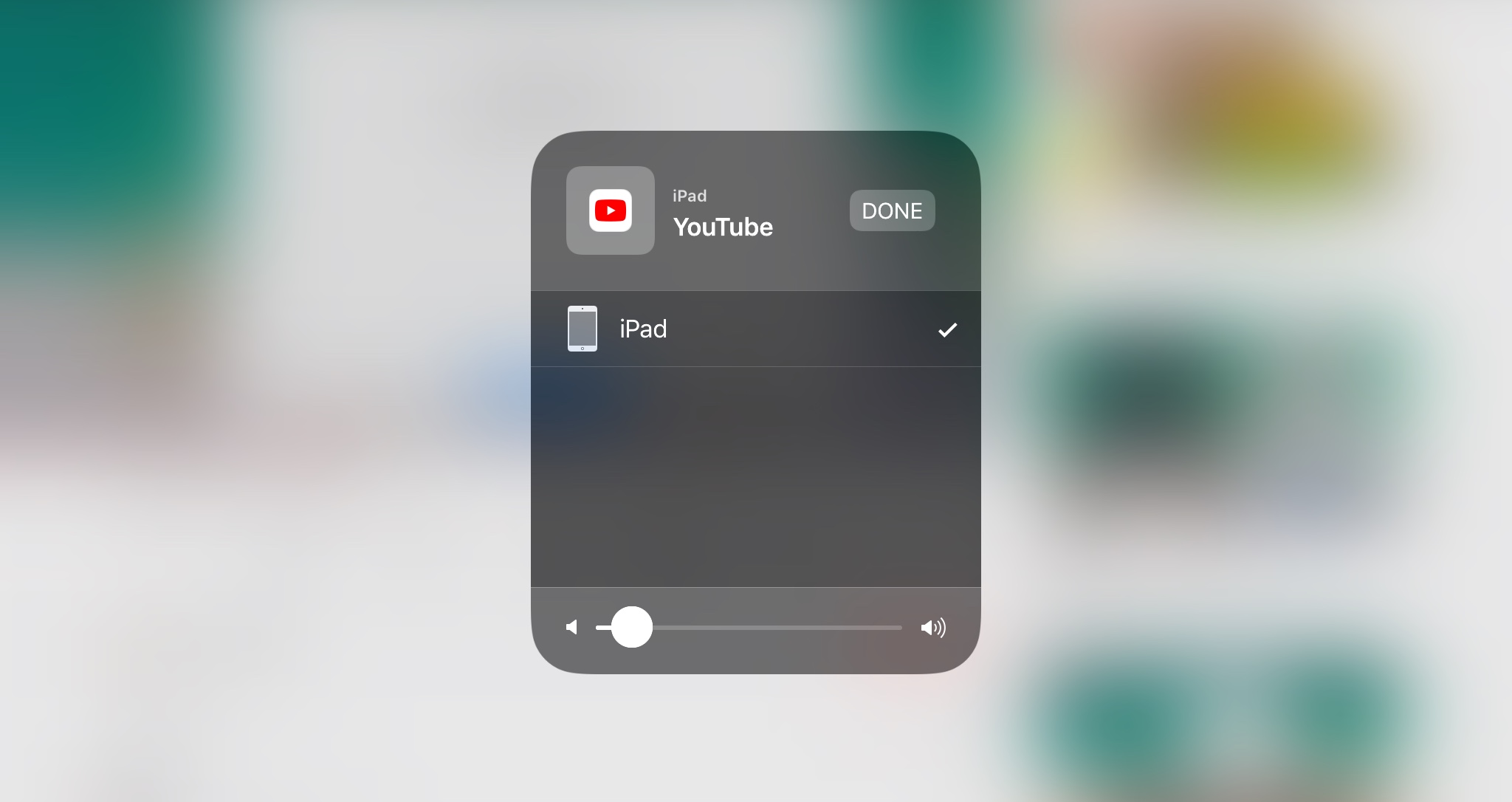
          0_1510963482209_2100E547-4518-45AF-B9F4-283031DBCECF.jpeg

          D 1 Reply Last reply
          0
          • KamdroidK Kamdroid

            @Deeeds The whole screen (however, the overlay would obviously not be blurred). It’d also be great to individually apply blur to graphics too.

            Here’s an example:
            0_1510963482209_2100E547-4518-45AF-B9F4-283031DBCECF.jpeg

            D Offline
            D Offline
            Deeeds
            wrote on last edited by
            #6

            @Kamdroid Oh. This shit is difficult to get performant. Apple do a lot of tricks to make this work fast. You either use UIKit's built in abilities to this (hyperPad doesn't include UIKit), which Apple's spent a lot of time on refining to get performant and "sexy", or you roll your own, and do a lot of testing on a lot of different iPads and iPhones to find the sweet spots between scaling and blurring techniques on each.

            KamdroidK 1 Reply Last reply
            0
            • D Deeeds

              @Kamdroid Oh. This shit is difficult to get performant. Apple do a lot of tricks to make this work fast. You either use UIKit's built in abilities to this (hyperPad doesn't include UIKit), which Apple's spent a lot of time on refining to get performant and "sexy", or you roll your own, and do a lot of testing on a lot of different iPads and iPhones to find the sweet spots between scaling and blurring techniques on each.

              KamdroidK Offline
              KamdroidK Offline
              Kamdroid
              wrote on last edited by
              #7

              @Deeeds yea, it’s a lot of work.

              But I guess HyperPad doesn’t need it to be that smooth.

              Maybe they could do it a hacky way, like converting whatever’s on the screen to a bitmap and apply some image/pixel manipulation to achieve a blurred effect.

              D 1 Reply Last reply
              0
              • KamdroidK Kamdroid

                @Deeeds yea, it’s a lot of work.

                But I guess HyperPad doesn’t need it to be that smooth.

                Maybe they could do it a hacky way, like converting whatever’s on the screen to a bitmap and apply some image/pixel manipulation to achieve a blurred effect.

                D Offline
                D Offline
                Deeeds
                wrote on last edited by Deeeds
                #8

                @Kamdroid That's how it's done.

                The background is grabbed, shrunk to about a 16th or 32nd of its size, given a guassian-like blur, then scaled back up to near full size, a box blur added to get rid of scaling jaggies, and then another scaling to full size, then add or multiply with a grey card to get light or dark.

                I'm using shorthand, there's a bit more done by UIKit, but most of those that copy the look do it this way.

                KamdroidK 1 Reply Last reply
                0
                • D Deeeds

                  @Kamdroid That's how it's done.

                  The background is grabbed, shrunk to about a 16th or 32nd of its size, given a guassian-like blur, then scaled back up to near full size, a box blur added to get rid of scaling jaggies, and then another scaling to full size, then add or multiply with a grey card to get light or dark.

                  I'm using shorthand, there's a bit more done by UIKit, but most of those that copy the look do it this way.

                  KamdroidK Offline
                  KamdroidK Offline
                  Kamdroid
                  wrote on last edited by
                  #9

                  @Deeeds Yep. I remember doing the bitmap technique to blur the screen of my Winforms app.

                  1 Reply Last reply
                  0
                  • MurtazaM Offline
                    MurtazaM Offline
                    Murtaza
                    Admin
                    wrote on last edited by
                    #10

                    We'll be doing some cool effects stuff soon.

                    In the next couple of updates we'll be introducing a change in the layer system that will enable "masking", and will also introduce2d lighting (not sure if these will be part of the same update, or separated. Currently on the roadmap they are the same update)

                    Then when this ground work is in place we'll offer additional premed shaders and effects. Then ideally a shader editor (or custom shader behaviours).

                    KamdroidK 1 Reply Last reply
                    0
                    • MurtazaM Murtaza

                      We'll be doing some cool effects stuff soon.

                      In the next couple of updates we'll be introducing a change in the layer system that will enable "masking", and will also introduce2d lighting (not sure if these will be part of the same update, or separated. Currently on the roadmap they are the same update)

                      Then when this ground work is in place we'll offer additional premed shaders and effects. Then ideally a shader editor (or custom shader behaviours).

                      KamdroidK Offline
                      KamdroidK Offline
                      Kamdroid
                      wrote on last edited by
                      #11

                      @Murtaza Awesome. Any estimates of when the next update will be?

                      MurtazaM 1 Reply Last reply
                      0
                      • KamdroidK Kamdroid

                        @Murtaza Awesome. Any estimates of when the next update will be?

                        MurtazaM Offline
                        MurtazaM Offline
                        Murtaza
                        Admin
                        wrote on last edited by Murtaza
                        #12

                        @Kamdroid

                        We'll be doing an update fixing bugs introduced from the last update, as well as other critical bugs and issues.

                        Once that's done we'll go back to the effects stuff. I don't have an exact date but hopefully by end of the Holidays we'll have the first update out. And then first phase of effects shouldn't be too far after.


                        1 Reply Last reply
                        0

                        Hello! It looks like you're interested in this conversation, but you don't have an account yet.

                        Getting fed up of having to scroll through the same posts each visit? When you register for an account, you'll always come back to exactly where you were before, and choose to be notified of new replies (either via email, or push notification). You'll also be able to save bookmarks and upvote posts to show your appreciation to other community members.

                        With your input, this post could be even better 💗

                        Register Login
                        Reply
                        • Reply as topic
                        Log in to reply
                        • Oldest to Newest
                        • Newest to Oldest
                        • Most Votes


                        • Login

                        • Login or register to search.
                        • First post
                          Last post
                        0
                        • Categories
                        • Recent
                        • Tags
                        • Popular
                        • Users
                        • Search

