
Newby question about hide/show graphic
-
Hi hyperPad peeps,
I'm seeking some advice. i am working on an interactive book concept and in the scene I have a background set. I want a graphic to appear when an object is triggered (touched), then to disappear when it is triggered again. I'm not really sure how to do it, the ways I have tried are not working. How would you go about it? Or can you point me to the right tutorial? Please pretty please :)
Donni
-
There are quite a few ways to do this, here's how I would do it:
Add a box container with a default value of 1, when you touch an object it will run 2 ifs, one of them for if the box container is equal to negative 1 and the other for positive 1, under each of those have your hide and show graphic. Also, add a multiply box container by -1 and set the box container to the multiply result. I hope you know how to use input fields, here's a screenshot:
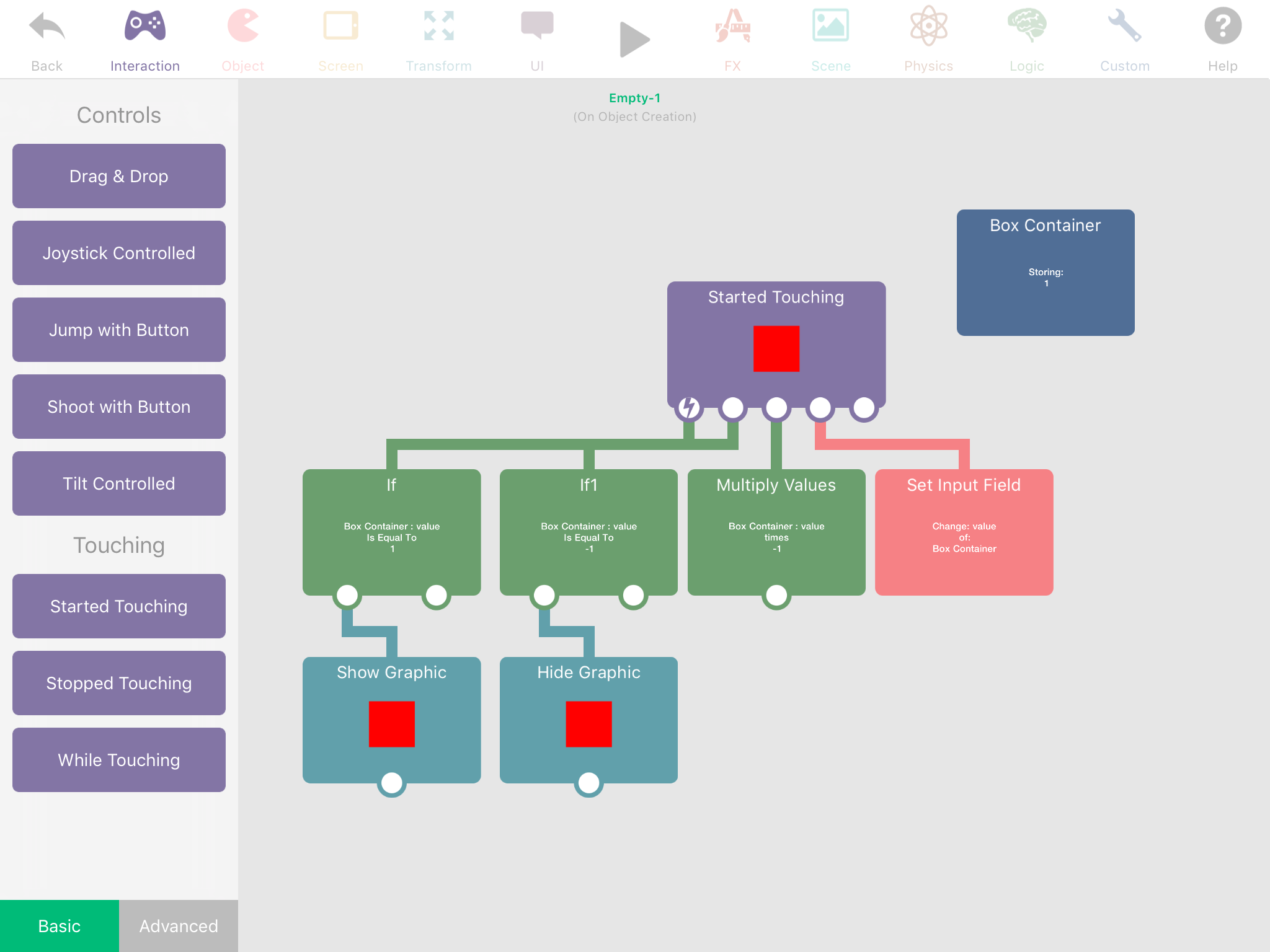
Obviously don't hide the object you are touching lol like I am, otherwise you won't be able to trigger it. -
Hi!
@donni_didit This is actually a really simple task!
If you already have the graphic just go into its behaviors and go to the "appearance" panel. You can make the graphic disappear using the "hide graphic" behavior.You can also achieve this with the "set color" behavior, also under the "appearance" panel. Just set the opacity to 0.
@Aidan-Oxley Your way is so complicated and completely unnecessary XD. Just use a "started touching" behavior!
-
Thankyou so Much!
Murphy's law, I just made it work after watching a tutorial on something else in hyperPad! I placed the graphic on my scene, then hide graphic in behaviour... then triggered by another object being touched, pretty much like the second commenter (I can't see your post replying). So freaking obvious!
I'll suss Aiden's way too because I really want to get a good grasp on how hyperPad works and I think learning by doing is good stuff!
Thankyou!!
-
Hi!
@donni_didit This is actually a really simple task!
If you already have the graphic just go into its behaviors and go to the "appearance" panel. You can make the graphic disappear using the "hide graphic" behavior.You can also achieve this with the "set color" behavior, also under the "appearance" panel. Just set the opacity to 0.
@Aidan-Oxley Your way is so complicated and completely unnecessary XD. Just use a "started touching" behavior!
@GameCRAZY I thought donni wanted it to trigger on and off when you keep touching it.
-
@GameCRAZY I thought donni wanted it to trigger on and off when you keep touching it.
@Aidan-Oxley If I'm wrong in what you asked, definitely don't use my way, it's for if you touch an object it will hide something, if you touch it again it will hide.
-
Now i'm on the imac, can see better !!! Yeah I just wanted to touch on an object, something else appears, then it disappears when you click on the object again. I like trying different ways though as I think it would help me get a better grip of what hyperPad does. How I did it, I think is how GameCRAZY suggested. You guys are awesome by the way!!!!!
-
In one of the previous updates we added a "Sequence" behaviour (under Logic category).
Where it will do what Aidan has suggested automatically.So if you have Hide Graphic, and Show graphic connected tot he sequence.
The first time Sequence runs, it will hide the graphic. The next time Sequence runs it will do show graphic.So just do this:
Started touching ---> Sequece --> Hide Graphic
                              \-> Show graphic
Sequence also has a random option built in, where it will randomly trigger a connected behaviour. Not what you want to do here, but cool feature and may be useful in the future :).
-
In one of the previous updates we added a "Sequence" behaviour (under Logic category).
Where it will do what Aidan has suggested automatically.So if you have Hide Graphic, and Show graphic connected tot he sequence.
The first time Sequence runs, it will hide the graphic. The next time Sequence runs it will do show graphic.So just do this:
Started touching ---> Sequece --> Hide Graphic
                              \-> Show graphic
Sequence also has a random option built in, where it will randomly trigger a connected behaviour. Not what you want to do here, but cool feature and may be useful in the future :).
@Murtaza we keep forgetting about it 😦
-
Now i'm on the imac, can see better !!! Yeah I just wanted to touch on an object, something else appears, then it disappears when you click on the object again. I like trying different ways though as I think it would help me get a better grip of what hyperPad does. How I did it, I think is how GameCRAZY suggested. You guys are awesome by the way!!!!!
@donni_didit Thanks!
By the way, to tag me insert an @ symbol and then my name. :)
-
thanks all, and especially @GameCRAZY for the extra tip! :hamster:
-
@donni_didit :)




Hello! It looks like you're interested in this conversation, but you don't have an account yet.
Getting fed up of having to scroll through the same posts each visit? When you register for an account, you'll always come back to exactly where you were before, and choose to be notified of new replies (either via email, or push notification). You'll also be able to save bookmarks and upvote posts to show your appreciation to other community members.
With your input, this post could be even better 💗
Register Login