Skip to content
  • Categories
  • Recent
  • Tags
  • Popular
  • Users
  • Search
Skins
  • Light
  • Brite
  • Cerulean
  • Cosmo
  • Flatly
  • Journal
  • Litera
  • Lumen
  • Lux
  • Materia
  • Minty
  • Morph
  • Pulse
  • Sandstone
  • Simplex
  • Sketchy
  • Spacelab
  • United
  • Yeti
  • Zephyr
  • Dark
  • Cyborg
  • Darkly
  • Quartz
  • Slate
  • Solar
  • Superhero
  • Vapor

  • Default (No Skin)
  • No Skin
Collapse
hyperPad

hyperPad Forum

  1. Home
  2. Help and Support
  3. Other than Patrol, how to make repeating series of actions

Other than Patrol, how to make repeating series of actions

Scheduled Pinned Locked Moved Help and Support
62 Posts 5 Posters 33.4k Views 3 Watching
  • Oldest to Newest
  • Newest to Oldest
  • Most Votes
Reply
  • Reply as topic
Log in to reply
This topic has been deleted. Only users with topic management privileges can see it.
  • D Deeeds

    @Aidan-Oxley

    Here's that project, with the funky way I solved looping.

    Is there really no simple way to loop over a set of commands a specified or infinite amount without resorting to trickery?

    http://bit.ly/2zBY5fl

    I don't know where this is stored, or how hyperPad's online storage works. Can you explain it or link to their practices?

    I read the terms of service real quick, didn't see anything in there about their storage.

    Aidan_FireA Offline
    Aidan_FireA Offline
    Aidan_Fire
    wrote on last edited by Aidan_Fire
    #12

    @Deeeds I’m not exactly sure how it works, but I’ve been using it for ages. All I know is that if I open the link in safari, I get your project directly, and that after 7 days it will delete itself.

    1 Reply Last reply
    0
    • D Deeeds

      @Aidan-Oxley

      Here's that project, with the funky way I solved looping.

      Is there really no simple way to loop over a set of commands a specified or infinite amount without resorting to trickery?

      http://bit.ly/2zBY5fl

      I don't know where this is stored, or how hyperPad's online storage works. Can you explain it or link to their practices?

      I read the terms of service real quick, didn't see anything in there about their storage.

      Aidan_FireA Offline
      Aidan_FireA Offline
      Aidan_Fire
      wrote on last edited by
      #13

      @Deeeds I couldn’t find any repeating loops in that project, but it looks more like a game you were making or something, looks interesting. Did you send the wrong project link? Or is it somewhere in there and I can’t find it?

      D 1 Reply Last reply
      0
      • Aidan_FireA Aidan_Fire

        @Deeeds I couldn’t find any repeating loops in that project, but it looks more like a game you were making or something, looks interesting. Did you send the wrong project link? Or is it somewhere in there and I can’t find it?

        D Offline
        D Offline
        Deeeds
        wrote on last edited by
        #14

        @Aidan-Oxley I have no idea what I sent, nor do I know of a way to check it once it's online...

        Aidan_FireA 1 Reply Last reply
        0
        • D Deeeds

          @Aidan-Oxley I have no idea what I sent, nor do I know of a way to check it once it's online...

          Aidan_FireA Offline
          Aidan_FireA Offline
          Aidan_Fire
          wrote on last edited by
          #15

          @Deeeds Copy your own link and paste into safari. It’s the project with circle thingies with green bars in them, when I tap they jump and spin. When I spam tap they go absolutely crazy.

          D 1 Reply Last reply
          0
          • Aidan_FireA Aidan_Fire

            @Deeeds Copy your own link and paste into safari. It’s the project with circle thingies with green bars in them, when I tap they jump and spin. When I spam tap they go absolutely crazy.

            D Offline
            D Offline
            Deeeds
            wrote on last edited by
            #16

            @Aidan-Oxley Argh, yes. The gravity changing infinite room.

            Sorry.

            That's not what I meant to send at all.

            I communicate on Mac, not iPad. The idea of trying to navigate anywhere on an iPad fills me with dread.

            D 1 Reply Last reply
            0
            • D Deeeds

              @Aidan-Oxley Argh, yes. The gravity changing infinite room.

              Sorry.

              That's not what I meant to send at all.

              I communicate on Mac, not iPad. The idea of trying to navigate anywhere on an iPad fills me with dread.

              D Offline
              D Offline
              Deeeds
              wrote on last edited by
              #17

              @Aidan-Oxley

              This is the ease curves.

              http://bit.ly/2zB3rYd

              Aidan_FireA 1 Reply Last reply
              0
              • D Deeeds

                @Aidan-Oxley

                This is the ease curves.

                http://bit.ly/2zB3rYd

                Aidan_FireA Offline
                Aidan_FireA Offline
                Aidan_Fire
                wrote on last edited by Aidan_Fire
                #18

                @Deeeds The way you have it looping is fine, if you want the loop to stop eventually you’d just have a behaviour off to turn the timer off. I added a random red square to show you what I meant with execute behaviour. Also, just a hint for making behaviours neater, try double tapping a parent behaviour, I seem to be the only person I know that actually uses this lol, everyone else’s projects I see have behaviours sitting under parents kinda randomly. http://bit.ly/2ybv1Hf

                1 Reply Last reply
                0
                • MurtazaM Offline
                  MurtazaM Offline
                  Murtaza
                  Admin
                  wrote on last edited by
                  #19

                  Ohhh, I think I see what you want to do.

                  Ok. There are a couple of ways to do this. Lets say you want to move something back and forth forever.

                  Method one:

                  Add behaviour bundel
                  Connect Move behaviour to bottom of behaviour bundle
                  Connect your second move to the bottom of move1.
                  Then connect bottom of move 2, to the top of move 1.

                  This will make it loop.

                  Method to:

                  Move 1 ---> Move 2 --> Behaviour On (Move 1).

                  Aidan_FireA 1 Reply Last reply
                  0
                  • MurtazaM Murtaza

                    Ohhh, I think I see what you want to do.

                    Ok. There are a couple of ways to do this. Lets say you want to move something back and forth forever.

                    Method one:

                    Add behaviour bundel
                    Connect Move behaviour to bottom of behaviour bundle
                    Connect your second move to the bottom of move1.
                    Then connect bottom of move 2, to the top of move 1.

                    This will make it loop.

                    Method to:

                    Move 1 ---> Move 2 --> Behaviour On (Move 1).

                    Aidan_FireA Offline
                    Aidan_FireA Offline
                    Aidan_Fire
                    wrote on last edited by
                    #20

                    @Murtaza Or use the new behaviour Execute Behaviour rather than Behaviour On.

                    D 1 Reply Last reply
                    0
                    • MurtazaM Offline
                      MurtazaM Offline
                      Murtaza
                      Admin
                      wrote on last edited by
                      #21

                      Yeah I mentioned that already above, except with a loop instead.

                      1 Reply Last reply
                      0
                      • MurtazaM Murtaza

                        The loop will do entire behaviour tree each time it iterates the loop. It's how loops work.

                        What you need to do is have some more logic to make each iteration of the loop do something else.

                        I'm not sure exactly what you're trying to do, but try using the Execute Sequence behaviour (under Logic tab). This behaviour will trigger the next behaviour each time it is executed.

                        So if you have a loop, then this, then behaviour A, B, C. It should first to A, then on the next loop to B, then C on the 3rd loop.

                        D Offline
                        D Offline
                        Deeeds
                        wrote on last edited by Deeeds
                        #22

                        @Murtaza I've tried variations on this, and can't get it to work.

                        Please, without the snark "It's how loops work", can you try to explain how you intended loops to work in hyperPad, and, specifically, how something like two actions should be repeated, sequentially, in the world of hyperPad... which is different to most of the rest of the world.

                        Imagine the simplest possible thing: two Set Colour behaviours to operate sequentially, one to black, the other to white. One has a duration of 0, the other of half a second fading back to the other.

                        I want to run this 10x, a flashing of black, white, black, white, etc...

                        For some strange reason, how to do this in hyperPad is not at all obvious, nor explained in any manner that I understand.

                        Granted, I could be dense, but having tried all the variations of ways to do this that I can think of, I'm also out of ideas... for what should be amazingly simple to do.

                        Jack de WildeJ 1 Reply Last reply
                        0
                        • D Deeeds

                          @Murtaza I've tried variations on this, and can't get it to work.

                          Please, without the snark "It's how loops work", can you try to explain how you intended loops to work in hyperPad, and, specifically, how something like two actions should be repeated, sequentially, in the world of hyperPad... which is different to most of the rest of the world.

                          Imagine the simplest possible thing: two Set Colour behaviours to operate sequentially, one to black, the other to white. One has a duration of 0, the other of half a second fading back to the other.

                          I want to run this 10x, a flashing of black, white, black, white, etc...

                          For some strange reason, how to do this in hyperPad is not at all obvious, nor explained in any manner that I understand.

                          Granted, I could be dense, but having tried all the variations of ways to do this that I can think of, I'm also out of ideas... for what should be amazingly simple to do.

                          Jack de WildeJ Offline
                          Jack de WildeJ Offline
                          Jack de Wilde
                          wrote on last edited by
                          #23

                          @Deeeds Loops are intended for stuff like looping through an array or performing repeated calculations.

                          It'd be cool if they worked with behaviours with duration, but I expect it'd be difficult to program since the loop wouldn't restart until the duration finishes, so it'd have to keep track of what is running so it knows when everything in the loop is done, and it needs to work with dynamic durations and conditional behaviours etc.

                          1 Reply Last reply
                          0
                          • Aidan_FireA Aidan_Fire

                            @Murtaza Or use the new behaviour Execute Behaviour rather than Behaviour On.

                            D Offline
                            D Offline
                            Deeeds
                            wrote on last edited by Deeeds
                            #24

                            @Aidan-Oxley @Murtaza @Jack8680

                            Continuing on this theme, whats the right/suggested/ideal way to perform and then repeat a series of animation events an arbitrary number of times?

                            Aidan_FireA 1 Reply Last reply
                            0
                            • D Deeeds

                              @Aidan-Oxley @Murtaza @Jack8680

                              Continuing on this theme, whats the right/suggested/ideal way to perform and then repeat a series of animation events an arbitrary number of times?

                              Aidan_FireA Offline
                              Aidan_FireA Offline
                              Aidan_Fire
                              wrote on last edited by
                              #25

                              @Deeeds Can you not just use the Play Animation behaviour with your timer and repeat logic?

                              D 1 Reply Last reply
                              0
                              • Aidan_FireA Aidan_Fire

                                @Deeeds Can you not just use the Play Animation behaviour with your timer and repeat logic?

                                D Offline
                                D Offline
                                Deeeds
                                wrote on last edited by
                                #26

                                @Aidan-Oxley " series of animation events"

                                eg. Move by, rotate by, Set Color, etc...

                                Aidan_FireA 1 Reply Last reply
                                0
                                • D Deeeds

                                  @Aidan-Oxley " series of animation events"

                                  eg. Move by, rotate by, Set Color, etc...

                                  Aidan_FireA Offline
                                  Aidan_FireA Offline
                                  Aidan_Fire
                                  wrote on last edited by
                                  #27

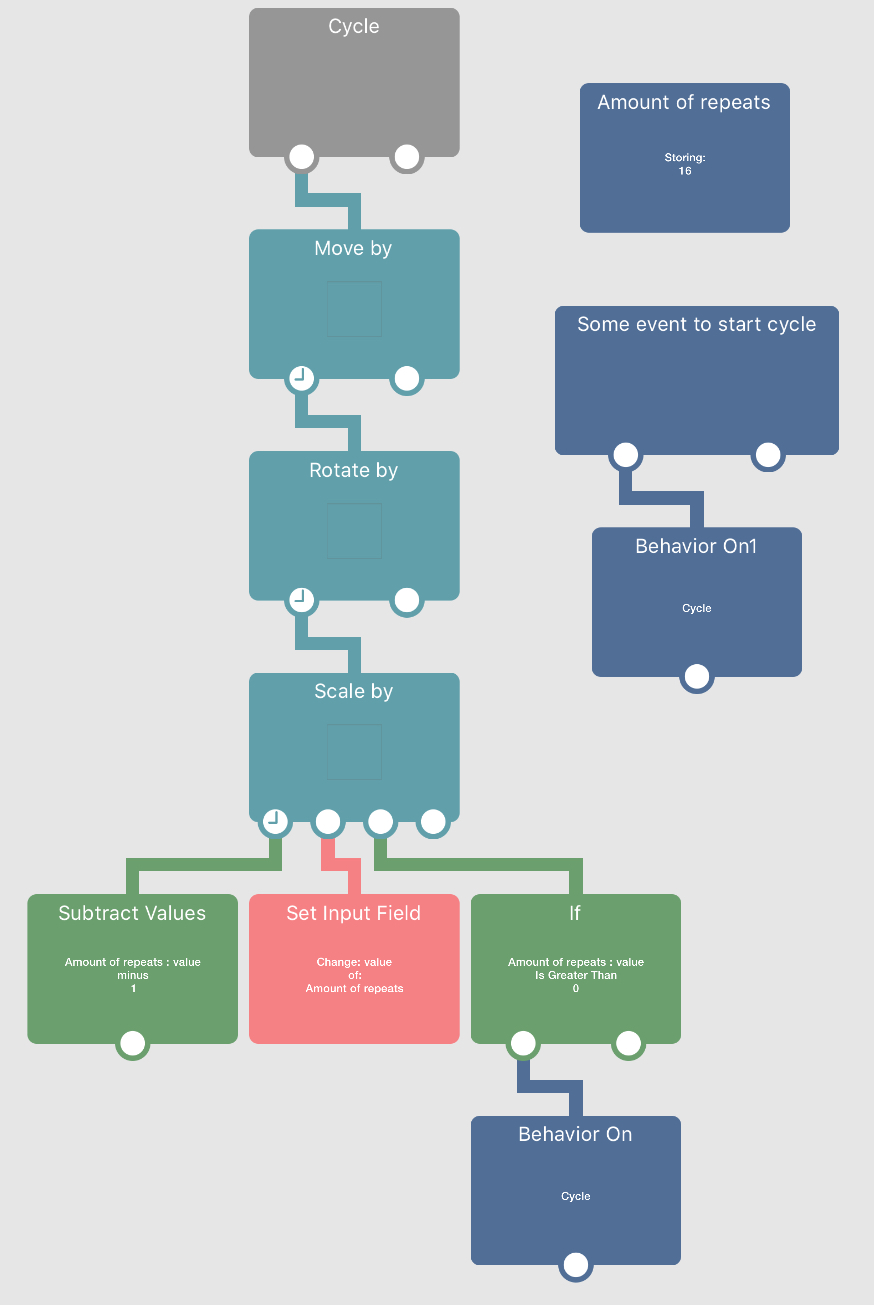
                                  @Deeeds Oh I thought you meant animations as in lots of pictures. Pretty sure it was said before, but you’d have your Transformation behaviours set for one cycle, and at the end of the cycle you simply turn on the start again using Behaviour On or Execute Behaviour. Here’s an an example image:
                                  0_1511846534740_7E344CB8-81B0-453E-BE4C-2ECD33C921CF.jpeg

                                  D 2 Replies Last reply
                                  0
                                  • Aidan_FireA Aidan_Fire

                                    @Deeeds Oh I thought you meant animations as in lots of pictures. Pretty sure it was said before, but you’d have your Transformation behaviours set for one cycle, and at the end of the cycle you simply turn on the start again using Behaviour On or Execute Behaviour. Here’s an an example image:
                                    0_1511846534740_7E344CB8-81B0-453E-BE4C-2ECD33C921CF.jpeg

                                    D Offline
                                    D Offline
                                    Deeeds
                                    wrote on last edited by
                                    #28

                                    @Aidan-Oxley Is amounts of repeats a Box Container or Value Behaviour?

                                    Why did you choose that one?

                                    1 Reply Last reply
                                    0
                                    • Aidan_FireA Aidan_Fire

                                      @Deeeds Oh I thought you meant animations as in lots of pictures. Pretty sure it was said before, but you’d have your Transformation behaviours set for one cycle, and at the end of the cycle you simply turn on the start again using Behaviour On or Execute Behaviour. Here’s an an example image:
                                      0_1511846534740_7E344CB8-81B0-453E-BE4C-2ECD33C921CF.jpeg

                                      D Offline
                                      D Offline
                                      Deeeds
                                      wrote on last edited by
                                      #29

                                      @Aidan-Oxley

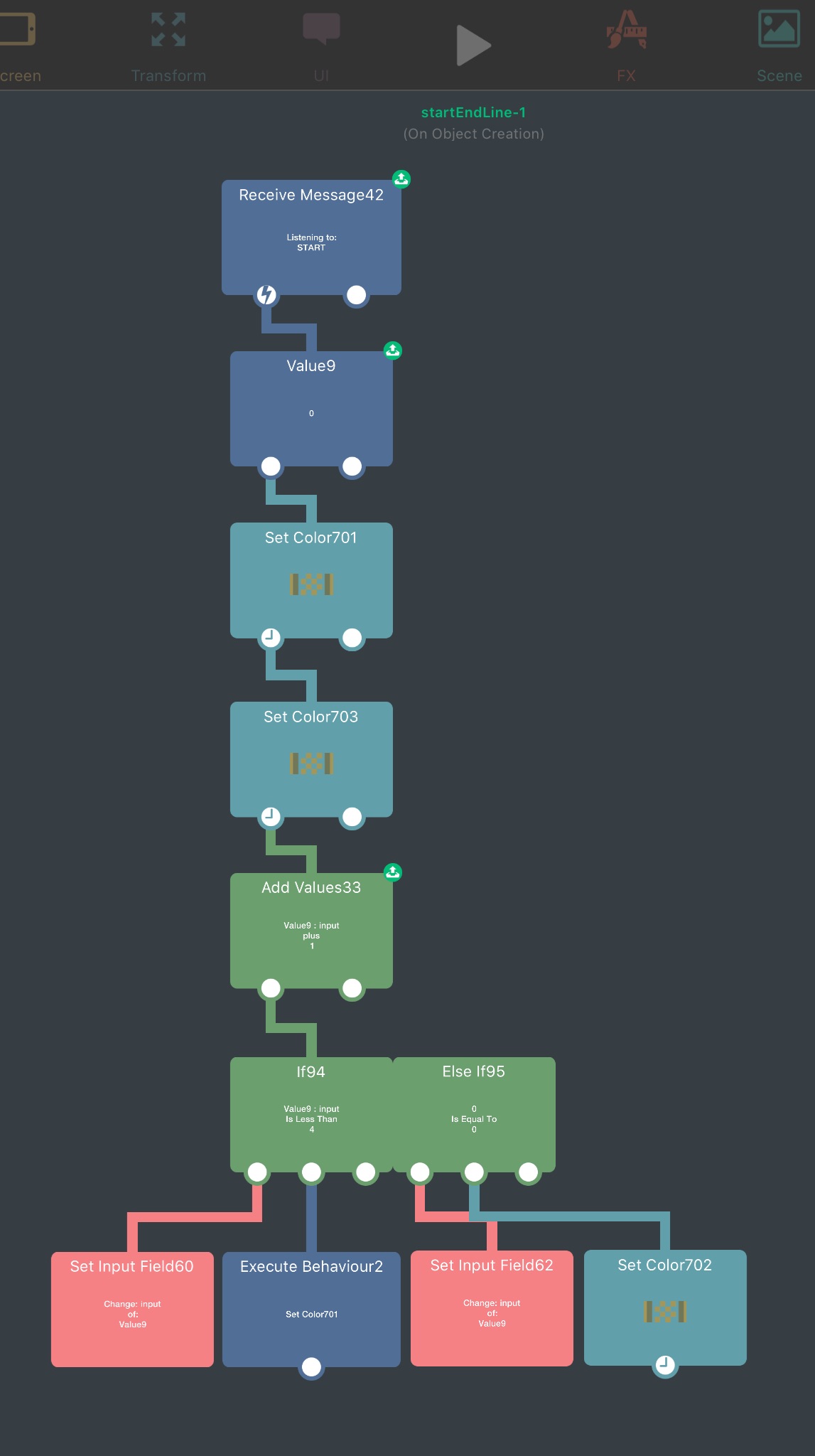
                                      The following "code" is supposed to flash a sign on and off a few times.

                                      Why does this work fine the first time, and every subsequent time it only flashes once?
                                      0_1511848093925_FuckingLoops.jpg

                                      Aidan_FireA 2 Replies Last reply
                                      0
                                      • D Deeeds

                                        @Aidan-Oxley

                                        The following "code" is supposed to flash a sign on and off a few times.

                                        Why does this work fine the first time, and every subsequent time it only flashes once?

                                        0_1511848093925_FuckingLoops.jpg

                                        Aidan_FireA Offline
                                        Aidan_FireA Offline
                                        Aidan_Fire
                                        wrote on last edited by
                                        #30

                                        @Deeeds I chose the Box Container because I have no idea how exactly a Value behaviour works and have never had the need for it (so I’ve never played with it to see how it works).

                                        1 Reply Last reply
                                        1
                                        • D Deeeds

                                          @Aidan-Oxley

                                          The following "code" is supposed to flash a sign on and off a few times.

                                          Why does this work fine the first time, and every subsequent time it only flashes once?

                                          0_1511848093925_FuckingLoops.jpg

                                          Aidan_FireA Offline
                                          Aidan_FireA Offline
                                          Aidan_Fire
                                          wrote on last edited by Aidan_Fire
                                          #31

                                          @Deeeds Reading what the Value behaviour does, it seems you have to activate it (using the Receive Message) otherwise it will never update its value. If that’s true, I’d think you would get stuck in a never ending cycle, but that’s not what’s happening. I think you should just use a box container like what I had in the screenshot.

                                          EDIT: I’m assuming Set Input Field60 is setting Value to Add Values33, and Set Input Field62 is setting Value9 to 0, right? And 0 is the Value9 default value.


                                          D 1 Reply Last reply
                                          1

                                          Hello! It looks like you're interested in this conversation, but you don't have an account yet.

                                          Getting fed up of having to scroll through the same posts each visit? When you register for an account, you'll always come back to exactly where you were before, and choose to be notified of new replies (either via email, or push notification). You'll also be able to save bookmarks and upvote posts to show your appreciation to other community members.

                                          With your input, this post could be even better 💗

                                          Register Login
                                          Reply
                                          • Reply as topic
                                          Log in to reply
                                          • Oldest to Newest
                                          • Newest to Oldest
                                          • Most Votes


                                          • Login

                                          • Login or register to search.
                                          • First post
                                            Last post
                                          0
                                          • Categories
                                          • Recent
                                          • Tags
                                          • Popular
                                          • Users
                                          • Search
