Skip to content
  • Categories
  • Recent
  • Tags
  • Popular
  • Users
  • Search
Skins
  • Light
  • Brite
  • Cerulean
  • Cosmo
  • Flatly
  • Journal
  • Litera
  • Lumen
  • Lux
  • Materia
  • Minty
  • Morph
  • Pulse
  • Sandstone
  • Simplex
  • Sketchy
  • Spacelab
  • United
  • Yeti
  • Zephyr
  • Dark
  • Cyborg
  • Darkly
  • Quartz
  • Slate
  • Solar
  • Superhero
  • Vapor

  • Default (No Skin)
  • No Skin
Collapse
hyperPad

hyperPad Forum

  1. Home
  2. Help and Support
  3. Lightning

Lightning

Scheduled Pinned Locked Moved Help and Support
24 Posts 7 Posters 10.2k Views 3 Watching
  • Oldest to Newest
  • Newest to Oldest
  • Most Votes
Reply
  • Reply as topic
Log in to reply
This topic has been deleted. Only users with topic management privileges can see it.
  • BryanB Offline
    BryanB Offline
    Bryan
    wrote on last edited by
    #7

    Oh sorry yeah I mean lighting. I made a typing error,

    Jack de WildeJ 1 Reply Last reply
    0
    • Aidan_FireA Offline
      Aidan_FireA Offline
      Aidan_Fire
      wrote on last edited by
      #8

      Oh, you will need an image maker/editor then to make a black shape to take up the entire screen and a blurry transparent spot (so everything except the blurry transparent spot appears black)

      1 Reply Last reply
      0
      • BryanB Bryan

        Oh sorry yeah I mean lighting. I made a typing error,

        Jack de WildeJ Offline
        Jack de WildeJ Offline
        Jack de Wilde
        wrote on last edited by Jack8680
        #9

        0_1480921732157_IMG_2556.PNG @Bryan you can use this if you want, I'm not sure whether it's exactly what you're looking for. (Save to camera roll, it shows as black because of the transparency)

        1 Reply Last reply
        0
        • TutorialDoctorT Offline
          TutorialDoctorT Offline
          TutorialDoctor
          wrote on last edited by
          #10

          You will want to set the blending mode of any B&W image to DODGE also.

          iTap DevelopmentI 1 Reply Last reply
          0
          • TutorialDoctorT TutorialDoctor

            You will want to set the blending mode of any B&W image to DODGE also.

            iTap DevelopmentI Offline
            iTap DevelopmentI Offline
            iTap Development
            wrote on last edited by
            #11

            @TutorialDoctor why?

            1 Reply Last reply
            0
            • MurtazaM Offline
              MurtazaM Offline
              Murtaza
              Admin
              wrote on last edited by
              #12

              The dodge blending mode will lighten anything behind it as well.

              iTap DevelopmentI Jack de WildeJ 2 Replies Last reply
              0
              • MurtazaM Murtaza

                The dodge blending mode will lighten anything behind it as well.

                iTap DevelopmentI Offline
                iTap DevelopmentI Offline
                iTap Development
                wrote on last edited by
                #13

                @Murtaza oh ok

                1 Reply Last reply
                0
                • MurtazaM Murtaza

                  The dodge blending mode will lighten anything behind it as well.

                  Jack de WildeJ Offline
                  Jack de WildeJ Offline
                  Jack de Wilde
                  wrote on last edited by Jack8680
                  #14

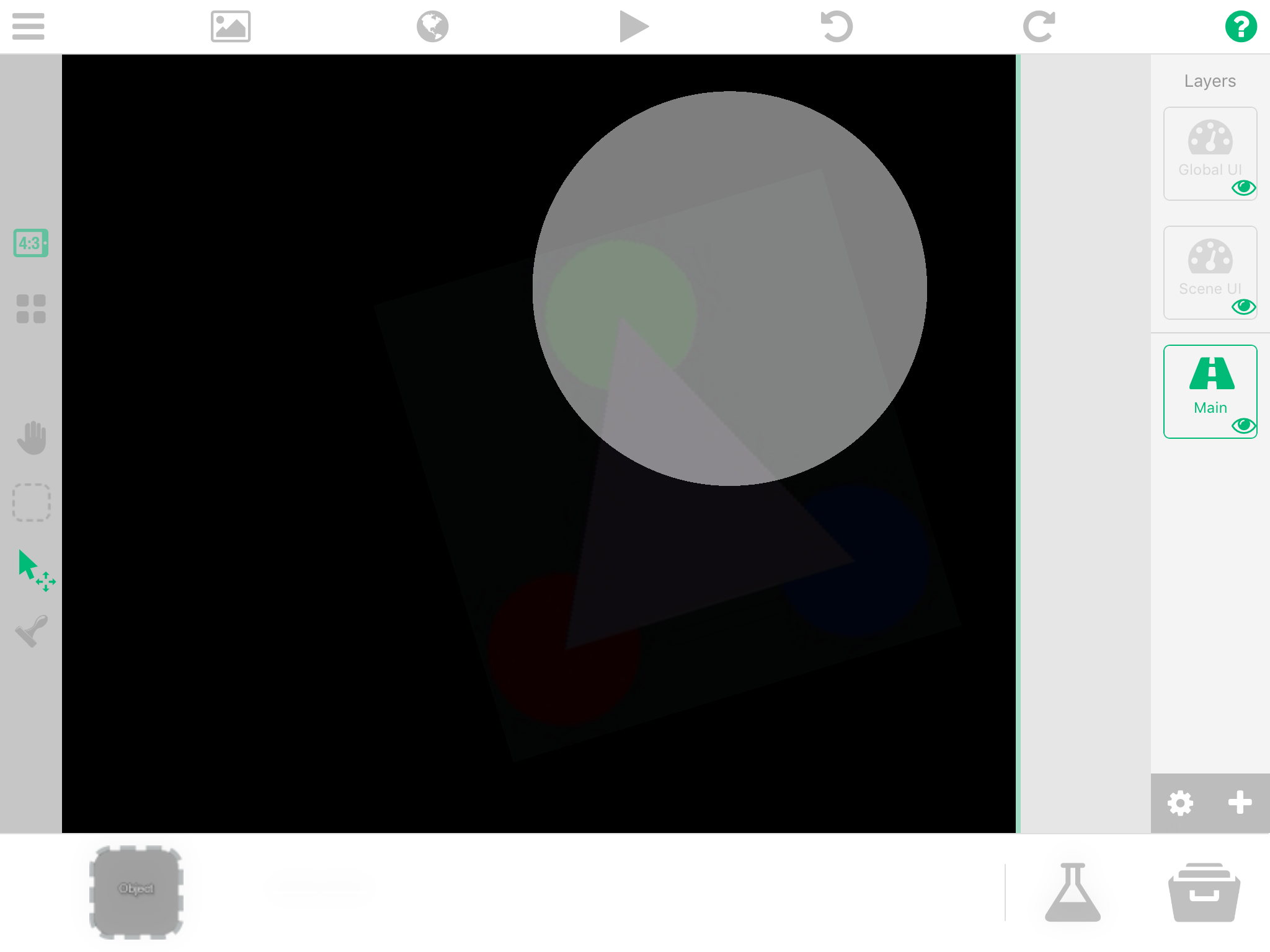
                  @Murtaza but it also adds white to black, so instead of lighting, it will look very faded but brighter, which doesn't exactly look right: 0_1481165513559_IMG_2559.PNG
                  MurtazaM 1 Reply Last reply
                  0
                  • Jack de WildeJ Jack de Wilde

                    @Murtaza but it also adds white to black, so instead of lighting, it will look very faded but brighter, which doesn't exactly look right: 0_1481165513559_IMG_2559.PNG

                    MurtazaM Offline
                    MurtazaM Offline
                    Murtaza
                    Admin
                    wrote on last edited by
                    #15

                    @Jack8680 Well yeah. It depends heavily on your other graphics :).

                    Try the other blend options.
                    Here's an explanation of them:
                    https://hyperpad.zendesk.com/hc/en-us/articles/211305123-Color-Blending

                    Jack de WildeJ 1 Reply Last reply
                    0
                    • MurtazaM Murtaza

                      @Jack8680 Well yeah. It depends heavily on your other graphics :).

                      Try the other blend options.
                      Here's an explanation of them:
                      https://hyperpad.zendesk.com/hc/en-us/articles/211305123-Color-Blending

                      Jack de WildeJ Offline
                      Jack de WildeJ Offline
                      Jack de Wilde
                      wrote on last edited by
                      #16

                      @Murtaza I've played with all the blend options before, but to create something that feels like real lighting I think we would need the masking blend option, so we can mask a black layer to reveal the background. And then maybe that could be combined with a transparent dodge to produce a kind of glare effect for more intense areas of light.

                      MurtazaM 1 Reply Last reply
                      0
                      • TutorialDoctorT Offline
                        TutorialDoctorT Offline
                        TutorialDoctor
                        wrote on last edited by
                        #17

                        This is the effect I get using Dodge. Make the lights with transparent backgrounds.
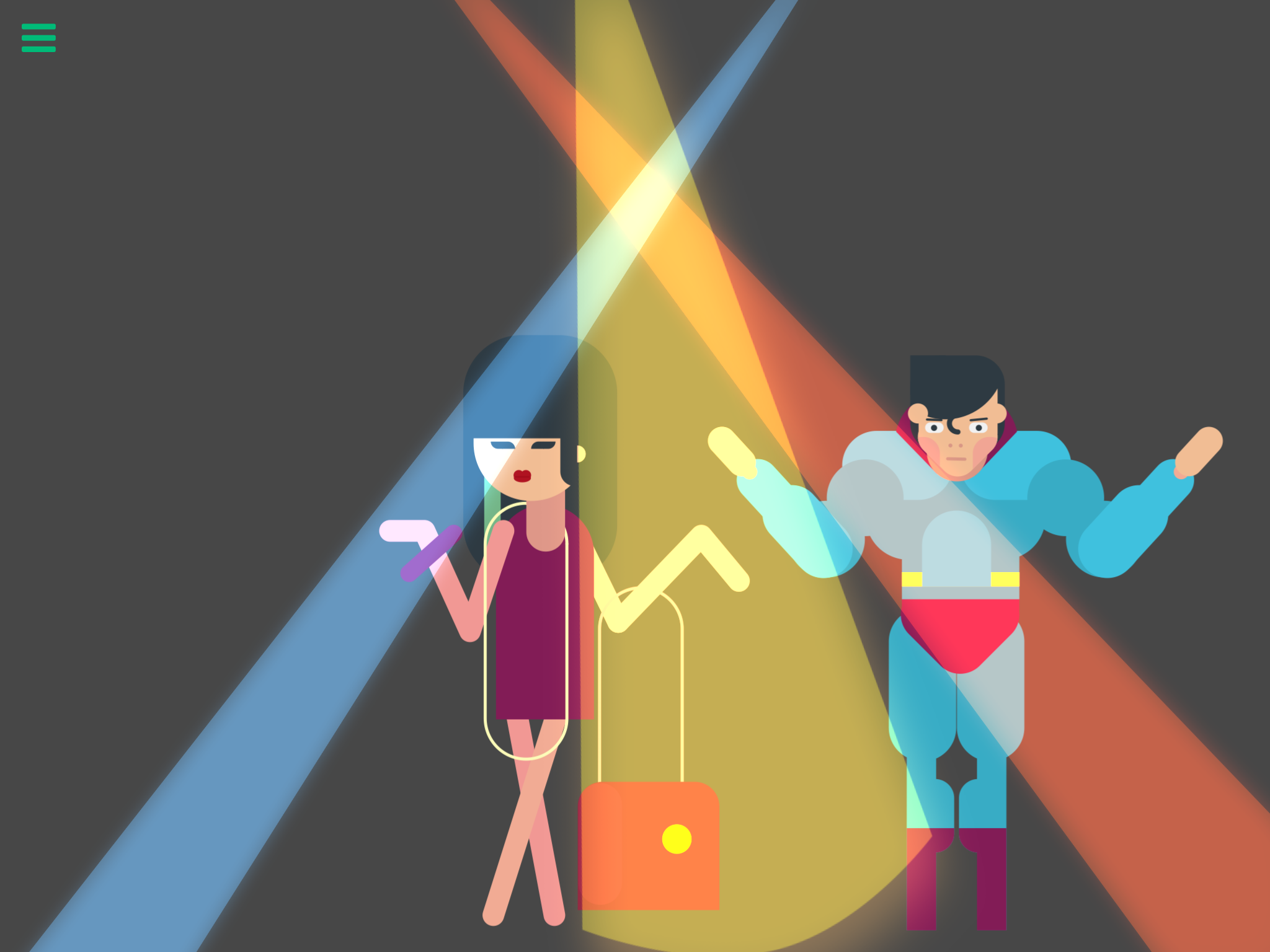
                        0_1481301676783_IMG_1299.PNG

                        1 Reply Last reply
                        1
                        • Jack de WildeJ Jack de Wilde

                          @Murtaza I've played with all the blend options before, but to create something that feels like real lighting I think we would need the masking blend option, so we can mask a black layer to reveal the background. And then maybe that could be combined with a transparent dodge to produce a kind of glare effect for more intense areas of light.

                          MurtazaM Offline
                          MurtazaM Offline
                          Murtaza
                          Admin
                          wrote on last edited by
                          #18

                          @Jack8680 it's. It a replacement for real lighting. But it is a great way to bring some life to your scene and make them feel more dynamic.

                          Jack de WildeJ 1 Reply Last reply
                          0
                          • MurtazaM Murtaza

                            @Jack8680 it's. It a replacement for real lighting. But it is a great way to bring some life to your scene and make them feel more dynamic.

                            Jack de WildeJ Offline
                            Jack de WildeJ Offline
                            Jack de Wilde
                            wrote on last edited by
                            #19

                            I agree that it looks good with dodge, but mask would allow for more realistic lighting.

                            1 Reply Last reply
                            0
                            • TutorialDoctorT Offline
                              TutorialDoctorT Offline
                              TutorialDoctor
                              wrote on last edited by TutorialDoctor
                              #20

                              Dodge gives some pretty good results. Using a gradient, the whiter the more intense the light. Fade off to either black or opaque to simulate falloff.
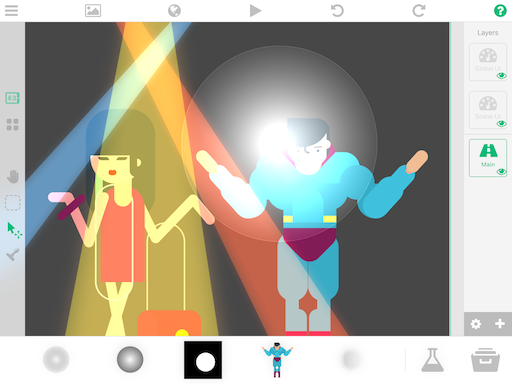
                              0_1481564871166_IMG_1308.PNG

                              Jack de WildeJ 1 Reply Last reply
                              0
                              • TutorialDoctorT TutorialDoctor

                                Dodge gives some pretty good results. Using a gradient, the whiter the more intense the light. Fade off to either black or opaque to simulate falloff.
                                0_1481564871166_IMG_1308.PNG

                                Jack de WildeJ Offline
                                Jack de WildeJ Offline
                                Jack de Wilde
                                wrote on last edited by
                                #21

                                What I'm trying to say is that you have lighting but no darkness. In this case it looks good, but for games where you want pitch black darkness, it won't work. You could use a huge shape with a transparent gradient circle in the middle for a point of light, but this wouldn't work with multiple. Similarly, you might be able to use 2 triangles that scale/skew/rotate from each object if you want realistic lighting, but it would still only work for 1 light source. Your way looks like shining a bright light at something which is not dark in the first place. It's a cool effect, but nit the same as real lighting.

                                MurtazaM 1 Reply Last reply
                                0
                                • Jack de WildeJ Jack de Wilde

                                  What I'm trying to say is that you have lighting but no darkness. In this case it looks good, but for games where you want pitch black darkness, it won't work. You could use a huge shape with a transparent gradient circle in the middle for a point of light, but this wouldn't work with multiple. Similarly, you might be able to use 2 triangles that scale/skew/rotate from each object if you want realistic lighting, but it would still only work for 1 light source. Your way looks like shining a bright light at something which is not dark in the first place. It's a cool effect, but nit the same as real lighting.

                                  MurtazaM Offline
                                  MurtazaM Offline
                                  Murtaza
                                  Admin
                                  wrote on last edited by
                                  #22

                                  @Jack8680 yup, like I said it's not a real replacement for lighting.

                                  We're working on an awesome lighting system that will be part of one of the next updates. Masking will also be part of it ( they rely on a similar change to layers).

                                  Jack de WildeJ 1 Reply Last reply
                                  1
                                  • MurtazaM Murtaza

                                    @Jack8680 yup, like I said it's not a real replacement for lighting.

                                    We're working on an awesome lighting system that will be part of one of the next updates. Masking will also be part of it ( they rely on a similar change to layers).

                                    Jack de WildeJ Offline
                                    Jack de WildeJ Offline
                                    Jack de Wilde
                                    wrote on last edited by
                                    #23

                                    @Murtaza does mask subtract brightness, transparancy, or just completely solidly mask the transparency? E.g. If I have a gradient from transparent to white, will it mask as that gradient or will the transparent part mask the object below it to invisible? Being able to mask using gradients would definitely allow for lighting, even shadows would be doable


                                    MurtazaM 1 Reply Last reply
                                    0
                                    • Jack de WildeJ Jack de Wilde

                                      @Murtaza does mask subtract brightness, transparancy, or just completely solidly mask the transparency? E.g. If I have a gradient from transparent to white, will it mask as that gradient or will the transparent part mask the object below it to invisible? Being able to mask using gradients would definitely allow for lighting, even shadows would be doable

                                      MurtazaM Offline
                                      MurtazaM Offline
                                      Murtaza
                                      Admin
                                      wrote on last edited by
                                      #24

                                      @Jack8680 good question.. I'm not sure.

                                      1 Reply Last reply
                                      0

                                      Hello! It looks like you're interested in this conversation, but you don't have an account yet.

                                      Getting fed up of having to scroll through the same posts each visit? When you register for an account, you'll always come back to exactly where you were before, and choose to be notified of new replies (either via email, or push notification). You'll also be able to save bookmarks and upvote posts to show your appreciation to other community members.

                                      With your input, this post could be even better 💗

                                      Register Login
                                      Reply
                                      • Reply as topic
                                      Log in to reply
                                      • Oldest to Newest
                                      • Newest to Oldest
                                      • Most Votes


                                      • Login

                                      • Login or register to search.
                                      • First post
                                        Last post
                                      0
                                      • Categories
                                      • Recent
                                      • Tags
                                      • Popular
                                      • Users
                                      • Search