
Patrolling enemies.
-
Gravity?
-
I have gravity in the world settings and I have tried setting a gravity to the enemy too, but I can’t seem to figure it out.
I have not set the enemy to do damage yet so if I push it with the player character the enemy just runs across the air. Patrol is set to ”linear”. -
I have gravity in the world settings and I have tried setting a gravity to the enemy too, but I can’t seem to figure it out.
I have not set the enemy to do damage yet so if I push it with the player character the enemy just runs across the air. Patrol is set to ”linear”.@jiis the patrol behaviour doesn't play well with physics. I'd suggest maybe using the set velocity behaviour on a timer instead, something like this:
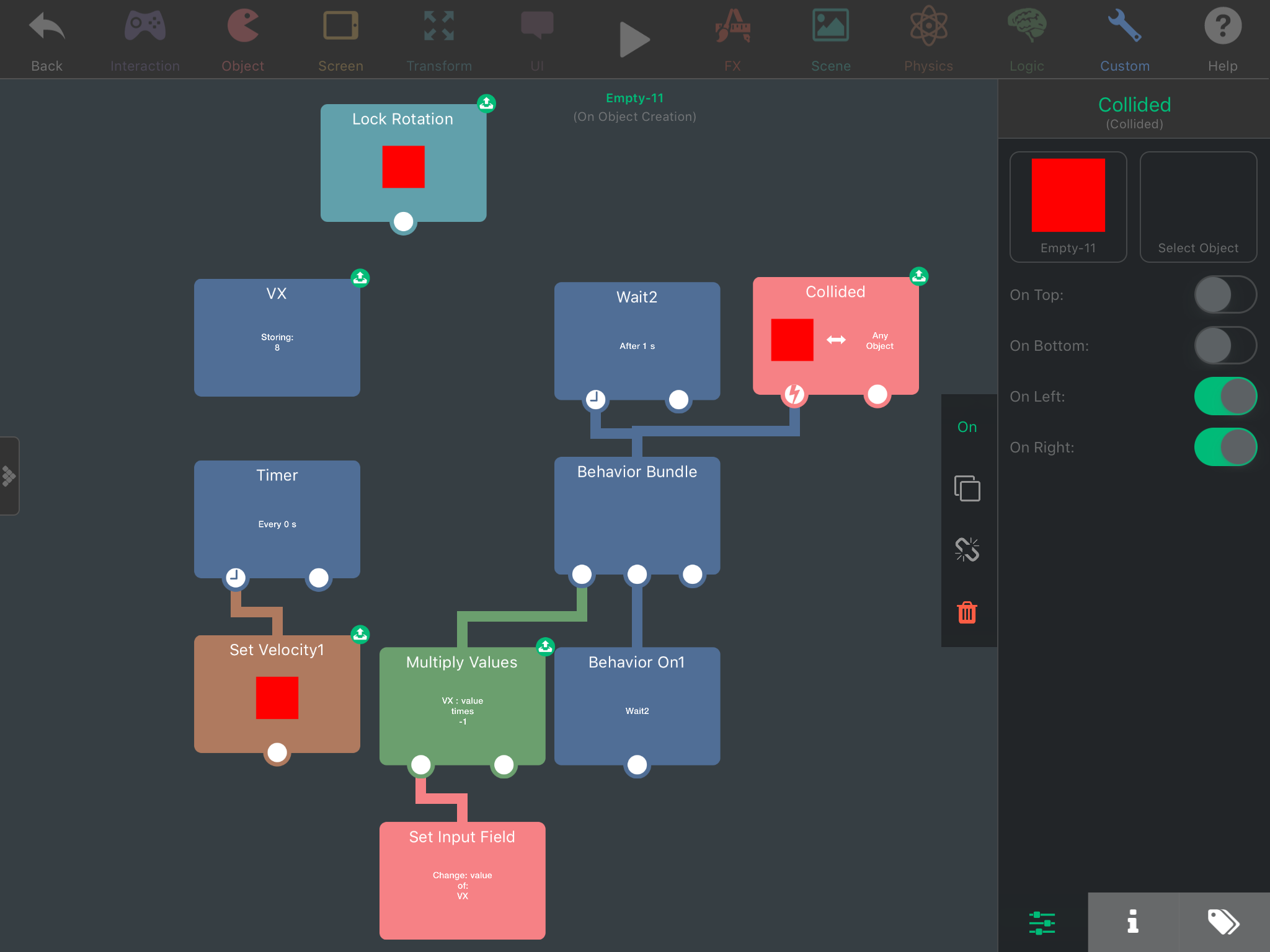
Basically, it multiplies horizontal velocity by -1 every second (or however long you want the patrol duration), but also switches when it collides with something on the left or right.
Colliding also runs the behaviour on for the Wait2, which has the effect of resetting the wait so you don't run into the issue where it bounces and then changes direction again right after.
You might want to use a tag in the collided behaviour so you can tag whatever objects should cause the enemy to bounce, or just get rid of it altogether.
The reason I put set velocity on a timer like this is so you don't have to worry about friction and air resistance slowing the enemy down.
I'm not great at explaining things so let me know if you need me to explain further. Here's a link to that project, behaviours are inside the red square object. http://bit.ly/2HLIM5e
-
@jiis the patrol behaviour doesn't play well with physics. I'd suggest maybe using the set velocity behaviour on a timer instead, something like this:
Basically, it multiplies horizontal velocity by -1 every second (or however long you want the patrol duration), but also switches when it collides with something on the left or right.
Colliding also runs the behaviour on for the Wait2, which has the effect of resetting the wait so you don't run into the issue where it bounces and then changes direction again right after.
You might want to use a tag in the collided behaviour so you can tag whatever objects should cause the enemy to bounce, or just get rid of it altogether.
The reason I put set velocity on a timer like this is so you don't have to worry about friction and air resistance slowing the enemy down.
I'm not great at explaining things so let me know if you need me to explain further. Here's a link to that project, behaviours are inside the red square object. http://bit.ly/2HLIM5e
-
@jiis the patrol behaviour doesn't play well with physics. I'd suggest maybe using the set velocity behaviour on a timer instead, something like this:
Basically, it multiplies horizontal velocity by -1 every second (or however long you want the patrol duration), but also switches when it collides with something on the left or right.
Colliding also runs the behaviour on for the Wait2, which has the effect of resetting the wait so you don't run into the issue where it bounces and then changes direction again right after.
You might want to use a tag in the collided behaviour so you can tag whatever objects should cause the enemy to bounce, or just get rid of it altogether.
The reason I put set velocity on a timer like this is so you don't have to worry about friction and air resistance slowing the enemy down.
I'm not great at explaining things so let me know if you need me to explain further. Here's a link to that project, behaviours are inside the red square object. http://bit.ly/2HLIM5e
@jack8680
I have tinkered with this in the project you sent and it works perfectly for me......BUT, I have gone insane trying to figure out where that ”Set input field” action comes from. I understand it may be a custom name, but I just can’t find a behavior that functions like that when making my project.
-
@JiiS The custom input field can be created from a behavior. When you select a behavior, you can see some behaviors have a green inbox icon where you can place in variables, text, etc.
You can touch the green inbox icon when viewing the behaviors to get a custom input field. :)
-
Thank you all very much! Still have trouble flipping the graphic when enemy turns with this method, but other than that, works like a dream!
Incredibly helpful community here.@jiis Using that method, can you see when the enemy changes directions? Every time the behaviours run that switch his direction, run some logic like this:
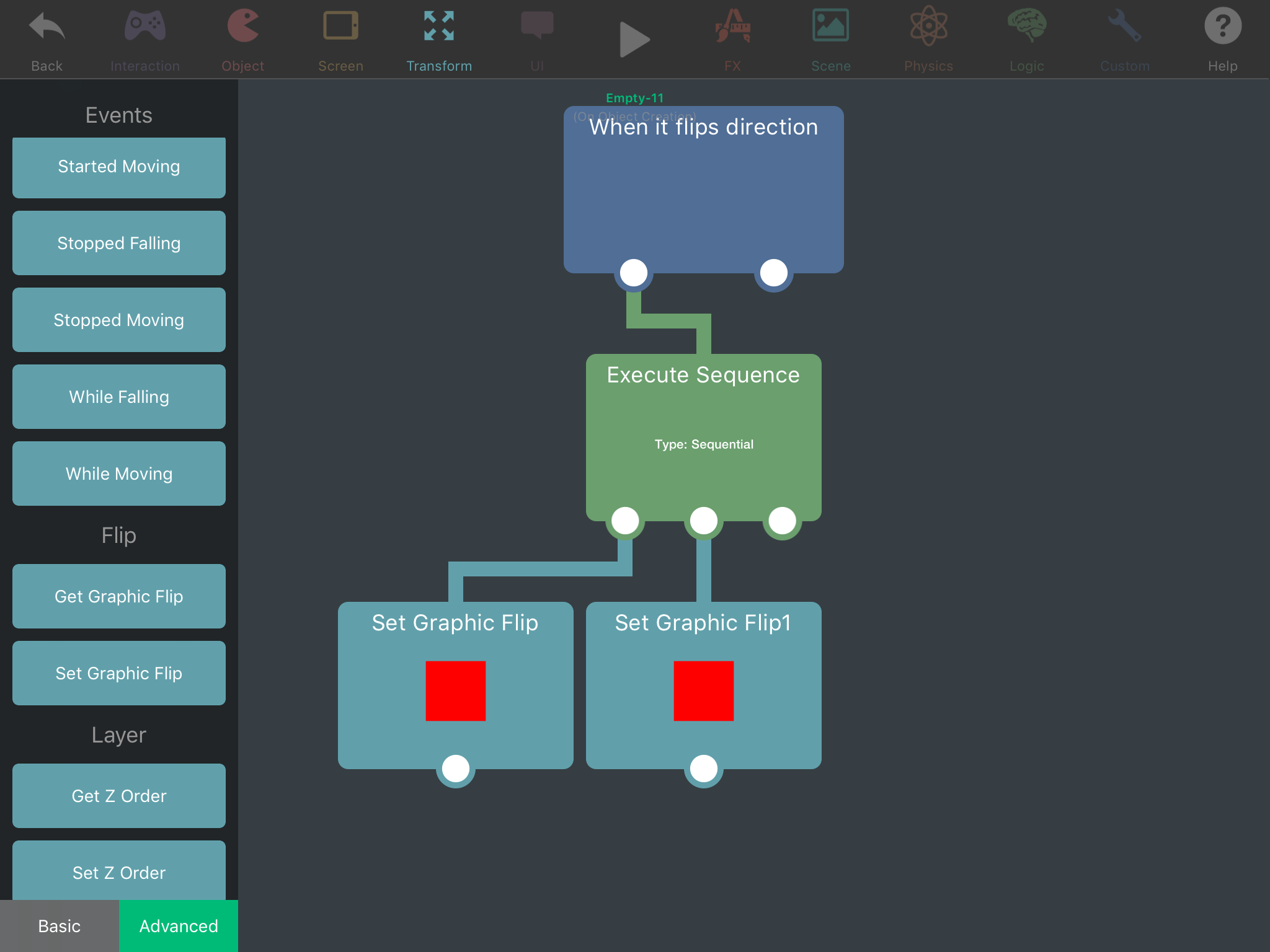
The first one of the "Set Graphic Flip" behaviours will have "Flip X" switched on, and the other will have it switched off (turned on will flip it, turned off will change it back to original). The "Execute Sequence" behaviour will alternate between the two behaviours every time it is run. -
Thank you and thank you!
Now I have my first fully functional enemy!
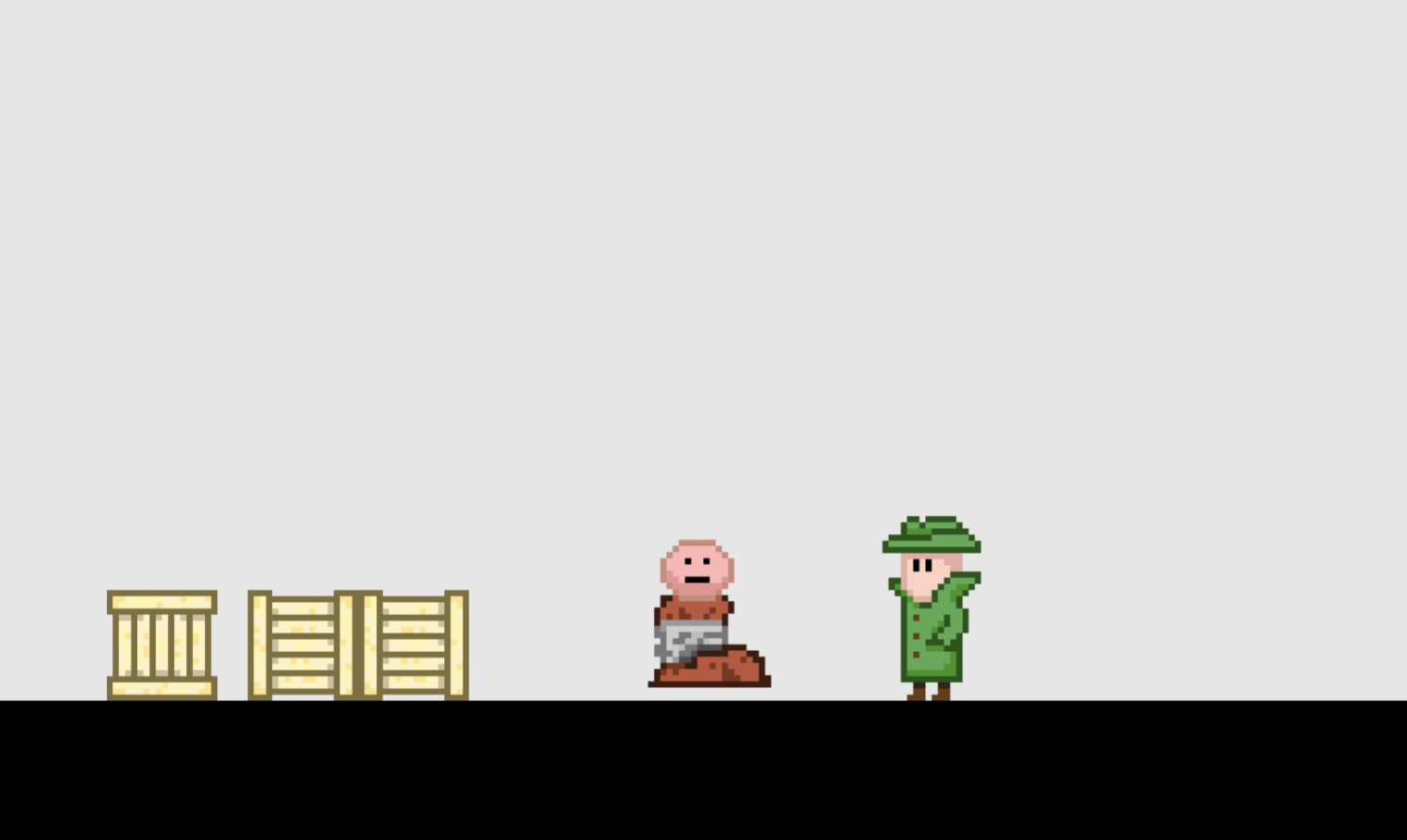
Still one of the original problems remain. :D The reason I rejected the patrol function was that the physics didn’t work right. One thing still remains, ”the floating body”. When I stomp the enemy with the detective it plays the animation of captured enemy. Problem is, the captured enemy floats few pixels in the air. It otherwise obeys the gravity.
I think the problem is the graphic or the function ”play animation”. The sprite should be same size, the captured one just has more empty pixels on top. It almost feels like the pixels from top go to the bottom. :O
The frames are all different small images, not from a tileset.Here is a pic:
EDIT: Spawn object seems to work well enough, it just needs the captured object to be hidden out of sight in the level.




Hello! It looks like you're interested in this conversation, but you don't have an account yet.
Getting fed up of having to scroll through the same posts each visit? When you register for an account, you'll always come back to exactly where you were before, and choose to be notified of new replies (either via email, or push notification). You'll also be able to save bookmarks and upvote posts to show your appreciation to other community members.
With your input, this post could be even better 💗
Register Login