Skip to content
  • Categories
  • Recent
  • Tags
  • Popular
  • Users
  • Search
Skins
  • Light
  • Brite
  • Cerulean
  • Cosmo
  • Flatly
  • Journal
  • Litera
  • Lumen
  • Lux
  • Materia
  • Minty
  • Morph
  • Pulse
  • Sandstone
  • Simplex
  • Sketchy
  • Spacelab
  • United
  • Yeti
  • Zephyr
  • Dark
  • Cyborg
  • Darkly
  • Quartz
  • Slate
  • Solar
  • Superhero
  • Vapor

  • Default (No Skin)
  • No Skin
Collapse
hyperPad

hyperPad Forum

  1. Home
  2. Help and Support
  3. Collision sounds when level starts.

Collision sounds when level starts.

Scheduled Pinned Locked Moved Help and Support
18 Posts 3 Posters 3.9k Views 1 Watching
  • Oldest to Newest
  • Newest to Oldest
  • Most Votes
Reply
  • Reply as topic
Log in to reply
This topic has been deleted. Only users with topic management privileges can see it.
  • JiiSJ Offline
    JiiSJ Offline
    JiiS
    wrote on last edited by
    #1

    I have a small sound problem. I have a lot of physics objects, crates, barrels etc.min my platformer. When I start the level, every object in the level collides with the ground they are on and play their collision sound effect.
    What would be the best / easiest way to mute the sound effects for a second or so when the level starts?

    1 Reply Last reply
    0
    • RobinsonXR Offline
      RobinsonXR Offline
      RobinsonX
      wrote on last edited by
      #2

      The collision behaviors should be disabled first, then can be enabled after a short duration.

      1 Reply Last reply
      0
      • KamdroidK Offline
        KamdroidK Offline
        Kamdroid
        wrote on last edited by
        #3

        The easiest way would be to add a short delay before letting those objects play sounds. Use the Wait behaviour, found in the "Other" behaviour category.

        Another way, you could just ignore the first collision the object has, assuming that the object will always unnecessarily collide once.

        1 Reply Last reply
        0
        • JiiSJ Offline
          JiiSJ Offline
          JiiS
          wrote on last edited by
          #4

          Thank you for your help! I’ll try to do it without having to edit every colliding object in the level. Maybe I can add some random object that mutes every object I’ve tagged as physics object for the first 0.5 second?

          1 Reply Last reply
          0
          • RobinsonXR Offline
            RobinsonXR Offline
            RobinsonX
            wrote on last edited by
            #5

            You can do that, but there’s an another way.

            You can tag all the physical objects (barrels, crates, etc.) and you can manipulate all the tag objects in one single object. It saves all the hassle of going through every single object to change something.

            1 Reply Last reply
            0
            • JiiSJ Offline
              JiiSJ Offline
              JiiS
              wrote on last edited by
              #6

              I have tried using the ”stop all sound effects”, but I have no idea how it works. No matter what I try the sound effects just keep playing.

              1 Reply Last reply
              0
              • RobinsonXR Offline
                RobinsonXR Offline
                RobinsonX
                wrote on last edited by
                #7

                "Stop all sound effects" only stops sounds that are currently playing and doesn't prevent sounds to start playing. You could try triggering it continously for the first few moments and disable it.

                1 Reply Last reply
                0
                • JiiSJ Offline
                  JiiSJ Offline
                  JiiS
                  wrote on last edited by
                  #8

                  I really can’t figure this out. I tried to loop with 0.0 second interval the ”stop sounds”, I’ve tried disabling the physical objects, always the level starts with a loud bang with everything hitting the floor or other objects they are on top of. I think the sound happens before any other command can silence them.

                  I think I’ll have to completely change the way the sounds are triggered. :O

                  There is no way to turn off the sounds and then turn them on like there is for music?

                  KamdroidK 1 Reply Last reply
                  0
                  • RobinsonXR Offline
                    RobinsonXR Offline
                    RobinsonX
                    wrote on last edited by
                    #9

                    Maybe you could send us a project, we can help! @JiiS

                    1 Reply Last reply
                    0
                    • JiiSJ JiiS

                      I really can’t figure this out. I tried to loop with 0.0 second interval the ”stop sounds”, I’ve tried disabling the physical objects, always the level starts with a loud bang with everything hitting the floor or other objects they are on top of. I think the sound happens before any other command can silence them.

                      I think I’ll have to completely change the way the sounds are triggered. :O

                      There is no way to turn off the sounds and then turn them on like there is for music?

                      KamdroidK Offline
                      KamdroidK Offline
                      Kamdroid
                      wrote on last edited by
                      #10

                      @jiis Ideally hyperPad should add some sort of global mute and unmute behaviour, which mutes everything in the scene.

                      I don't think there's currently a better solution that will not require you to edit each object that makes a sound.

                      If you need some help on how to make an object not play sound on the first collision, let me know, I'll make you an example project.

                      Though maybe @Hamed or @Murtaza have a better idea on how to approach this.

                      1 Reply Last reply
                      1
                      • JiiSJ Offline
                        JiiSJ Offline
                        JiiS
                        wrote on last edited by
                        #11

                        Thanks to you both.

                        RobinsonX: Where would I send it?

                        Kamdroid: Thanks, two offers for help, I don’t know what to do. :D

                        Maybe I’ll send it to Robinson and if he/she can’t figure it out i’ll continue screaming for help.

                        1 Reply Last reply
                        0
                        • RobinsonXR Offline
                          RobinsonXR Offline
                          RobinsonX
                          wrote on last edited by
                          #12

                          @JiiS You can send the link of the project in this page, everyone here can help and suggest stuff.

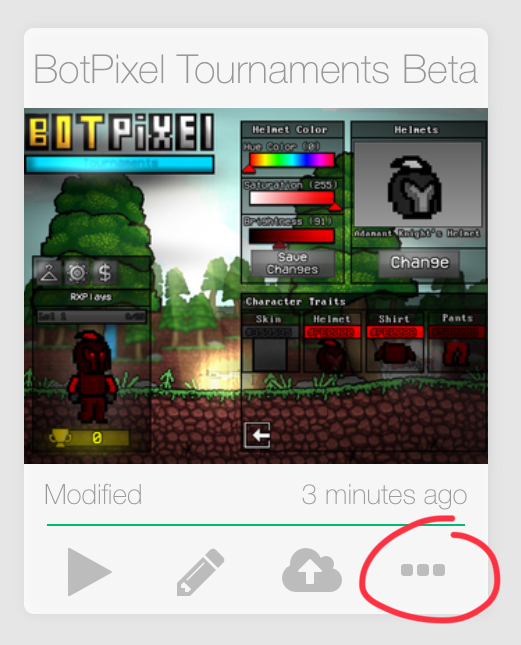
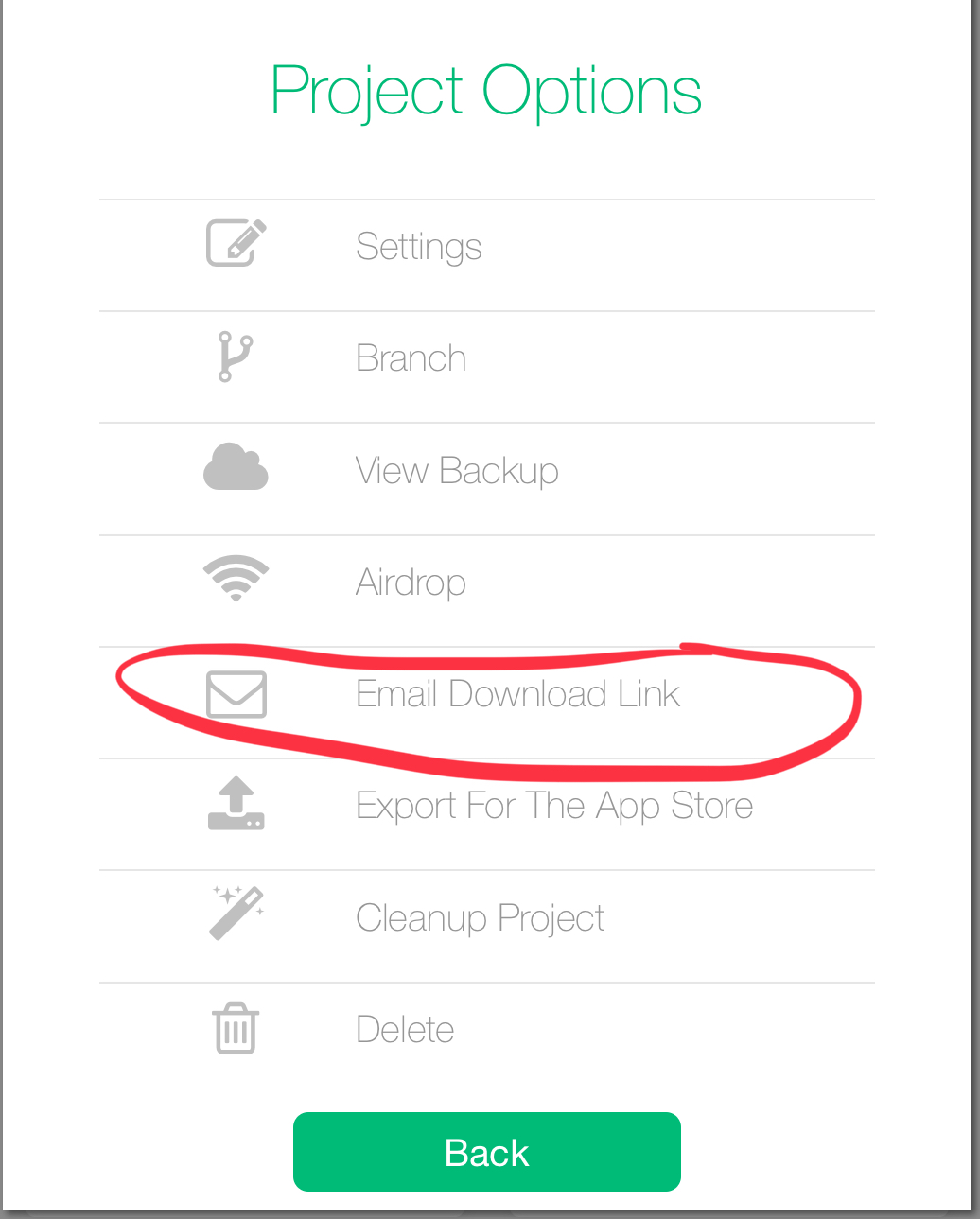
                          On your project (On the Projects menu), press the three dots on the bottom right corner of the project thumbnail, you can press Email Download Link and get the link that way. (Send the link to your own email or copy the link directly from the message)
                          0_1564856054471_068C22C6-A570-43C0-B855-76136146C1FA.jpeg

                          0_1564856064452_8EF4CBBD-51F9-4817-A643-2AACD417C4EA.jpeg

                          1 Reply Last reply
                          1
                          • JiiSJ Offline
                            JiiSJ Offline
                            JiiS
                            wrote on last edited by JiiS
                            #13

                            Let’s see if this works.

                            There’s a lot of work in progress stuff, but this first level is quite playable. I don’t want to continue building the next levels before I (you :D) solve this.

                            Polish comes later. =)

                            EDIT: The link doesn’t work for me, says connection error every time, but let me know if it works for you.

                            1 Reply Last reply
                            0
                            • RobinsonXR Offline
                              RobinsonXR Offline
                              RobinsonX
                              wrote on last edited by
                              #14

                              http://bit.ly/2T4ByP3

                              :D
                              I fixed it! Copy the link and paste it on safari if it doesn't open up here. @JiiS

                              JiiSJ 2 Replies Last reply
                              2
                              • RobinsonXR RobinsonX

                                http://bit.ly/2T4ByP3

                                :D
                                I fixed it! Copy the link and paste it on safari if it doesn't open up here. @JiiS

                                JiiSJ Offline
                                JiiSJ Offline
                                JiiS
                                wrote on last edited by
                                #15

                                @robinsonx
                                Thanks! There may not be a lot of people on the forum yet, but damn you guys areall so supportive!

                                1 Reply Last reply
                                2
                                • RobinsonXR RobinsonX

                                  http://bit.ly/2T4ByP3

                                  :D
                                  I fixed it! Copy the link and paste it on safari if it doesn't open up here. @JiiS

                                  JiiSJ Offline
                                  JiiSJ Offline
                                  JiiS
                                  wrote on last edited by JiiS
                                  #16

                                  @robinsonx
                                  Now had time to sit down and try this. It seems you added some other nice touches as well. :D Needs all kinds of polish, but I love what you did to the doors. Definitely gonna steal that graphic trick! =)

                                  I might be dumb, but where are the crate collision mechanics now so I can study them?
                                  EDIT: I was blind, found the Mother Crate.

                                  1 Reply Last reply
                                  0
                                  • RobinsonXR Offline
                                    RobinsonXR Offline
                                    RobinsonX
                                    wrote on last edited by
                                    #17

                                    There's a single crate above where the main character starts. (Outside the map) That crate holds all the logic of the crates, you can change the logic and it will update all the other crates in the scene.

                                    The crates in the scene can be duplicated and they will be replaced with the original crate's logic.

                                    And of course! You got permission to use everything in the project that I put in. Abuse it as much as you want! :D


                                    1 Reply Last reply
                                    1
                                    • RobinsonXR Offline
                                      RobinsonXR Offline
                                      RobinsonX
                                      wrote on last edited by
                                      #18

                                      @JiiS :D

                                      1 Reply Last reply
                                      0

                                      Hello! It looks like you're interested in this conversation, but you don't have an account yet.

                                      Getting fed up of having to scroll through the same posts each visit? When you register for an account, you'll always come back to exactly where you were before, and choose to be notified of new replies (either via email, or push notification). You'll also be able to save bookmarks and upvote posts to show your appreciation to other community members.

                                      With your input, this post could be even better 💗

                                      Register Login
                                      Reply
                                      • Reply as topic
                                      Log in to reply
                                      • Oldest to Newest
                                      • Newest to Oldest
                                      • Most Votes


                                      • Login

                                      • Login or register to search.
                                      • First post
                                        Last post
                                      0
                                      • Categories
                                      • Recent
                                      • Tags
                                      • Popular
                                      • Users
                                      • Search