Skip to content
  • Categories
  • Recent
  • Tags
  • Popular
  • Users
  • Search
Skins
  • Light
  • Brite
  • Cerulean
  • Cosmo
  • Flatly
  • Journal
  • Litera
  • Lumen
  • Lux
  • Materia
  • Minty
  • Morph
  • Pulse
  • Sandstone
  • Simplex
  • Sketchy
  • Spacelab
  • United
  • Yeti
  • Zephyr
  • Dark
  • Cyborg
  • Darkly
  • Quartz
  • Slate
  • Solar
  • Superhero
  • Vapor

  • Default (No Skin)
  • No Skin
Collapse
hyperPad

hyperPad Forum

  1. Home
  2. Help and Support
  3. I don’t know how to code well in this

I don’t know how to code well in this

Scheduled Pinned Locked Moved Help and Support
19 Posts 4 Posters 3.0k Views 1 Watching
  • Oldest to Newest
  • Newest to Oldest
  • Most Votes
Reply
  • Reply as topic
Log in to reply
This topic has been deleted. Only users with topic management privileges can see it.
  • Hyper dus gamesH Offline
    Hyper dus gamesH Offline
    Hyper dus games
    wrote on last edited by
    #1

    I need help on how to code in this I have coding experience but I’m not understanding this language I would like to know if you can make variables first but I still have many questions

    MelideM 1 Reply Last reply
    0
    • Hyper dus gamesH Hyper dus games

      I need help on how to code in this I have coding experience but I’m not understanding this language I would like to know if you can make variables first but I still have many questions

      MelideM Offline
      MelideM Offline
      Melide
      wrote on last edited by
      #2

      @Hyper-dus-games I'm sorry I don't really understand everything about other languages but on hyperPad, it's pretty simple. You just connect a bunch of blocks to make algorithms. That's really the basic of hyperPad, as long as you know that you can pretty much do a lot of things. But you can also use the data of these blocks and modified them, when you are in the settings of a block, you will see a little icon on the top right of others blocks. You can drag them into your block as a value and do what you want. These blocks are called behaviors as I remembered.

      1 Reply Last reply
      0
      • Hyper dus gamesH Offline
        Hyper dus gamesH Offline
        Hyper dus games
        wrote on last edited by
        #3

        Can you do if value = 1 then?

        MelideM 2 Replies Last reply
        0
        • Hyper dus gamesH Hyper dus games

          Can you do if value = 1 then?

          MelideM Offline
          MelideM Offline
          Melide
          wrote on last edited by
          #4

          @Hyper-dus-games there is the " If " behavior that does that, yes. Also, putting an If behavior next to an existing If behavior will change the first If by an Else If. You can change the equal to " < , > , = , <= , >= " ( less, more, equal, less or equal, more or equal ). Excuse me again for my English, I'm trying my best ^^

          Hyper dus gamesH 1 Reply Last reply
          0
          • Hyper dus gamesH Hyper dus games

            Can you do if value = 1 then?

            MelideM Offline
            MelideM Offline
            Melide
            wrote on last edited by
            #5

            @Hyper-dus-games If you need more help on understanding most of the features on hyperPad, you can learn a ton a things here:

            https://hyperpad.zendesk.com/hc/en-us

            1 Reply Last reply
            0
            • MelideM Melide

              @Hyper-dus-games there is the " If " behavior that does that, yes. Also, putting an If behavior next to an existing If behavior will change the first If by an Else If. You can change the equal to " < , > , = , <= , >= " ( less, more, equal, less or equal, more or equal ). Excuse me again for my English, I'm trying my best ^^

              Hyper dus gamesH Offline
              Hyper dus gamesH Offline
              Hyper dus games
              wrote on last edited by
              #6

              @XxWhiteHearrxX thanks that was helpful

              1 Reply Last reply
              0
              • MurtazaM Offline
                MurtazaM Offline
                Murtaza
                Admin
                wrote on last edited by
                #7

                hyperPad has Box containers which are essentially variables.

                Hyper dus gamesH 2 Replies Last reply
                0
                • MurtazaM Murtaza

                  hyperPad has Box containers which are essentially variables.

                  Hyper dus gamesH Offline
                  Hyper dus gamesH Offline
                  Hyper dus games
                  wrote on last edited by
                  #8

                  @Murtaza where do you find box containers

                  1 Reply Last reply
                  0
                  • MurtazaM Murtaza

                    hyperPad has Box containers which are essentially variables.

                    Hyper dus gamesH Offline
                    Hyper dus gamesH Offline
                    Hyper dus games
                    wrote on last edited by
                    #9

                    @Murtaza how do you bring a value to a different object?

                    1 Reply Last reply
                    0
                    • MurtazaM Offline
                      MurtazaM Offline
                      Murtaza
                      Admin
                      wrote on last edited by
                      #10

                      See this on sharing values between behaviours:
                      https://hyperpad.zendesk.com/hc/en-us/articles/202467445-Sharing-Values-Between-Behaviors

                      But box containers are are restricted to the object it self. So another object in your scene can not read/write to it.

                      Instead, you can use something like attributes. Attributes is a lit of keys/values for an object that can be accessed by any other object.

                      1 Reply Last reply
                      0
                      • Hyper dus gamesH Offline
                        Hyper dus gamesH Offline
                        Hyper dus games
                        wrote on last edited by
                        #11

                        How do Attributes work?

                        MurtazaM 1 Reply Last reply
                        0
                        • Hyper dus gamesH Hyper dus games

                          How do Attributes work?

                          MurtazaM Offline
                          MurtazaM Offline
                          Murtaza
                          Admin
                          wrote on last edited by
                          #12

                          @Hyper-dus-games
                          See our documentation
                          https://hyperpad.zendesk.com/hc/en-us/articles/207778953-Object-Attributes

                          1 Reply Last reply
                          0
                          • Hyper dus gamesH Offline
                            Hyper dus gamesH Offline
                            Hyper dus games
                            wrote on last edited by
                            #13

                            Sorry for so many questions but I just don’t understand I’m trying to bring a value to a different block to then change that value when it’s clicked on that different block

                            1 Reply Last reply
                            0
                            • Aidan_FireA Offline
                              Aidan_FireA Offline
                              Aidan_Fire
                              wrote on last edited by
                              #14

                              I might be able to help but I don't understand exactly what you're trying to do, can you give more details?

                              1 Reply Last reply
                              0
                              • Aidan_FireA Offline
                                Aidan_FireA Offline
                                Aidan_Fire
                                wrote on last edited by
                                #15

                                To create a variable that more than one object can see, use Attributes. First create the attribute in the object that you want to store the variable:
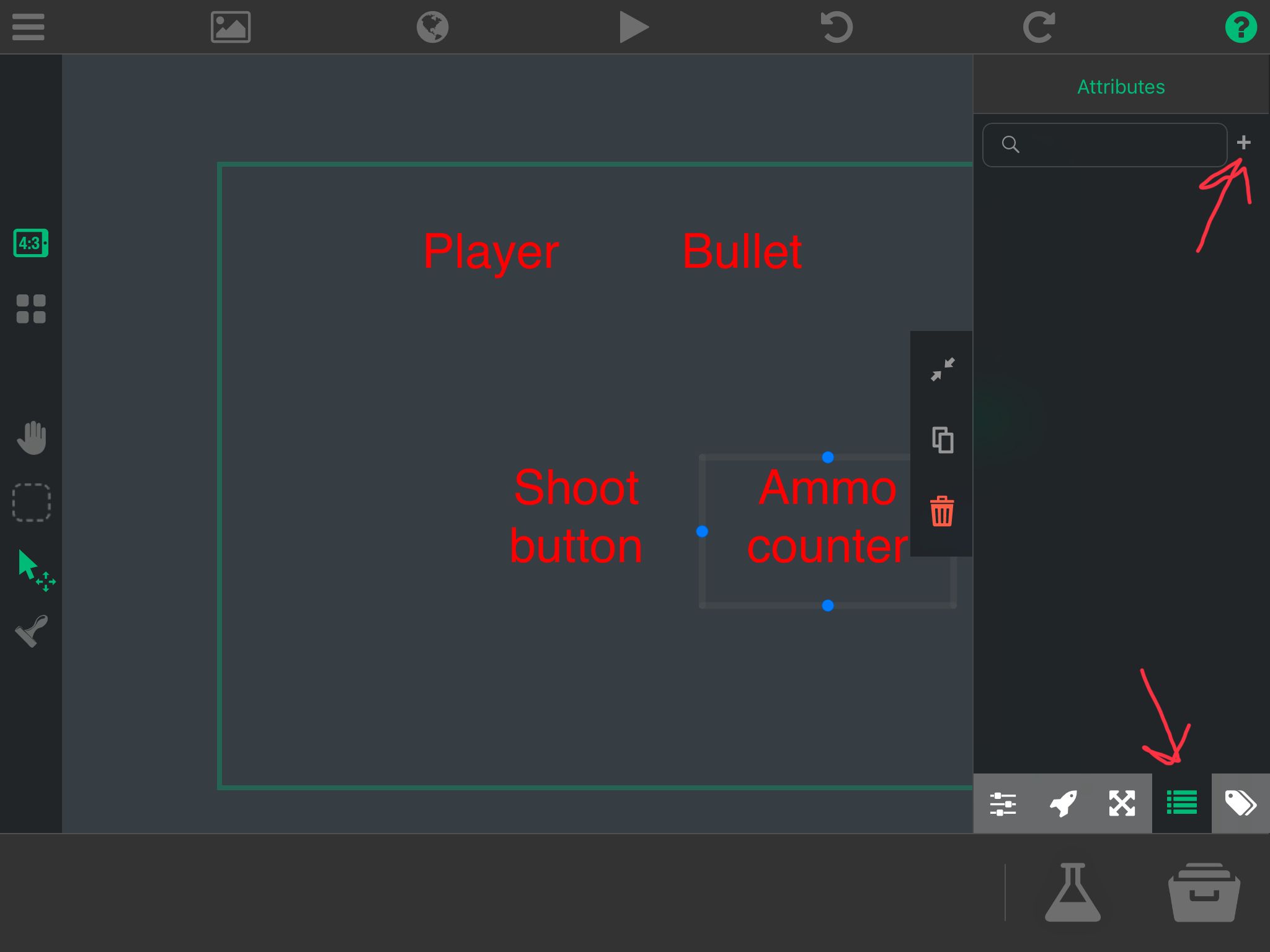
                                B389808A-85F8-433D-8C55-78F17B634135.jpeg
                                Then you can use Set Attribute to modify the variable (make sure you select the object that owns the Attribute and select the right attribute) and you can use Get Attribute in other objects to send it over. Hope this helps.

                                Hyper dus gamesH 1 Reply Last reply
                                0
                                • Aidan_FireA Aidan_Fire

                                  To create a variable that more than one object can see, use Attributes. First create the attribute in the object that you want to store the variable:
                                  B389808A-85F8-433D-8C55-78F17B634135.jpeg
                                  Then you can use Set Attribute to modify the variable (make sure you select the object that owns the Attribute and select the right attribute) and you can use Get Attribute in other objects to send it over. Hope this helps.

                                  Hyper dus gamesH Offline
                                  Hyper dus gamesH Offline
                                  Hyper dus games
                                  wrote on last edited by
                                  #16

                                  @Aidan-Oxley can you send a video of that proses? Because I don’t fully understand

                                  (Sorry for so many questions)

                                  Aidan_FireA 1 Reply Last reply
                                  0
                                  • Hyper dus gamesH Hyper dus games

                                    @Aidan-Oxley can you send a video of that proses? Because I don’t fully understand

                                    (Sorry for so many questions)

                                    Aidan_FireA Offline
                                    Aidan_FireA Offline
                                    Aidan_Fire
                                    wrote on last edited by
                                    #17

                                    @Hyper-dus-games yes I can, give me a few minutes.

                                    1 Reply Last reply
                                    0
                                    • Aidan_FireA Offline
                                      Aidan_FireA Offline
                                      Aidan_Fire
                                      wrote on last edited by
                                      #18

                                      Ok, so I have created an example and recorded the whole thing. In this example, I have two objects. If you touch the first one (on the right), you will be given a pop up where you will be able to type in anything you want, and this object will save what you type as an attribute and also display as text what you entered. The second object (to the left) will get the attribute of the first object and then display it as text.

                                      I also decided to add some colour behaviours just for the video so you could see when I am touching the labels. I ran into a small problem while making it to do with the timing of behaviours which is why you will see it fail the first time. I'll send you a link to the project as well if you want to open it yourself.

                                      1 Reply Last reply
                                      0
                                      • Aidan_FireA Offline
                                        Aidan_FireA Offline
                                        Aidan_Fire
                                        wrote on last edited by Aidan_Fire
                                        #19

                                        E0DF639D-BC23-4E78-99B2-FEC71318DD4A.MP4

                                        Video is above (I would recommend copying it and pasting to another browser, it's weird in hyperPad), copy and paste this link into safari for the project: https://go.aws/39n3Taz

                                        1 Reply Last reply
                                        0

                                        Hello! It looks like you're interested in this conversation, but you don't have an account yet.

                                        Getting fed up of having to scroll through the same posts each visit? When you register for an account, you'll always come back to exactly where you were before, and choose to be notified of new replies (either via email, or push notification). You'll also be able to save bookmarks and upvote posts to show your appreciation to other community members.

                                        With your input, this post could be even better 💗

                                        Register Login
                                        Reply
                                        • Reply as topic
                                        Log in to reply
                                        • Oldest to Newest
                                        • Newest to Oldest
                                        • Most Votes


                                        • Login

                                        • Login or register to search.
                                        • First post
                                          Last post
                                        0
                                        • Categories
                                        • Recent
                                        • Tags
                                        • Popular
                                        • Users
                                        • Search

