
Problem testing game in viewer app
-
I finished a game and wanted to test it on my phone and other iPad but every time I try to open the file in HyperPad viewer I keep getting a notification with ‘Error Error loading project. Please try again later’.
Same thing happens when I use the share link option.
The only way to get the game to open in the viewer app is by sharing from the hyperPad app directly to the viewer app in the same device without saving it as a file first. Is there any way I can try my game in other devices without getting this error? Is there something I’m doing wrong? -
I finished a game and wanted to test it on my phone and other iPad but every time I try to open the file in HyperPad viewer I keep getting a notification with ‘Error Error loading project. Please try again later’.
Same thing happens when I use the share link option.
The only way to get the game to open in the viewer app is by sharing from the hyperPad app directly to the viewer app in the same device without saving it as a file first. Is there any way I can try my game in other devices without getting this error? Is there something I’m doing wrong? -
I’ve been having this same problem with no help. I’ve logged out and in, deleted app and redownloaded. Still has the same error code. Will the “Viewer” app be fixed, so I can airdrop and test my HyperPad games on my phone again?
-
I’ve been having this same problem with no help. I’ve logged out and in, deleted app and redownloaded. Still has the same error code. Will the “Viewer” app be fixed, so I can airdrop and test my HyperPad games on my phone again?
Thats odd, the Viewer app has been updated a few times since this post.
We're currently getting another update ready and conducting testing now. You can sign up here for the testflight beta: https://testflight.apple.com/join/qxo5xKzP
See if that helps!
-
I’ve been having this same problem with no help. I’ve logged out and in, deleted app and redownloaded. Still has the same error code. Will the “Viewer” app be fixed, so I can airdrop and test my HyperPad games on my phone again?
-
@TheMagicDesign Make sure the imported file is a folder and not a zip file in the Games directory.
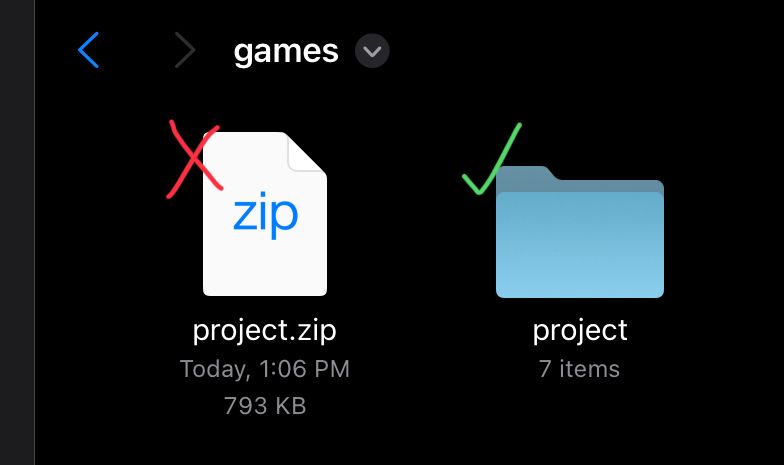
@RobinsonX How do you import your game files into the Viewer? I saved the files from my iPad game into my iCloud Files folder. How do I then open the game from my iPhone?
-
@RobinsonX How do you import your game files into the Viewer? I saved the files from my iPad game into my iCloud Files folder. How do I then open the game from my iPhone?
I use method 1. If that doesn't work, there's another method.
Method 1: The Intended Way
- Make sure the Viewer app is open.
- Go to the .tap file in the Files app on the device you want to install it on, press share and select the Viewer app. (or you can tap on it and Apple will recognize it's trying to import it into the Viewer app)
- Viewer app should be able to extract the project from the .tap file.
Method 2: If None of the Above Works
- You have to convert the
.tapfile into a.zipfile. You can simply rename the extension (there are file apps that can do this - e.g., iZip). - In the Files app, tap on the zip file to unzip it. It should be a folder containing all the project assets.
- Move/copy the folder into the
Gamesdirectory of the viewer app. - Open the Viewer app. If the project does not appear, restart it.
-
I use method 1. If that doesn't work, there's another method.
Method 1: The Intended Way
- Make sure the Viewer app is open.
- Go to the .tap file in the Files app on the device you want to install it on, press share and select the Viewer app. (or you can tap on it and Apple will recognize it's trying to import it into the Viewer app)
- Viewer app should be able to extract the project from the .tap file.
Method 2: If None of the Above Works
- You have to convert the
.tapfile into a.zipfile. You can simply rename the extension (there are file apps that can do this - e.g., iZip). - In the Files app, tap on the zip file to unzip it. It should be a folder containing all the project assets.
- Move/copy the folder into the
Gamesdirectory of the viewer app. - Open the Viewer app. If the project does not appear, restart it.
@RobinsonX I believe the second method worked. THANK YOU SO MUCH!!!
-
@RobinsonX I believe the second method worked. THANK YOU SO MUCH!!!
@TheMagicDesign That's awesome to hear! I think I can add some sort of "import project" feature into the native app so you don't have to do all these steps again.
Apple is very weird when it comes to importing things via the File app.




Hello! It looks like you're interested in this conversation, but you don't have an account yet.
Getting fed up of having to scroll through the same posts each visit? When you register for an account, you'll always come back to exactly where you were before, and choose to be notified of new replies (either via email, or push notification). You'll also be able to save bookmarks and upvote posts to show your appreciation to other community members.
With your input, this post could be even better 💗
Register Login