
Basic logic help
-
I’m a bit confused over the order of the IF and Boolean behaviours.
For instance, if I want this logic:
IF NOT (Collision with Object A OR Collision with Object B)
Do Something
ELSE
Do something elseCould someone please provide or point me to an example? Thanks
-
I’m a bit confused over the order of the IF and Boolean behaviours.
For instance, if I want this logic:
IF NOT (Collision with Object A OR Collision with Object B)
Do Something
ELSE
Do something elseCould someone please provide or point me to an example? Thanks
@Aceboss The Collision Event behavior is event based and is supposed to be used to trigger behavior(s) when:
- An object started colliding with another object
- An object stopped colliding with another object
- While an object is colliding with another object
They work like the Started, While and Stopped Touching behaviors. Although, the Boolean behavior is not event based, it's used as a check (outputting 0 or 1) in conjunction with the If behavior (check if equal to 1 or 0).
-
I’m a bit confused over the order of the IF and Boolean behaviours.
For instance, if I want this logic:
IF NOT (Collision with Object A OR Collision with Object B)
Do Something
ELSE
Do something elseCould someone please provide or point me to an example? Thanks
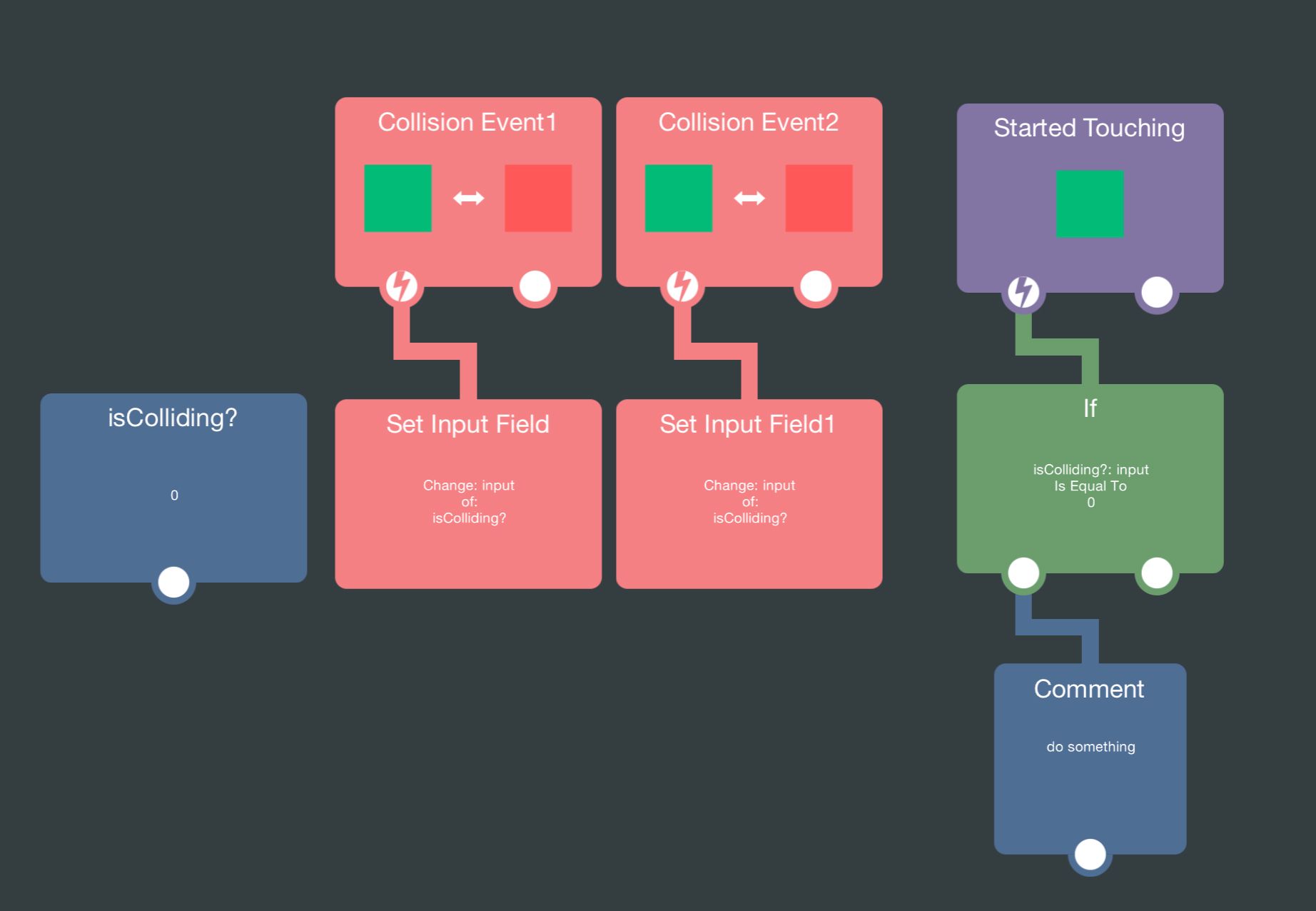
Here is an example of what you're trying to do. I have a variable
isColliding?and it is set to 1 once A has started colliding with B. It is set back to 0 once A stops colliding with B.Now I coded it such that when I start touching the object, it triggers another behavior only if A is not colliding with B.
You can plug another if behavior under to only trigger when multiple conditions are met. You can also invert the condition by changingIs Equal TotoIs Not Equal To. -
@Aceboss The Collision Event behavior is event based and is supposed to be used to trigger behavior(s) when:
- An object started colliding with another object
- An object stopped colliding with another object
- While an object is colliding with another object
They work like the Started, While and Stopped Touching behaviors. Although, the Boolean behavior is not event based, it's used as a check (outputting 0 or 1) in conjunction with the If behavior (check if equal to 1 or 0).
-
Thanks. I am gathering there’s no inherent ELSE behaviour for an IF, and if you want to emulate that you’d need to have an “IF (variable) == 1”
behaviour and another “IF (variable) != 1” behaviour next to it, is that right? -
@Aceboss If you add a second if and put it beside the first if. It will snap together and turn into an ELSE
@Murtaza Thanks, I must have missed that in the manual, my apologies. It seems though this is an elseif rather than just an else, I guess under the elseif condition I can put something like 0 equals 0 to always force it to true and become an else. Pls advise if I am incorrect.
-
@Murtaza Thanks, I must have missed that in the manual, my apologies. It seems though this is an elseif rather than just an else, I guess under the elseif condition I can put something like 0 equals 0 to always force it to true and become an else. Pls advise if I am incorrect.


Hello! It looks like you're interested in this conversation, but you don't have an account yet.
Getting fed up of having to scroll through the same posts each visit? When you register for an account, you'll always come back to exactly where you were before, and choose to be notified of new replies (either via email, or push notification). You'll also be able to save bookmarks and upvote posts to show your appreciation to other community members.
With your input, this post could be even better 💗
Register Login