
Dictionary load and save tutorials
-
I cannot make it work.
The system should display something after load when you use the button modify and enter a key is that right?So I am in game, then I modify. I enter a key. I save then what? I load? But that doesn’t work.
-
This is extremely complex stuff for somebody with no programming background — for someone who is not an IT engineer and doesn’t have proper tutorials.
It’s not really doable… technically it is, but it took me four hours just to set a variable. There are too many possible parameters. We need clear explanations every step of the way.
The rest of the software is brilliantly done, but when it comes to programming — which is, in fact, just logic — we need to understand the logic behind the logic.
Trying to guess takes too much time for simple tasks, and for more complex ones, it’s just frustrating. A simple, clear tutorial would solve all the problems in a matter of minutes. -
It took me one hour, but I debunked your stuff.
It is working now. But the tutorial you gave me doesn’t work.
Here is the corrected version
https://limewire.com/d/fUaAU#guXmnbnc8j -
This post is deleted!
@MrAeon1111 It gets approachable with time. Doctionaries and libraries are just like, level 7 abstract thought it seems easy in concept but when you try to grab it it's slippery. Time and patience 🙌
-
Thanks, man. I really love the software.
It’s beautifully done. It’s clean. It’s clear everything is at the right place. I’m amazed.
Just the little lack of tutorial is my only concern until now. -
Thanks, man. I really love the software.
It’s beautifully done. It’s clean. It’s clear everything is at the right place. I’m amazed.
Just the little lack of tutorial is my only concern until now.@MrAeon1111 Word. RX does what he can but he's been a college student through it all so his time is on budget. I struggled with stored values for a long time as well. People might not always be snappy getting back (I can answer things but I'm also learning and I make mistakes) but someone will come around. I think Discord help section probably gets checked more idk for sure
-
Thanks guys..
-
Oh oops, yeah I found out about the issue with the demo I made. One of the behaviors were using the wrong input for when deleting a key. 🙃
So in the project, when pressing save, it will save the current contents of the dictionary to file. If there is already a save, it will be overwritten.
After you quit and come back, you can press load to restore that. It will load the contents back into the dictionary and it will update the label to display the contents.
-
But yeah, about the tutorials, I am disappointed with how we currently do things and the lack of tutorials we have. We do have a dedicated Help page with all the documentation, links to video tutorials, etc. but either the content doesn't help (too broad/no examples) or nobody refers to them.
It also doesn't help that most of it is outdated 🙃 They're reliable but the screenshots would show UI that is different than what we have now
We are currently focusing on web support, but I also think we should also focus on making the app itself more beginner friendly with built-in interactive examples and explanations. If the stuff that we have isn't clicking, then we should probably focus on more concrete foundational examples like this one:
-
We could really use a clear tutorial on arrays and dictionaries — something that shows how to add and remove elements with simple, clean examples, and explains how an inventory system should work.
This would be perfect. ❤️
-
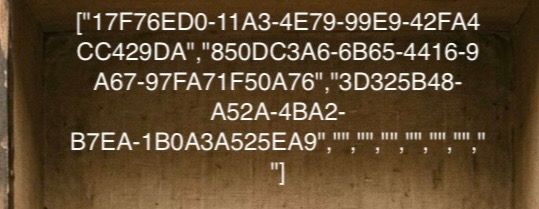
How do I put an object at the next index value place?
It’s not append and not prepend. And I am not supposed to know the current index.After the A9. How can I put my next object there? Is there any function to put things one after the other?
-
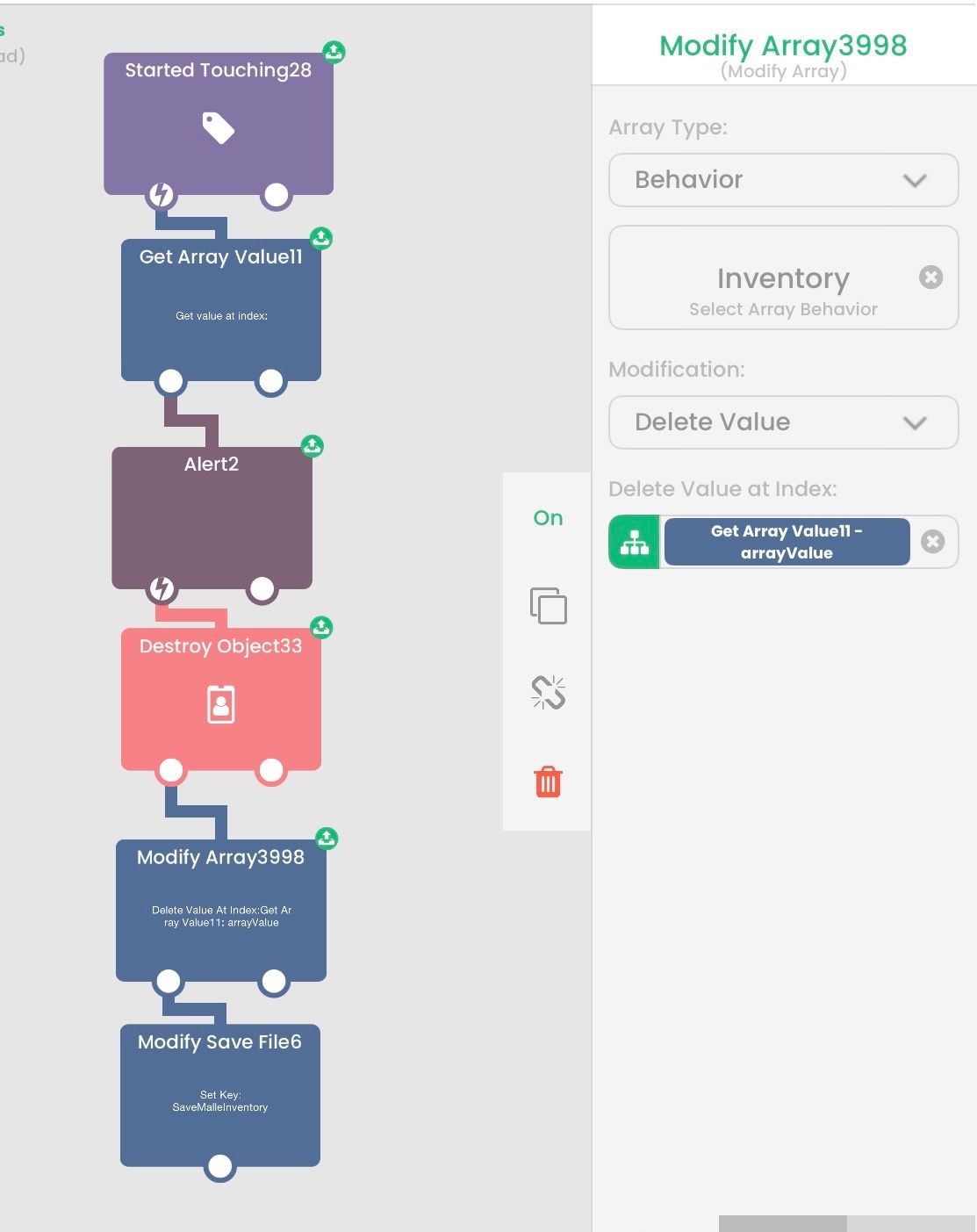
How to delete a spawned object from the array?
I pick up an object and that object appears in the inventory. I want to remove the object from the inventory and from the array at the same time. Destroying the inventory object itself is easy, but I don’t know how to remove the source object (the one that was used to spawn the inventory object) from the array.
The problem is that the object I pick up and the object in the inventory do not share the same object ID. Every time I pick something up, the inventory gets a new object instance with a new ID.
How can I delete the original source object (the one that was used to spawn the inventory object) from the array when I destroy the inventory object? -
Here I found it
-
How do I put an object at the next index value place?
It’s not append and not prepend. And I am not supposed to know the current index.After the A9. How can I put my next object there? Is there any function to put things one after the other?
How do I put an object at the next index value place?
It’s not append and not prepend. And I am not supposed to know the current index.After the A9. How can I put my next object there? Is there any function to put things one after the other?
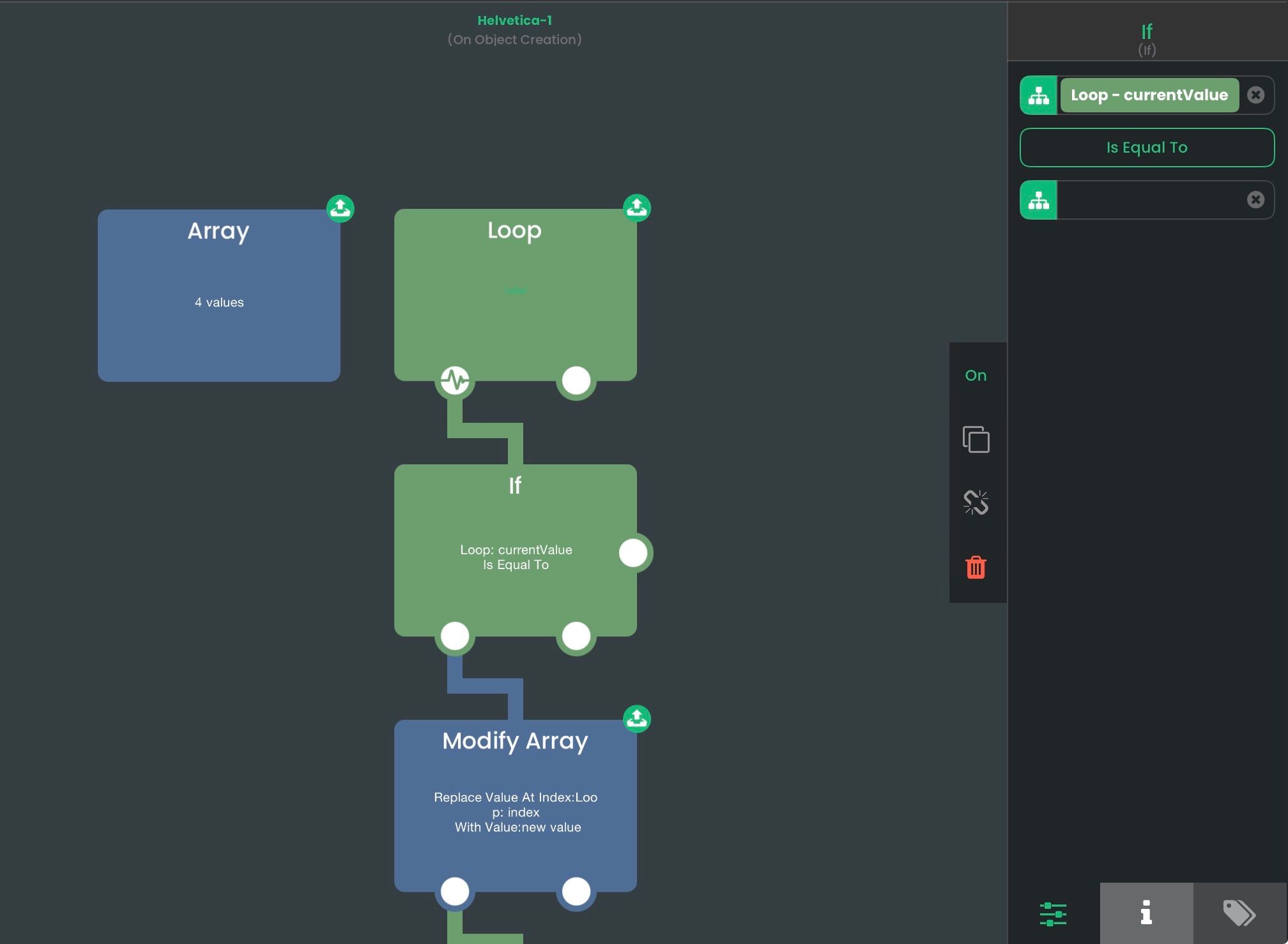
You must find the index of the first occurrence of "".
Loop loop through all elements of an array --> If check whether the current value is equal to "" --> Modify Array if the current value is equal to "", then you can replace the item given the current
indexof the Loop behavior -->Break you want to break out of the loop so it doesn't do it for the rest of the array.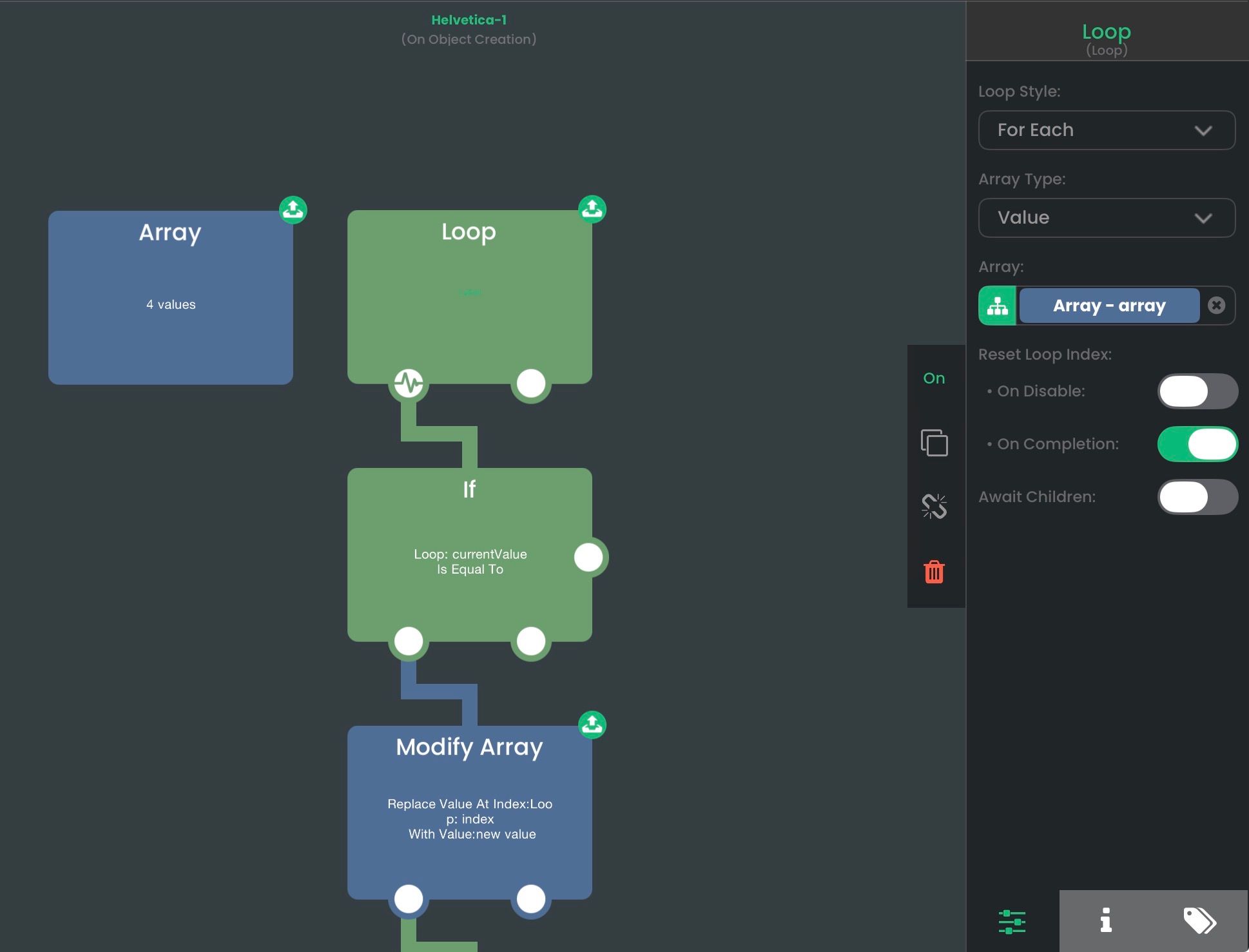
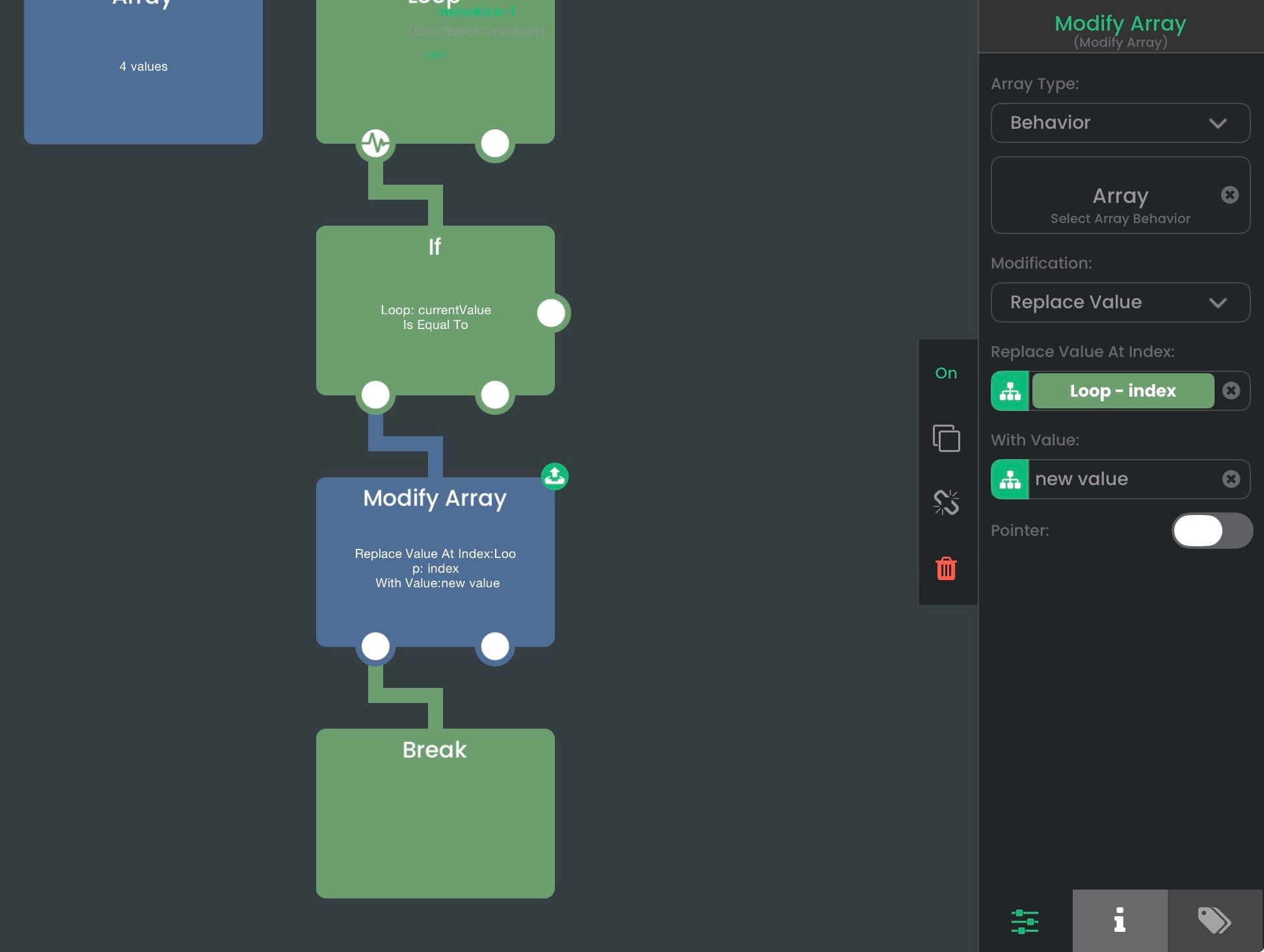
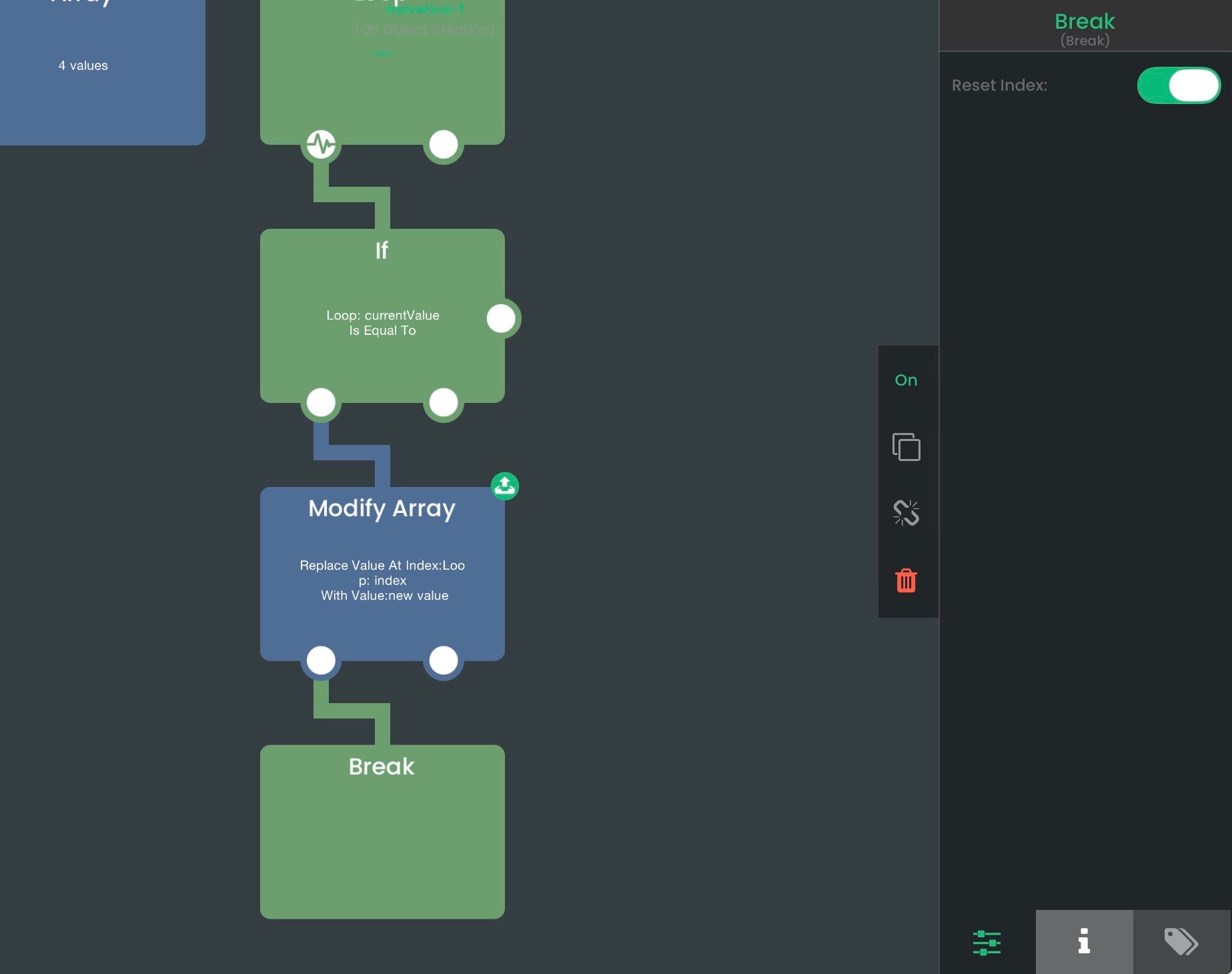
-
How to delete a spawned object from the array?
I pick up an object and that object appears in the inventory. I want to remove the object from the inventory and from the array at the same time. Destroying the inventory object itself is easy, but I don’t know how to remove the source object (the one that was used to spawn the inventory object) from the array.
The problem is that the object I pick up and the object in the inventory do not share the same object ID. Every time I pick something up, the inventory gets a new object instance with a new ID.
How can I delete the original source object (the one that was used to spawn the inventory object) from the array when I destroy the inventory object?How to delete a spawned object from the array?
I pick up an object and that object appears in the inventory. I want to remove the object from the inventory and from the array at the same time. Destroying the inventory object itself is easy, but I don’t know how to remove the source object (the one that was used to spawn the inventory object) from the array.
The problem is that the object I pick up and the object in the inventory do not share the same object ID. Every time I pick something up, the inventory gets a new object instance with a new ID.
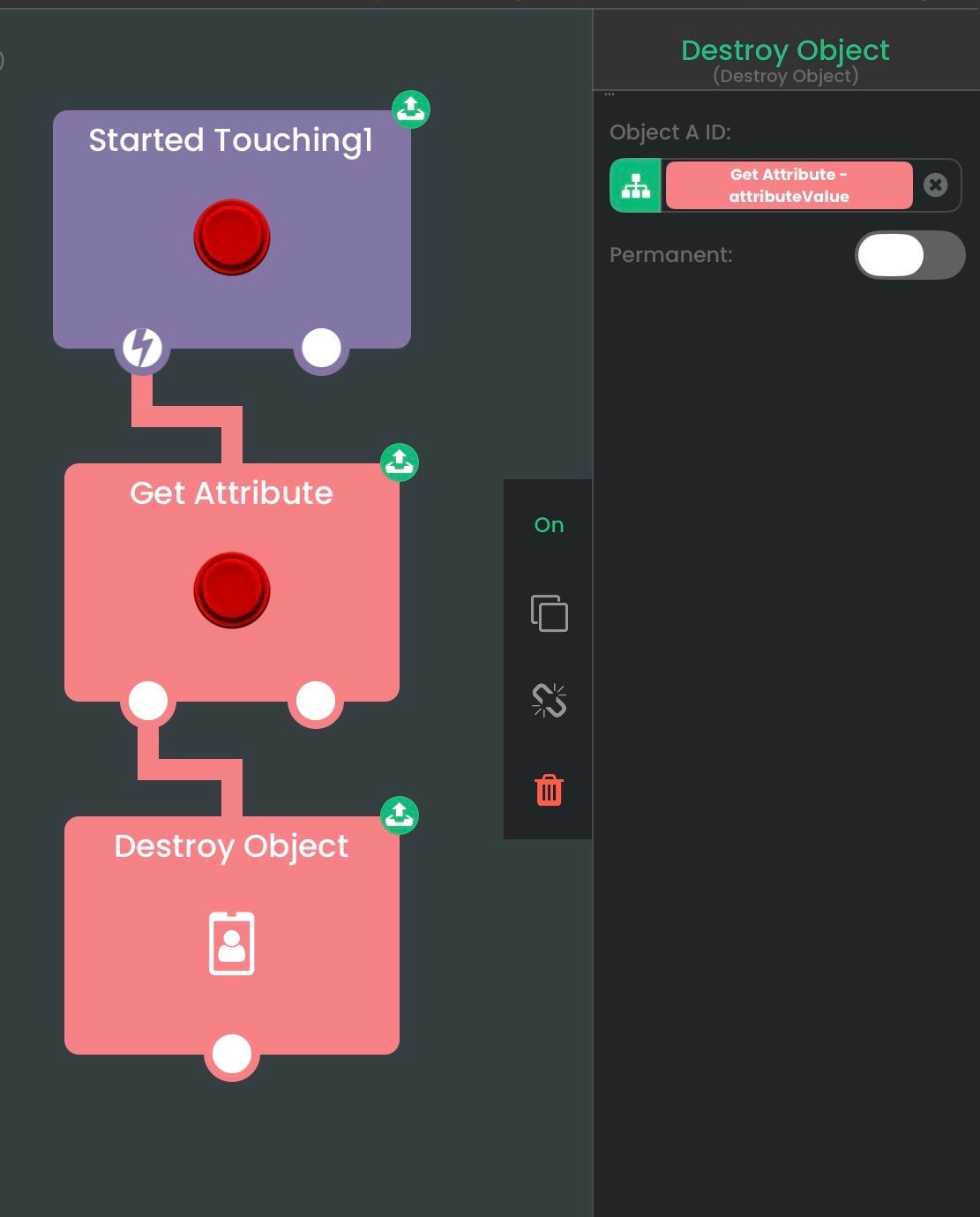
How can I delete the original source object (the one that was used to spawn the inventory object) from the array when I destroy the inventory object?For this one you want to store the source object ID in the spawned object using attributes. You can use Set Attribute to set a key with the object ID as the value. Then when destroying the object, you can use Get Attribute to retrieve it from the object.
Here's an example:
Original Object
The original object spawns another object (the red one). In the spawned object, we can set an attribute
source object idwith the original object id.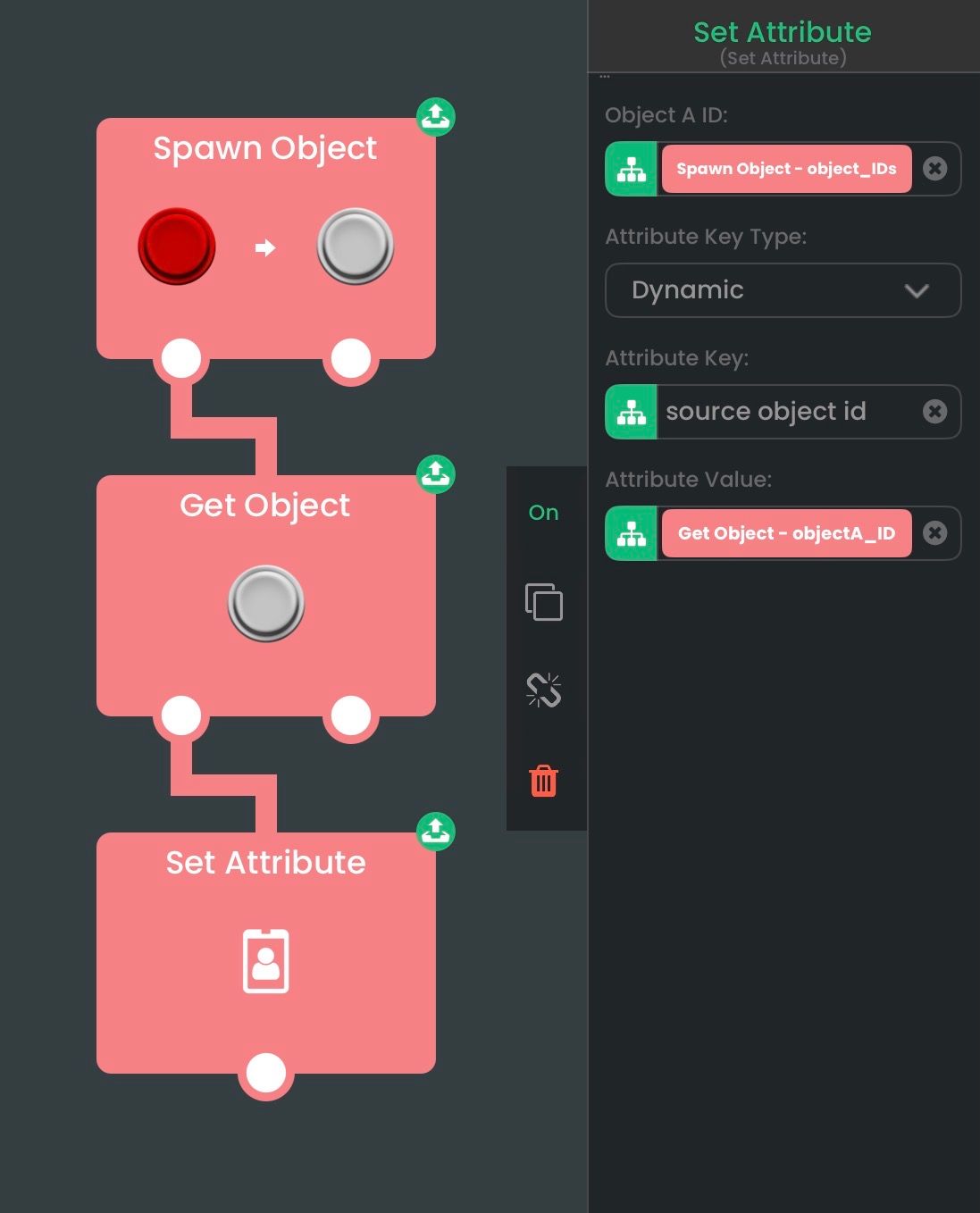
Spawned Object
The spawned object can retrieve the original object that spawned it and destroy it.
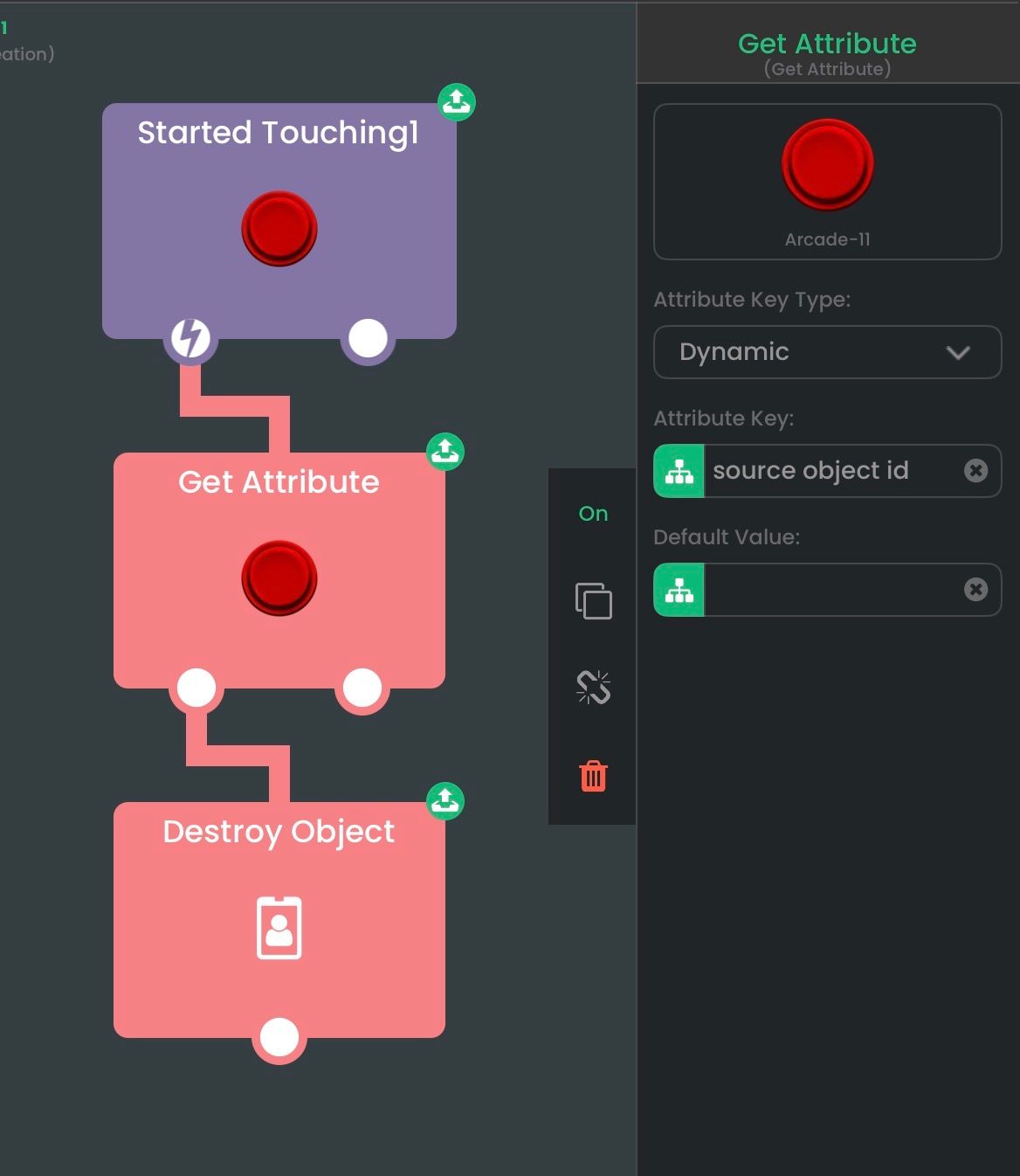
-
Thanks 😃

Hello! It looks like you're interested in this conversation, but you don't have an account yet.
Getting fed up of having to scroll through the same posts each visit? When you register for an account, you'll always come back to exactly where you were before, and choose to be notified of new replies (either via email, or push notification). You'll also be able to save bookmarks and upvote posts to show your appreciation to other community members.
With your input, this post could be even better 💗
Register Login