Skip to content
  • Categories
  • Recent
  • Tags
  • Popular
  • Users
  • Search
Skins
  • Light
  • Brite
  • Cerulean
  • Cosmo
  • Flatly
  • Journal
  • Litera
  • Lumen
  • Lux
  • Materia
  • Minty
  • Morph
  • Pulse
  • Sandstone
  • Simplex
  • Sketchy
  • Spacelab
  • United
  • Yeti
  • Zephyr
  • Dark
  • Cyborg
  • Darkly
  • Quartz
  • Slate
  • Solar
  • Superhero
  • Vapor

  • Default (No Skin)
  • No Skin
Collapse
hyperPad

hyperPad Forum

  1. Home
  2. Help and Support
  3. Anchor point

Anchor point

Scheduled Pinned Locked Moved Help and Support
28 Posts 6 Posters 7.8k Views 2 Watching
  • Oldest to Newest
  • Newest to Oldest
  • Most Votes
Reply
  • Reply as topic
Log in to reply
This topic has been deleted. Only users with topic management privileges can see it.
  • iTap DevelopmentI iTap Development

    Since you can’t set the anchor point of an object yet, I’m trying to create my own anchor point. So far I can rotate an object around a point with sine and cosine, but that is from the center of the object. I need it to rotate from a point on the object For example, rotate around the the top right corner.
    I can’t seem to figure it out....any help would be great!

    J Offline
    J Offline
    [MufasaFace]
    wrote on last edited by
    #2

    @iTap-Development which behavior are you using?

    iTap DevelopmentI 1 Reply Last reply
    0
    • J [MufasaFace]

      @iTap-Development which behavior are you using?

      iTap DevelopmentI Offline
      iTap DevelopmentI Offline
      iTap Development
      wrote on last edited by
      #3

      @Justin-Hattaway I’m using quite a few...

      Aidan_FireA 1 Reply Last reply
      0
      • iTap DevelopmentI iTap Development

        @Justin-Hattaway I’m using quite a few...

        Aidan_FireA Offline
        Aidan_FireA Offline
        Aidan_Fire
        wrote on last edited by Aidan_Fire
        #4

        @iTap-Development You can set the anchor point of an object, if I understand what you’re saying correctly. Anchor point as in when the object moves, the anchor of that object is at the point it moved to, when the object rotates it rotates about that anchor. EDIT: Just after sending this post, I created a random project to mess around with this, Move behaviours les you set an anchor and change the anchor while the project is running, but rotate behaviours don’t. But, if you tap on the object and find the transform object tab (where you can set its scale etc) you can unlock the anchor and change it, then anything you do to the object will be based on that anchor. I think you can’t change this though while the project is running.

        iTap DevelopmentI 1 Reply Last reply
        0
        • Aidan_FireA Aidan_Fire

          @iTap-Development You can set the anchor point of an object, if I understand what you’re saying correctly. Anchor point as in when the object moves, the anchor of that object is at the point it moved to, when the object rotates it rotates about that anchor. EDIT: Just after sending this post, I created a random project to mess around with this, Move behaviours les you set an anchor and change the anchor while the project is running, but rotate behaviours don’t. But, if you tap on the object and find the transform object tab (where you can set its scale etc) you can unlock the anchor and change it, then anything you do to the object will be based on that anchor. I think you can’t change this though while the project is running.

          iTap DevelopmentI Offline
          iTap DevelopmentI Offline
          iTap Development
          wrote on last edited by
          #5

          @Aidan-Oxley yeah I need to be able to set it while the game is running....I have a workaround but being able to set the anchor point(like having an actual behavior) would be best.

          1 Reply Last reply
          0
          • DGames135D Offline
            DGames135D Offline
            DGames135
            wrote on last edited by
            #6

            Haha just reading this and realising I’m doing Sine and Cosine rule at school 😂 . No megusta...

            iTap DevelopmentI 1 Reply Last reply
            0
            • DGames135D DGames135

              Haha just reading this and realising I’m doing Sine and Cosine rule at school 😂 . No megusta...

              iTap DevelopmentI Offline
              iTap DevelopmentI Offline
              iTap Development
              wrote on last edited by
              #7

              @DGames135 LOL I love sine and cosine!

              DGames135D 1 Reply Last reply
              0
              • iTap DevelopmentI iTap Development

                @DGames135 LOL I love sine and cosine!

                DGames135D Offline
                DGames135D Offline
                DGames135
                wrote on last edited by
                #8

                @iTap-Development 😡how?

                Aidan_FireA 1 Reply Last reply
                0
                • DGames135D DGames135

                  @iTap-Development 😡how?

                  Aidan_FireA Offline
                  Aidan_FireA Offline
                  Aidan_Fire
                  wrote on last edited by
                  #9

                  @DGames135 I love trigonometry, calculus and algebra. In fact, I’m better at that stuff than I am at simple maths 😐

                  iTap DevelopmentI 1 Reply Last reply
                  0
                  • Aidan_FireA Aidan_Fire

                    @DGames135 I love trigonometry, calculus and algebra. In fact, I’m better at that stuff than I am at simple maths 😐

                    iTap DevelopmentI Offline
                    iTap DevelopmentI Offline
                    iTap Development
                    wrote on last edited by iTap Development
                    #10

                    @DGames135 its simple....they work great for my projects, so love is what they get! @Aidan-Oxley so since you love trigonometry, do happen to know the math behind rotating on an anchor? Because I don’t LOL

                    maybe we should start a new thread and get everyone’s opinion on sine and cosine!🤣🤣🤣

                    Jack de WildeJ 1 Reply Last reply
                    0
                    • iTap DevelopmentI iTap Development

                      @DGames135 its simple....they work great for my projects, so love is what they get! @Aidan-Oxley so since you love trigonometry, do happen to know the math behind rotating on an anchor? Because I don’t LOL

                      maybe we should start a new thread and get everyone’s opinion on sine and cosine!🤣🤣🤣

                      Jack de WildeJ Offline
                      Jack de WildeJ Offline
                      Jack de Wilde
                      wrote on last edited by
                      #11

                      @iTap-Development if you really want a trig way it shouldn't be too hard, but here's an easy way using move anchors (if I understand what you want): http://bit.ly/2fS4jj8
                      It moves to the anchor you want to rotate about, rotates, then reverses the movement of the anchor.

                      iTap DevelopmentI 2 Replies Last reply
                      0
                      • Jack de WildeJ Jack de Wilde

                        @iTap-Development if you really want a trig way it shouldn't be too hard, but here's an easy way using move anchors (if I understand what you want): http://bit.ly/2fS4jj8
                        It moves to the anchor you want to rotate about, rotates, then reverses the movement of the anchor.

                        iTap DevelopmentI Offline
                        iTap DevelopmentI Offline
                        iTap Development
                        wrote on last edited by
                        #12

                        @Jack8680 thanks I check it out....I did want to do a trig way but I can’t figure it out....

                        Aidan_FireA 1 Reply Last reply
                        0
                        • iTap DevelopmentI iTap Development

                          @Jack8680 thanks I check it out....I did want to do a trig way but I can’t figure it out....

                          Aidan_FireA Offline
                          Aidan_FireA Offline
                          Aidan_Fire
                          wrote on last edited by
                          #13

                          @iTap-Development I’m trying to make a trig version, but it’s too late for me brain not working past 11 pm lol. It’s gonna end up with like 10x more behaviours than Jack’s version 😝. I’ll do it tomorrow.

                          1 Reply Last reply
                          0
                          • Jack de WildeJ Jack de Wilde

                            @iTap-Development if you really want a trig way it shouldn't be too hard, but here's an easy way using move anchors (if I understand what you want): http://bit.ly/2fS4jj8
                            It moves to the anchor you want to rotate about, rotates, then reverses the movement of the anchor.

                            iTap DevelopmentI Offline
                            iTap DevelopmentI Offline
                            iTap Development
                            wrote on last edited by
                            #14

                            @Jack8680 I never thought of doing it that way! Thanks!
                            @Aidan-Oxley lol ok.

                            Aidan_FireA 1 Reply Last reply
                            0
                            • iTap DevelopmentI iTap Development

                              @Jack8680 I never thought of doing it that way! Thanks!
                              @Aidan-Oxley lol ok.

                              Aidan_FireA Offline
                              Aidan_FireA Offline
                              Aidan_Fire
                              wrote on last edited by
                              #15

                              @iTap-Development [0_1507239850952_rotate.tap](Uploading 100%) Here’s a trig version lol. Aww I don’t have the privileges to upload the actual file lol. Link: http://bit.ly/2yrzlps

                              iTap DevelopmentI 2 Replies Last reply
                              0
                              • Aidan_FireA Aidan_Fire

                                @iTap-Development [0_1507239850952_rotate.tap](Uploading 100%) Here’s a trig version lol. Aww I don’t have the privileges to upload the actual file lol. Link: http://bit.ly/2yrzlps

                                iTap DevelopmentI Offline
                                iTap DevelopmentI Offline
                                iTap Development
                                wrote on last edited by
                                #16

                                @Aidan-Oxley great I’ll check it out tomorrow....because it’s 9:00 pm here and I’m tired!

                                1 Reply Last reply
                                0
                                • Aidan_FireA Aidan_Fire

                                  @iTap-Development [0_1507239850952_rotate.tap](Uploading 100%) Here’s a trig version lol. Aww I don’t have the privileges to upload the actual file lol. Link: http://bit.ly/2yrzlps

                                  iTap DevelopmentI Offline
                                  iTap DevelopmentI Offline
                                  iTap Development
                                  wrote on last edited by
                                  #17

                                  @Aidan-Oxley hey could you explain the “initial angle” box container and how you’re using it?

                                  Aidan_FireA 1 Reply Last reply
                                  0
                                  • iTap DevelopmentI iTap Development

                                    @Aidan-Oxley hey could you explain the “initial angle” box container and how you’re using it?

                                    Aidan_FireA Offline
                                    Aidan_FireA Offline
                                    Aidan_Fire
                                    wrote on last edited by Aidan_Fire
                                    #18

                                    @iTap-Development It’s the angle from the anchor to the object when the object is at rotation 0°. For example, anchor is 1 metre up and 1 metre to the right (so both positive), so when the object is at 0° rotation, the angle from the anchor to the object is 225° (so that’s down-left). Hope this makes sense.

                                    iTap DevelopmentI 1 Reply Last reply
                                    0
                                    • Aidan_FireA Aidan_Fire

                                      @iTap-Development It’s the angle from the anchor to the object when the object is at rotation 0°. For example, anchor is 1 metre up and 1 metre to the right (so both positive), so when the object is at 0° rotation, the angle from the anchor to the object is 225° (so that’s down-left). Hope this makes sense.

                                      iTap DevelopmentI Offline
                                      iTap DevelopmentI Offline
                                      iTap Development
                                      wrote on last edited by iTap Development
                                      #19

                                      @Aidan-Oxley hey, so I’m just coming back to this(I got a 3d printer so I’ve been busy with that!);
                                      What do you need the “initial angle” for?
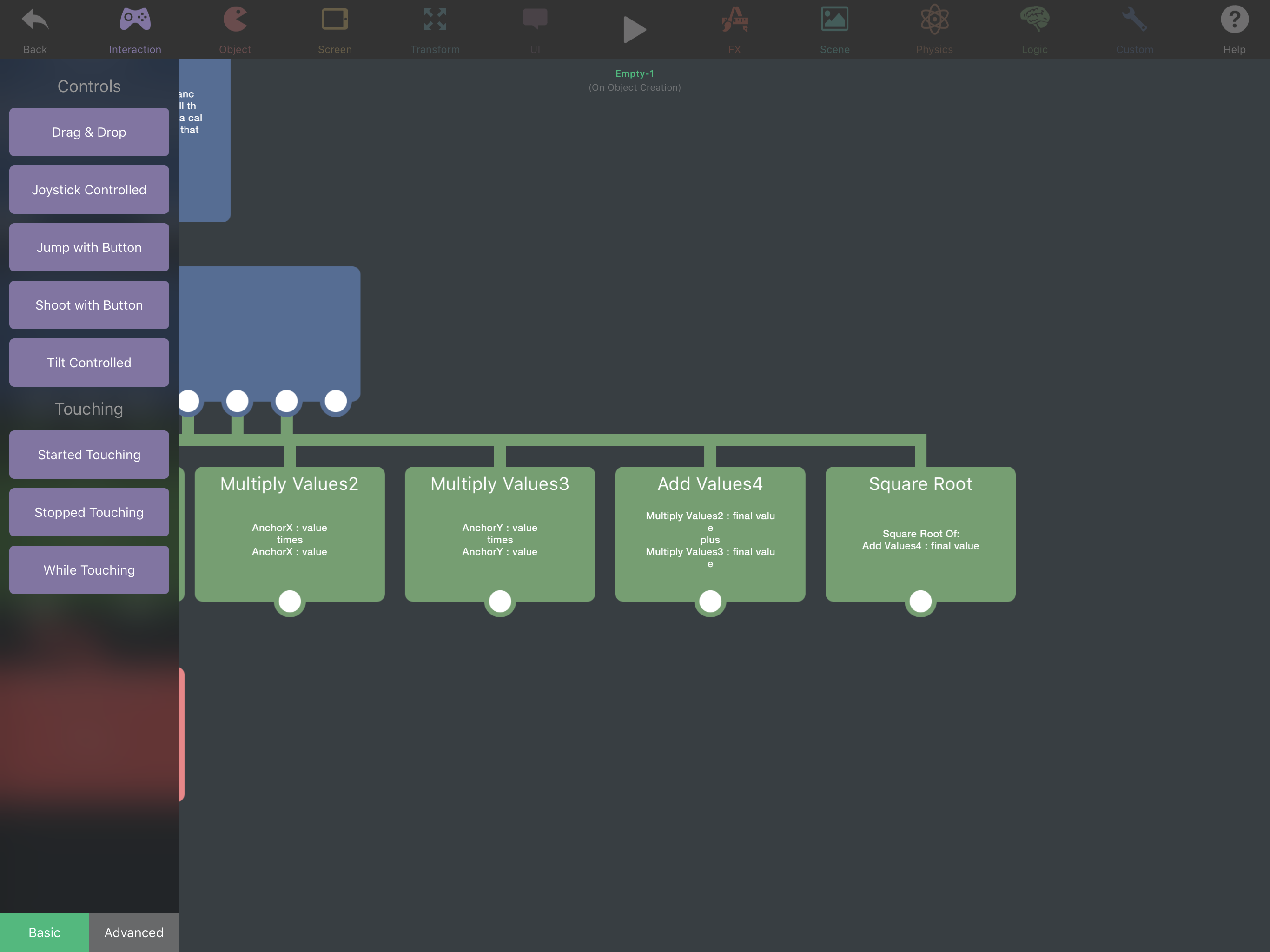
                                      And I’m not sure as to the purpose of the behaviors in the screen shot.0_1509768978624_1A339C64-88B6-41E1-8C8C-A6109AC1CEDC.png
                                      Jack de WildeJ Aidan_FireA D 3 Replies Last reply
                                      0
                                      • iTap DevelopmentI iTap Development

                                        @Aidan-Oxley hey, so I’m just coming back to this(I got a 3d printer so I’ve been busy with that!);
                                        What do you need the “initial angle” for?
                                        And I’m not sure as to the purpose of the behaviors in the screen shot.0_1509768978624_1A339C64-88B6-41E1-8C8C-A6109AC1CEDC.png

                                        Jack de WildeJ Offline
                                        Jack de WildeJ Offline
                                        Jack de Wilde
                                        wrote on last edited by Jack8680
                                        #20

                                        @iTap-Development those behaviours are Pythagoras' theorem. The result from the square root is the distance from the centre to the anchor point.

                                        1 Reply Last reply
                                        0
                                        • iTap DevelopmentI iTap Development

                                          @Aidan-Oxley hey, so I’m just coming back to this(I got a 3d printer so I’ve been busy with that!);
                                          What do you need the “initial angle” for?
                                          And I’m not sure as to the purpose of the behaviors in the screen shot.0_1509768978624_1A339C64-88B6-41E1-8C8C-A6109AC1CEDC.png

                                          Aidan_FireA Offline
                                          Aidan_FireA Offline
                                          Aidan_Fire
                                          wrote on last edited by
                                          #21

                                          @iTap-Development Jack is right. This is how you work out the diagonal distance between two points if you know their coordinates.


                                          iTap DevelopmentI 1 Reply Last reply
                                          0

                                          Hello! It looks like you're interested in this conversation, but you don't have an account yet.

                                          Getting fed up of having to scroll through the same posts each visit? When you register for an account, you'll always come back to exactly where you were before, and choose to be notified of new replies (either via email, or push notification). You'll also be able to save bookmarks and upvote posts to show your appreciation to other community members.

                                          With your input, this post could be even better 💗

                                          Register Login
                                          Reply
                                          • Reply as topic
                                          Log in to reply
                                          • Oldest to Newest
                                          • Newest to Oldest
                                          • Most Votes


                                          • Login

                                          • Login or register to search.
                                          • First post
                                            Last post
                                          0
                                          • Categories
                                          • Recent
                                          • Tags
                                          • Popular
                                          • Users
                                          • Search