
Hi, can you also do local wifi hotspot multiplayer mode for this? I really hope it is possible to do local multiplayer games in hyperpad similar to what you can play in nintendo switch especially in the context of classroom based educational games where I can see hyperpad thriving in the hands of 21st century teachers. Thanks for your response in advance sir.
 A
A
Aries29
@Aries29
Posts
-
RobinsonX (Game ChangeLogs) -
New Public BetaIt still crashes in my case though after playing seven levels out of ten. Still, I hope you guys can fix it in a way that it won't crash while playing a project or something. That would certainly mean that hyperpad is already ROCK stable.😉
-
New Public BetaDitto with Aidan there.👍🏻
-
Latest Update destroyed my play sound behaviors!!!!!!!!iPad Model: iPad Pro 10.5
iOS version: 12.1
hyperPad Version: latest beta (Dec 3)
Description: the sound still stutters like crazy!!!
Steps to reproduce: just repeat playing a scene with multiple play sounds and play music behavior and you’ll end up producing something like the video I attached below.
Additional info: nothing -
Play Sound does not return after an overlay is closed! Help!Humans talk like humans do. But if your intention is simplify things on your end, much as I disdain talking like a machine, here it goes.
iPad Model: iPad Pro 10.5
iOS version: 12.1
hyperPad Version: recent beta
Description: play sound behavior does not work after an overlay such as a pause overlay is loaded and closed
Steps to reproduce: make a scene, add a character, add a shoot button, add a play music behavior to play background music on the scene, add a while touching behavior to the shoot button and underneath a play sound behavior using a shooting sound, add a play music behavior to the pause menu, play the scene, tap the shoot button, then load up the overlay pause menu, close it, then check if the play sound behavior still works.
Additional info: i partially solved it by adding a behavior on code bloack beside the close overlay code block. While the play music behavior works by restarting after the overlay is closed, the play sound behavior does not. -
Play Sound does not return after an overlay is closed! Help!@hamed and @murtaza, I just want you guys to know that I have partially solved the issue of play music and play sound behaviors not continuing to play back in the scene after an overlay (e.g. Pause) is loaded and then closed. I simply added a behavior on to re-trigger the "load from file" behavior which in turn controls what background music in every level must be played (using play music behavior). It is part of my global behaviors. However, adding behavior on to a play sound behavior (e.g. shooting) does not make it come back unlike in the case of play music. Please help me fix this annoying play sound behavior guys. Thanks.
-
Undo and Redo options INSIDE the object's behavior with pop-up message confirming if the user wants to "cut" a connection between behaviors@murtaza then can you at least make hyperpad more "accurate" in detecting fingers on the behavior editor behavior? It is annoying since I also experienced that while editing my project and as demonstrated here already several times, the finger is waaaaay too far from the connecting lines of the behaviors to the right side. If a user is merely "panning," then it should not inadvertently destroy his or her behaviors' connections.
-
Latest Update destroyed my play sound behaviors!!!!!!!!@hamed I already sent this via contact@hyperpad email but just the same, here's the link. What I hope is that you can "return" hyperpad to its old working version where an overlay "pauses" everything in the background scene including play music and play sound behaviors as it plays its "own" play music behavior then once closed, "resumes” everything "including" the play sound and play music behaviors of the scene behind it.
-
Latest Update destroyed my play sound behaviors!!!!!!!!@davio it's what I am doing at the moment too. But it is a bug. Make no mistake about it and hence here I am calling it to be fixed. Not to be tolerated. I'd like to hear your suggestion instead on the disappearing play music and play sound behaviors when an overlay is loaded up and closed. The sounds from the scene say shooting sounds no longer return once the overlay is closed. What do you do about that?
-
Latest Update destroyed my play sound behaviors!!!!!!!! -
Latest Update destroyed my play sound behaviors!!!!!!!!@hamed as for the collision points, a picture is worth a thousand words. Just look at these please:
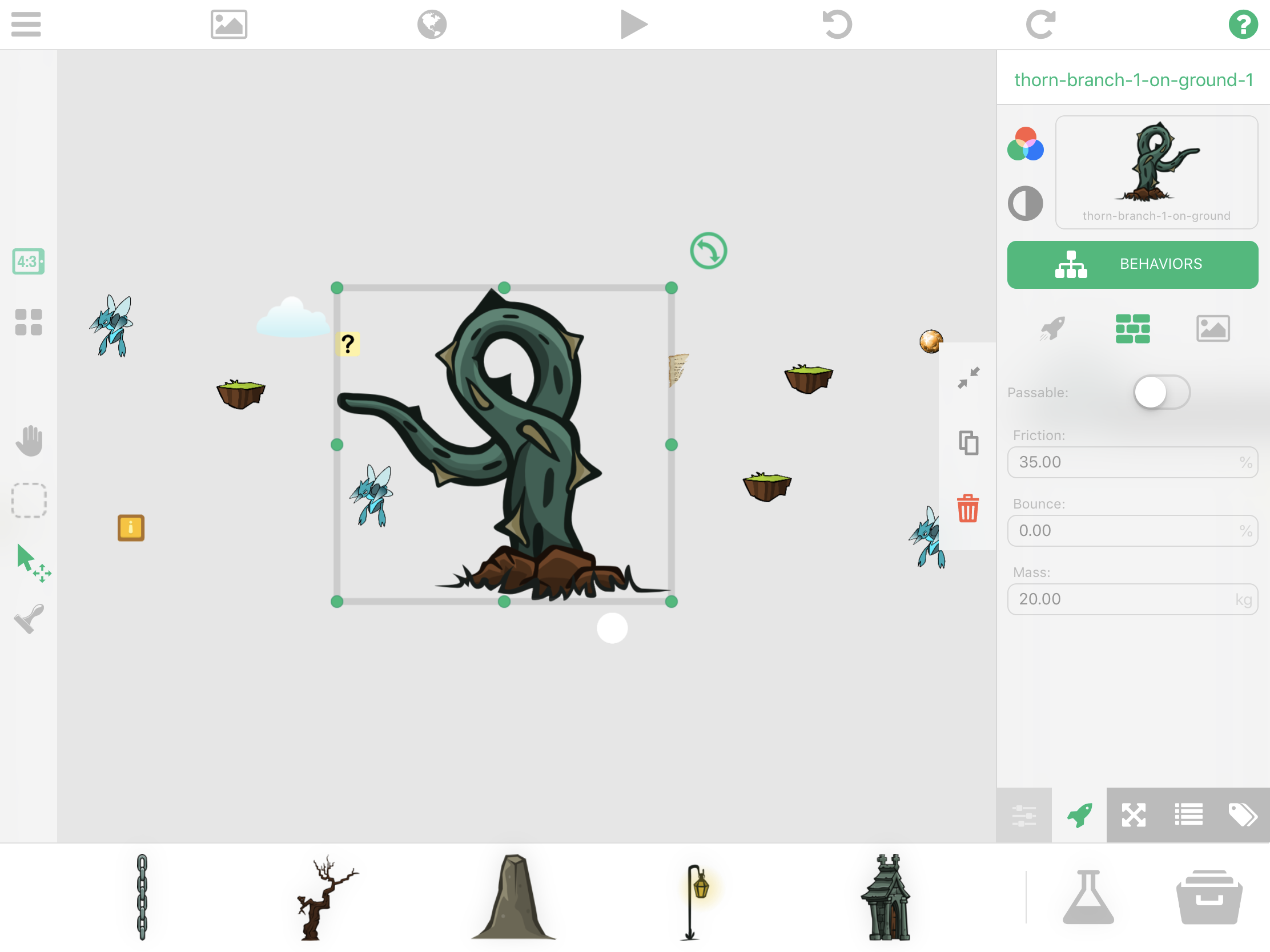
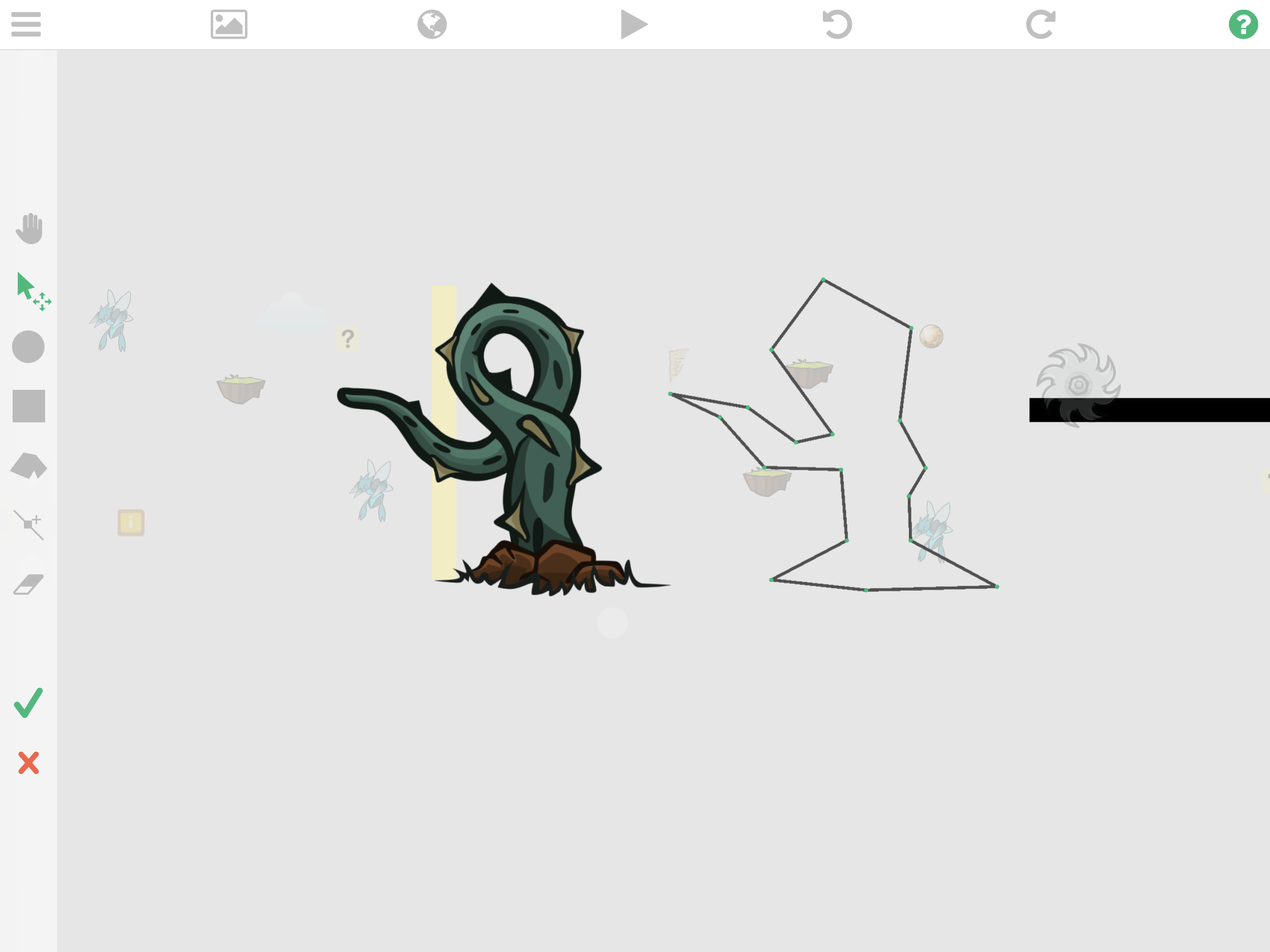
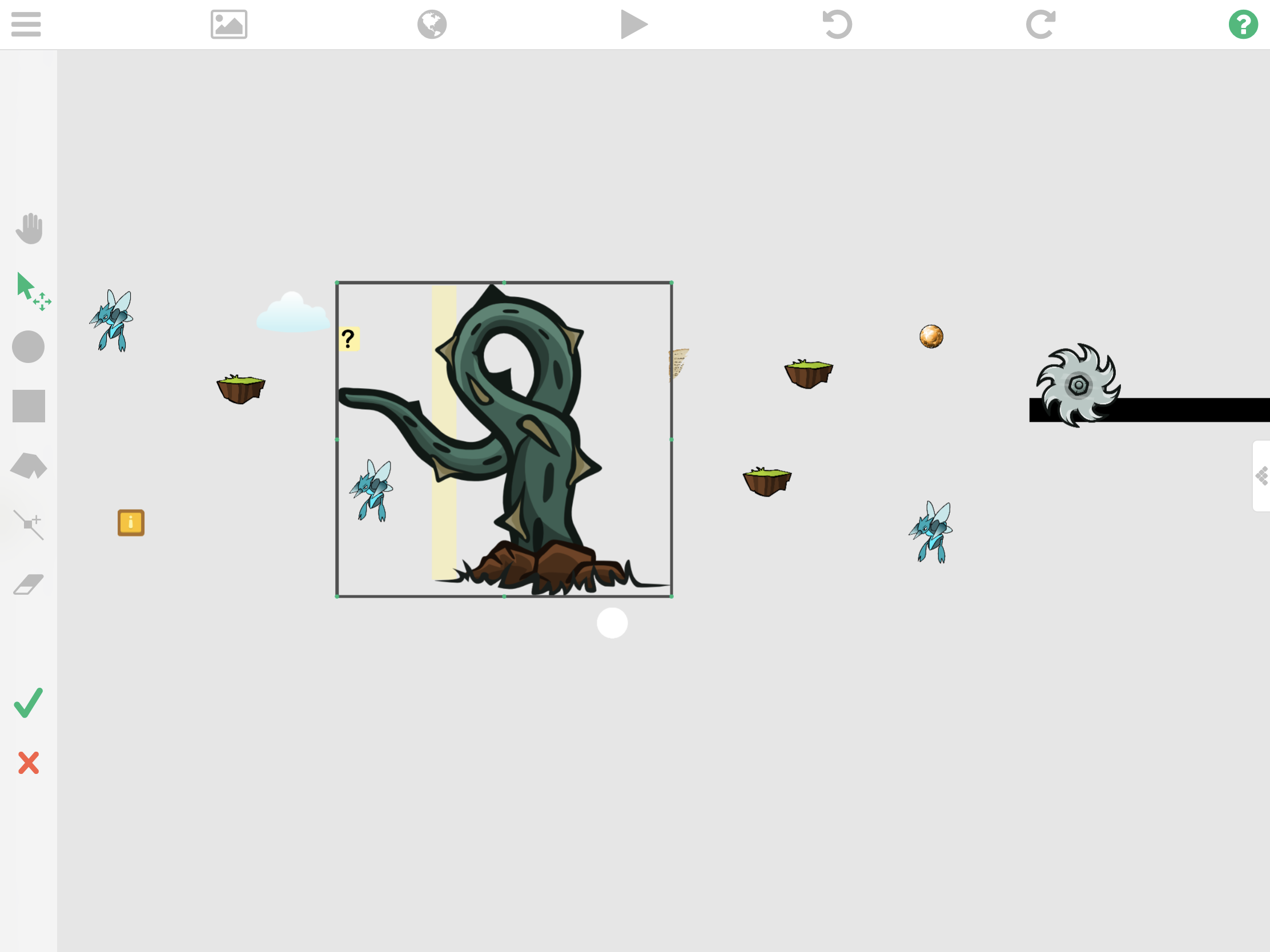
This happens when I am editing the collision points of an object (see pic 3) that is not originally facing the way it should be like this vine above. This vine originally has its tail facing right. I simply "flipped" it over the x axis to face left (see pic 1). Once I edit its collision points, the ghost of its edited collision points appear ahead of it (see pic 2). The only work around I have for this as suggested by @Aidan-Oxley which works as a hit or miss, is to first flip it on its original side, edit its collision points, then flip it back to the way I intended it. Not a fine solution though for an intuitive app such as hyperpad.
-
Latest Update destroyed my play sound behaviors!!!!!!!!@hamed it used to work before. A simple scenario. Your character is walking in a level. Stumbles on a treasure. You collided with it or touched it as player. Overlay pops up with its own sound or music telling you what it is. Then you close the overlay. By then you should be able to hear your own music and play sounds "back" from that same scene underneath that overlay right? How come you're saying you never allowed that when in ver. 1.190 it works "normally?" And it should work that way logically right? Any music or play sound behavior should resume working after a pop-up overlay is closed. What for is the resume all toggle in your close overlay behavior if not for that?
-
Latest Update destroyed my play sound behaviors!!!!!!!!@hamed and @murtaza, I just tested the latest beta build. The play sound works louder now, but it still doesn't solve the sound not returning after an overlay such as pause is invoked. THE SOUND DOES NOT RETURN STILL. Also, I still need to flip the image into its original side before I can change it's collision points. Else, it will create a "ghost” set of collision points of its own ahead of it.
-
Latest Update destroyed my play sound behaviors!!!!!!!!Just checked by email and there's none. Where did you happen to send it? My email add is asperez@bicol-u.edu.ph
-
Latest Update destroyed my play sound behaviors!!!!!!!! -
Latest Update destroyed my play sound behaviors!!!!!!!! -
Latest Update destroyed my play sound behaviors!!!!!!!!@murtaza I fully understand. I just hope it works just as good as the last sound engine did. Got to believe in you guys. But please, do your best to iron this out asap. I wish time is on my side right now. But I can only do so much given how slim my time is at the moment. Still have to write the rest of my paper and fixing this game is already taking quite a toll on my time at the moment. Can you please let me access the current beta app? @hamed has not fixed the link he posted here to let me join.