Skip to content
  • Categories
  • Recent
  • Tags
  • Popular
  • Users
  • Search
Skins
  • Light
  • Brite
  • Cerulean
  • Cosmo
  • Flatly
  • Journal
  • Litera
  • Lumen
  • Lux
  • Materia
  • Minty
  • Morph
  • Pulse
  • Sandstone
  • Simplex
  • Sketchy
  • Spacelab
  • United
  • Yeti
  • Zephyr
  • Dark
  • Cyborg
  • Darkly
  • Quartz
  • Slate
  • Solar
  • Superhero
  • Vapor

  • Default (No Skin)
  • No Skin
Collapse
hyperPad

hyperPad Forum

  1. Home
  2. Help and Support
  3. Can’t switch joysticks (Change weapon)

Can’t switch joysticks (Change weapon)

Scheduled Pinned Locked Moved Help and Support
15 Posts 3 Posters 100 Views 1 Watching
  • Oldest to Newest
  • Newest to Oldest
  • Most Votes
Reply
  • Reply as topic
Log in to reply
This topic has been deleted. Only users with topic management privileges can see it.
  • MurtazaM Offline
    MurtazaM Offline
    Murtaza
    Admin
    wrote last edited by
    #2

    Can you share your project? It's possible that some of your behaviours are not executing in the correct order.
    @robinsonx do you have any suggestions? I'm sure you've created such a system before.

    1 Reply Last reply
    0
    • MrAeon1111M Offline
      MrAeon1111M Offline
      MrAeon1111
      wrote last edited by
      #3

      alt text

      RobinsonXR 1 Reply Last reply
      1
      • MrAeon1111M MrAeon1111

        alt text

        RobinsonXR Offline
        RobinsonXR Offline
        RobinsonX
        wrote last edited by
        #4

        @MrAeon1111 I am assuming that disabling a Joystick Controlled behavior has no effect? That sounds like a bug - I'll look deeper into it when I get the opportunity.

        Alternatively, you could use the Joystick Analog behavior to code the exact behavior you want. It takes more work, but it is doable. The behavior executes repeatedly while holding the joystick - the idea is that you can enable/disable logic under the behavior whenever you want. So there can be a Set Velocity behavior that moves one object, and another one that moves another object. You can disable/enable those to change which object the joystick is controlling.

        MrAeon1111M 1 Reply Last reply
        0
        • RobinsonXR RobinsonX

          @MrAeon1111 I am assuming that disabling a Joystick Controlled behavior has no effect? That sounds like a bug - I'll look deeper into it when I get the opportunity.

          Alternatively, you could use the Joystick Analog behavior to code the exact behavior you want. It takes more work, but it is doable. The behavior executes repeatedly while holding the joystick - the idea is that you can enable/disable logic under the behavior whenever you want. So there can be a Set Velocity behavior that moves one object, and another one that moves another object. You can disable/enable those to change which object the joystick is controlling.

          MrAeon1111M Offline
          MrAeon1111M Offline
          MrAeon1111
          wrote last edited by
          #5

          @RobinsonX The disable function works. But I cannot activate the new joystick. Enable and execute do not work on the new joystick

          MrAeon1111M 1 Reply Last reply
          0
          • MrAeon1111M MrAeon1111

            @RobinsonX The disable function works. But I cannot activate the new joystick. Enable and execute do not work on the new joystick

            MrAeon1111M Offline
            MrAeon1111M Offline
            MrAeon1111
            wrote last edited by
            #6

            MrAeon1111 in fact, two joystick do not work. Do you have any system with two working joystick in the same project? If yes, can you show me the code?

            MrAeon1111M 1 Reply Last reply
            0
            • MrAeon1111M MrAeon1111

              MrAeon1111 in fact, two joystick do not work. Do you have any system with two working joystick in the same project? If yes, can you show me the code?

              MrAeon1111M Offline
              MrAeon1111M Offline
              MrAeon1111
              wrote last edited by
              #7

              MrAeon1111
              alt text

              MrAeon1111M 1 Reply Last reply
              0
              • MrAeon1111M MrAeon1111

                MrAeon1111
                alt text

                MrAeon1111M Offline
                MrAeon1111M Offline
                MrAeon1111
                wrote last edited by
                #8

                MrAeon1111

                alt text

                MrAeon1111M 1 Reply Last reply
                1
                • MrAeon1111M MrAeon1111

                  MrAeon1111

                  alt text

                  MrAeon1111M Offline
                  MrAeon1111M Offline
                  MrAeon1111
                  wrote last edited by
                  #9

                  MrAeon1111

                  This set up simply two joysticks doesn’t work

                  1 Reply Last reply
                  0
                  • RobinsonXR Offline
                    RobinsonXR Offline
                    RobinsonX
                    wrote last edited by
                    #10

                    You have to select the joystick object in the Joystick behaviors. It automatically selects one of the joysticks, but you have the choice to change which joystick is being referenced in the behaviors.

                    1 Reply Last reply
                    0
                    • RobinsonXR Offline
                      RobinsonXR Offline
                      RobinsonX
                      wrote last edited by
                      #11

                      You can have as many joysticks as you want in your project. You'll just have to make sure the correct objects are being selected in the behaviors.

                      1 Reply Last reply
                      0
                      • MrAeon1111M Offline
                        MrAeon1111M Offline
                        MrAeon1111
                        wrote last edited by
                        #12

                        The problem is when, you copy a behaviour joystick.
                        I cannot make the switch between the two copy.
                        I want one joystick with gun and the other joystick with a laser.

                        1 Reply Last reply
                        0
                        • RobinsonXR Offline
                          RobinsonXR Offline
                          RobinsonX
                          wrote last edited by RobinsonX
                          #13

                          I have this Joystick behavior (notice that I already have one selected for the left behavior - it's red). You can tap on the object in any behavior to change the object.
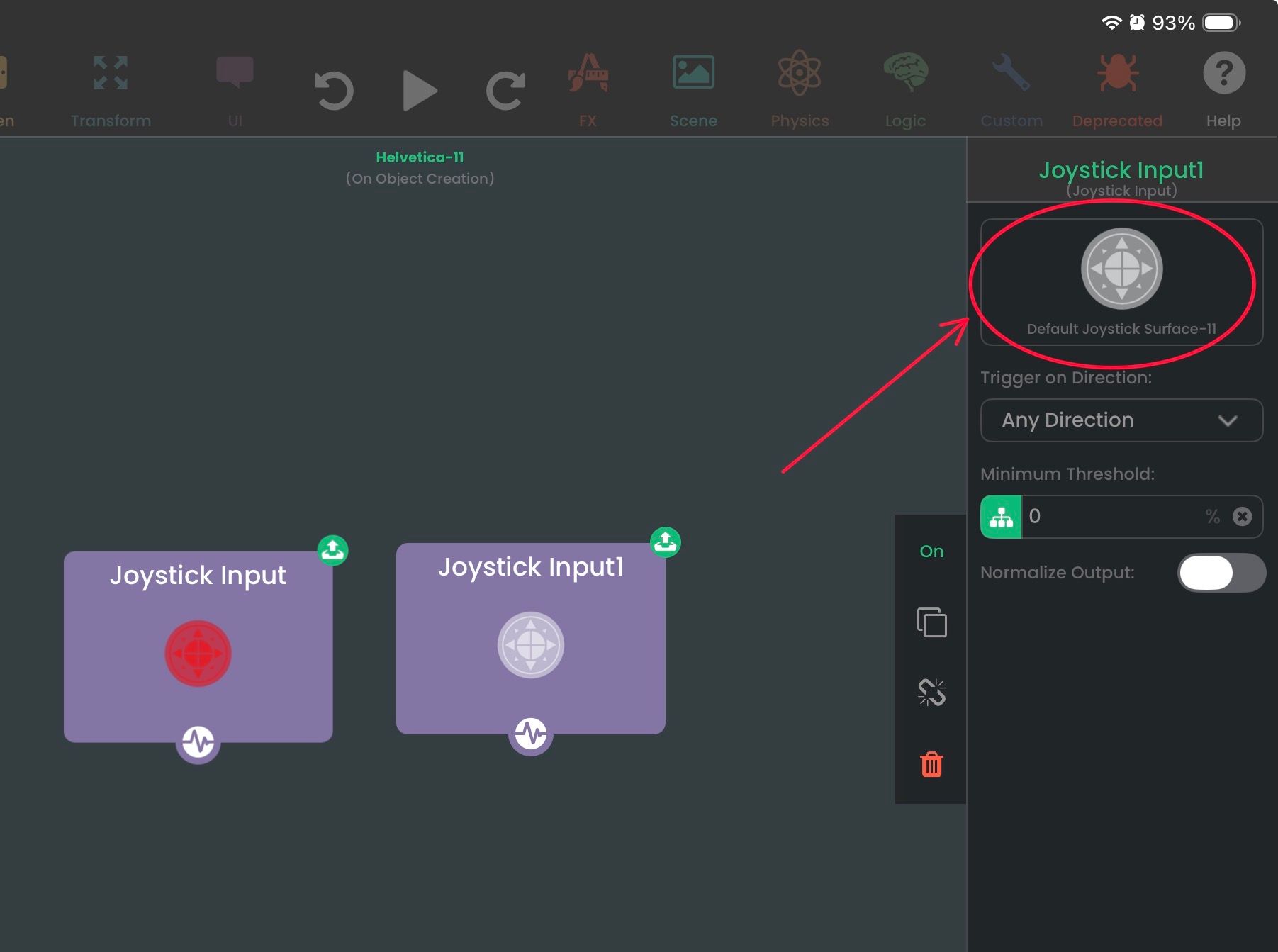
                          IMG_8381.jpeg

                          Now it will take you to the scene to select another object. In this example, I'm selecting the blue joystick.
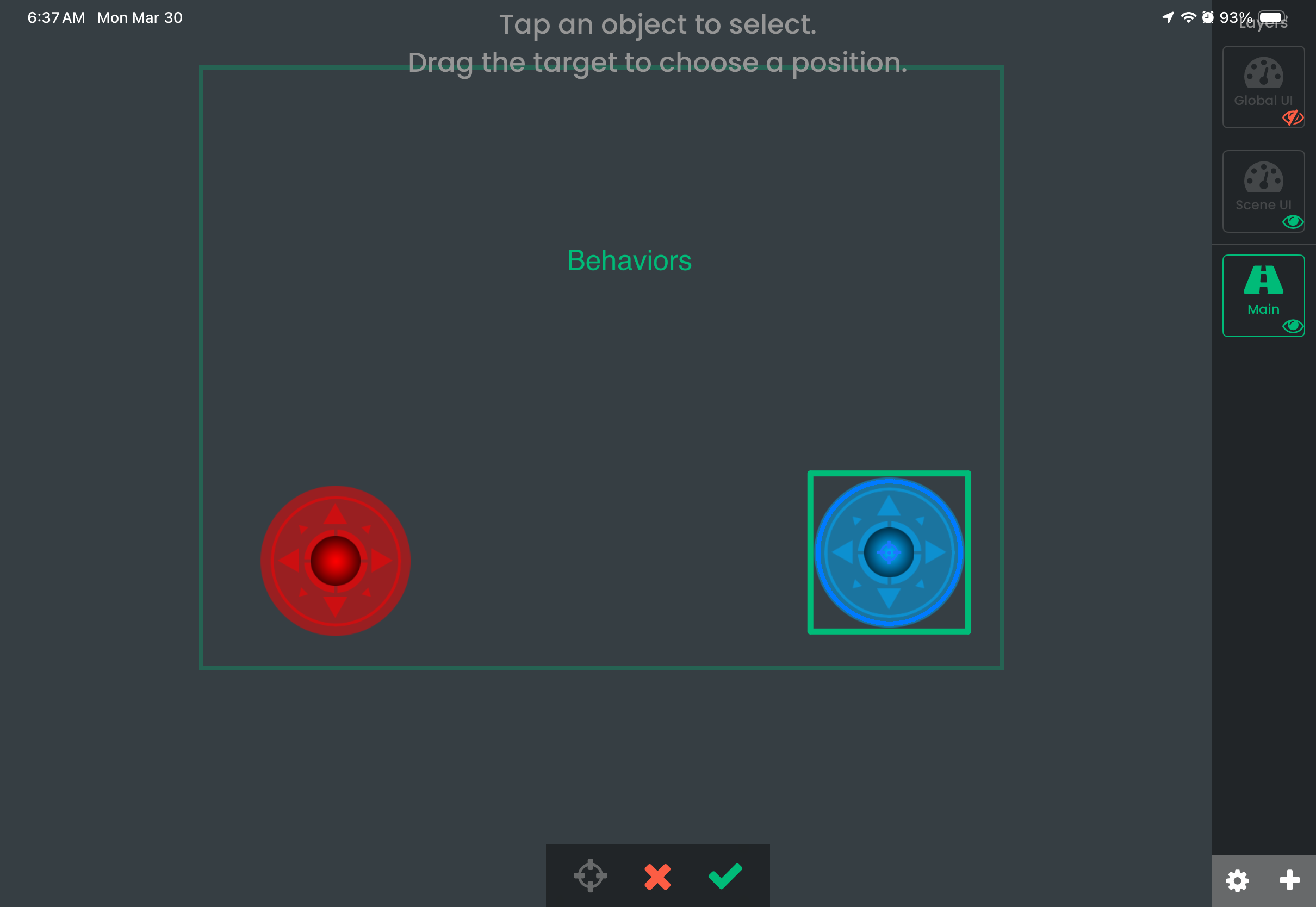
                          IMG_8382.png

                          After pressing the checkmark, the blue joystick has been selected for this behavior. Now I have two joystick behaviors, each triggering when their corresponding joysticks are being used.
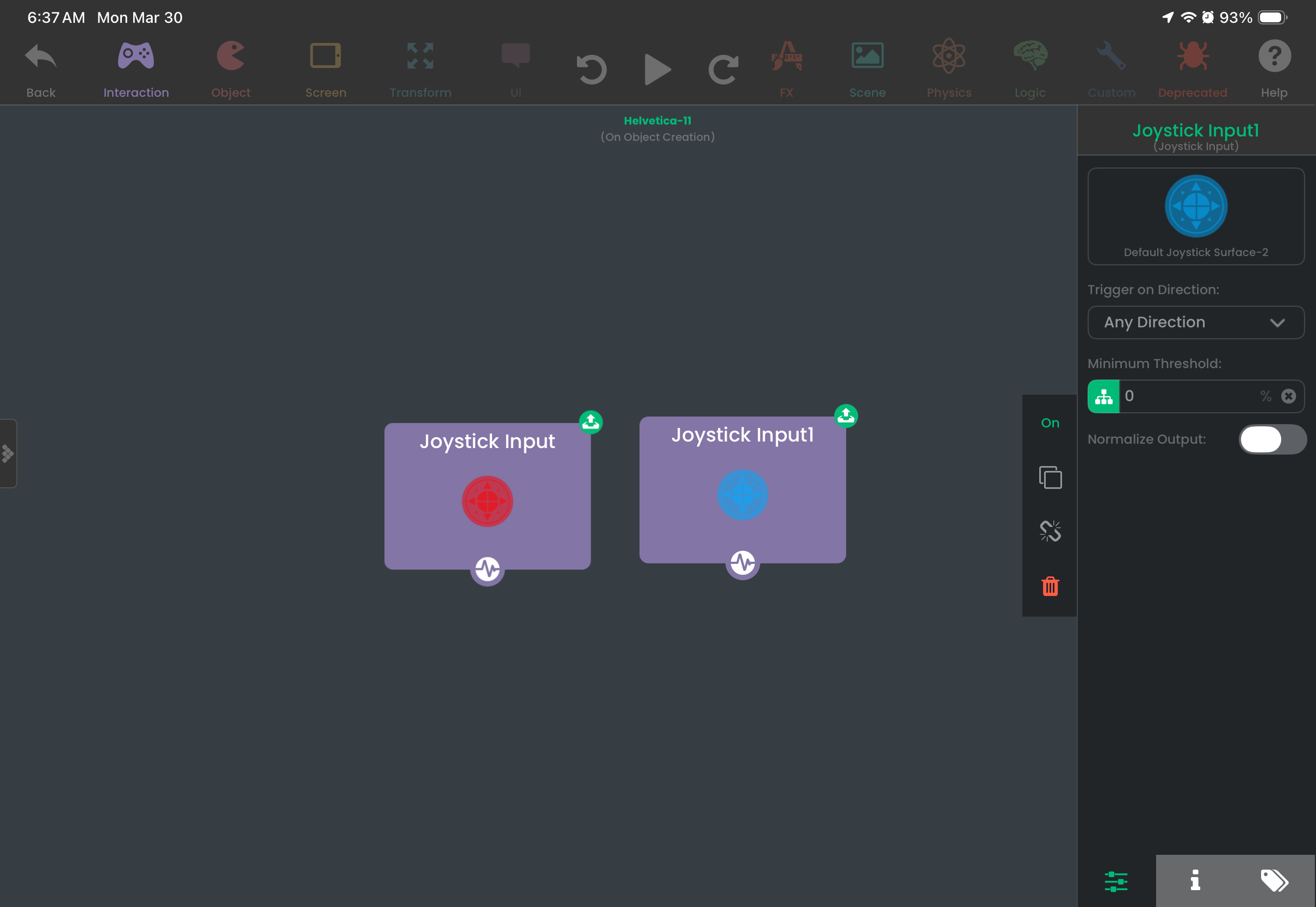
                          IMG_8383.png

                          1 Reply Last reply
                          0
                          • MrAeon1111M Offline
                            MrAeon1111M Offline
                            MrAeon1111
                            wrote last edited by
                            #14

                            It’s about having two copies of joystick control behaviour.
                            And I cannot switch from one joystick control behaviour to another.
                            If I have one joystick in my UI and two copies of joystick behaviour.
                            I cannot switch from one to the other…
                            That was my point…

                            1 Reply Last reply
                            0
                            • MrAeon1111M Offline
                              MrAeon1111M Offline
                              MrAeon1111
                              wrote last edited by
                              #15

                              It works with joystick input but not with joystick control.

                              1 Reply Last reply
                              0

                              Hello! It looks like you're interested in this conversation, but you don't have an account yet.

                              Getting fed up of having to scroll through the same posts each visit? When you register for an account, you'll always come back to exactly where you were before, and choose to be notified of new replies (either via email, or push notification). You'll also be able to save bookmarks and upvote posts to show your appreciation to other community members.

                              With your input, this post could be even better 💗

                              Register Login
                              Reply
                              • Reply as topic
                              Log in to reply
                              • Oldest to Newest
                              • Newest to Oldest
                              • Most Votes


                              • Login

                              • Login or register to search.
                              • First post
                                Last post
                              0
                              • Categories
                              • Recent
                              • Tags
                              • Popular
                              • Users
                              • Search