Skip to content
  • Categories
  • Recent
  • Tags
  • Popular
  • Users
  • Search
Skins
  • Light
  • Brite
  • Cerulean
  • Cosmo
  • Flatly
  • Journal
  • Litera
  • Lumen
  • Lux
  • Materia
  • Minty
  • Morph
  • Pulse
  • Sandstone
  • Simplex
  • Sketchy
  • Spacelab
  • United
  • Yeti
  • Zephyr
  • Dark
  • Cyborg
  • Darkly
  • Quartz
  • Slate
  • Solar
  • Superhero
  • Vapor

  • Default (No Skin)
  • No Skin
Collapse
hyperPad

hyperPad Forum

  1. Home
  2. Bug Reports
  3. Fixed
  4. Imports wrong order of animation files

Imports wrong order of animation files

Scheduled Pinned Locked Moved Fixed
13 Posts 3 Posters 2.3k Views 1 Watching
  • Oldest to Newest
  • Newest to Oldest
  • Most Votes
Reply
  • Reply as topic
Log in to reply
This topic has been deleted. Only users with topic management privileges can see it.
  • SplitMindGamingS SplitMindGaming

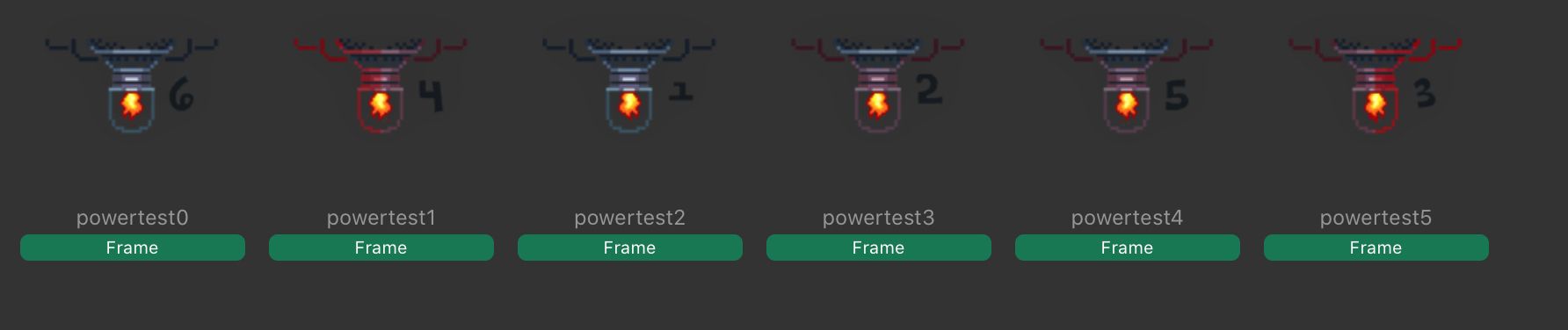
    Ok so this is a hit and miss for me. But i do have the animation set of files that will not import in the correct order regardless of how i name the file wether it be frame0 frame1 or frame-0 frame-1. It will import them in the wrong order and i would have to manually drag out the frames to the correct position after it is imported.

    This was tested on a 2020 ipad pro 12 inch on the new beta version. It was uploaded from the files app. @Hamed let me know if you would like the animation files sent to your email. I have 3 sets of them that constantly import in the wrong order.

    SplitMindGamingS Offline
    SplitMindGamingS Offline
    SplitMindGaming
    wrote on last edited by
    #2

    I added numbers to the frames to really see the mis order. 403DF532-96AF-4989-8A1C-B8774C4CEAB2.jpeg
    1 Reply Last reply
    0
    • StanicaS Offline
      StanicaS Offline
      Stanica
      wrote on last edited by
      #3

      Can confirm this happens to me as well. It imports in a different order and I had to manually change it in the file system

      1 Reply Last reply
      0
      • HamedH Offline
        HamedH Offline
        Hamed
        Admin
        wrote on last edited by
        #4

        @SplitMindGaming can you send me the animation files so i can test? Also is this only through files app? Is this happening in drop box import as well?

        SplitMindGamingS 1 Reply Last reply
        0
        • HamedH Hamed

          @SplitMindGaming can you send me the animation files so i can test? Also is this only through files app? Is this happening in drop box import as well?

          SplitMindGamingS Offline
          SplitMindGamingS Offline
          SplitMindGaming
          wrote on last edited by
          #5

          @Hamed just tested with dropbox and it imports correctly. Seems to be a files app issue. I just sent you the numbered animation files as well to your email.

          1 Reply Last reply
          0
          • HamedH Offline
            HamedH Offline
            Hamed
            Admin
            wrote on last edited by
            #6

            so it looks like the best I can do to fix this issue is to order by name. It won't order by the order you selected, which is still better than a random order its doing now

            1 Reply Last reply
            0
            • HamedH Offline
              HamedH Offline
              Hamed
              Admin
              wrote on last edited by
              #7

              fixed 1.26

              SplitMindGamingS 1 Reply Last reply
              0
              • HamedH Hamed

                fixed 1.26

                SplitMindGamingS Offline
                SplitMindGamingS Offline
                SplitMindGaming
                wrote on last edited by
                #8

                @Hamed is there an update to the beta? Whats the best way to rename the files?

                1 Reply Last reply
                0
                • HamedH Offline
                  HamedH Offline
                  Hamed
                  Admin
                  wrote on last edited by
                  #9

                  Not yet, will try to push up beta later today

                  SplitMindGamingS 1 Reply Last reply
                  0
                  • HamedH Hamed

                    Not yet, will try to push up beta later today

                    SplitMindGamingS Offline
                    SplitMindGamingS Offline
                    SplitMindGaming
                    wrote on last edited by
                    #10

                    @Hamed off topic from this post but is it possible for you to add the ability the have tags select tags? This would be so much of a time saver because i have multiple objects that respond to different objects. Would be so much easier for example under collide behavior if i could select “ falling objects collides with obstacles” because right now i have to manually go to each object and assign the behaviors 1 by 1.

                    1 Reply Last reply
                    0
                    • HamedH Offline
                      HamedH Offline
                      Hamed
                      Admin
                      wrote on last edited by
                      #11

                      @SplitMindGaming you should be able to do this through with the get objects by tag behaviour https://hyperpad.zendesk.com/hc/en-us/articles/360016521831-Get-Object-By-Tag.

                      Drag the output of get objects by tag and drag it into each object in your collide behaviour.

                      However, you'll need to re-trigger get objects by tag and your collide behaviour whenever you spawn a new object with that tag

                      SplitMindGamingS 1 Reply Last reply
                      0
                      • HamedH Hamed

                        @SplitMindGaming you should be able to do this through with the get objects by tag behaviour https://hyperpad.zendesk.com/hc/en-us/articles/360016521831-Get-Object-By-Tag.

                        Drag the output of get objects by tag and drag it into each object in your collide behaviour.

                        However, you'll need to re-trigger get objects by tag and your collide behaviour whenever you spawn a new object with that tag

                        SplitMindGamingS Offline
                        SplitMindGamingS Offline
                        SplitMindGaming
                        wrote on last edited by
                        #12

                        @Hamed thanks that works. I just now have a problem that it effects all objects with the tag even if it didnt collide with it. For example i have a falling object that when it hits an obstacle tagged with obstacle it will shoot out a particle. The problem is that it will shoot out the particle for all objects with that tag. I need to figure out for it to play just on that 1 object.

                        SplitMindGamingS 1 Reply Last reply
                        0
                        • SplitMindGamingS SplitMindGaming

                          @Hamed thanks that works. I just now have a problem that it effects all objects with the tag even if it didnt collide with it. For example i have a falling object that when it hits an obstacle tagged with obstacle it will shoot out a particle. The problem is that it will shoot out the particle for all objects with that tag. I need to figure out for it to play just on that 1 object.

                          SplitMindGamingS Offline
                          SplitMindGamingS Offline
                          SplitMindGaming
                          wrote on last edited by
                          #13

                          I just figured it out. Thanks @Hamed lifesaver. Literally saved me hours of coding.

                          1 Reply Last reply
                          0

                          Hello! It looks like you're interested in this conversation, but you don't have an account yet.

                          Getting fed up of having to scroll through the same posts each visit? When you register for an account, you'll always come back to exactly where you were before, and choose to be notified of new replies (either via email, or push notification). You'll also be able to save bookmarks and upvote posts to show your appreciation to other community members.

                          With your input, this post could be even better đź’—

                          Register Login
                          Reply
                          • Reply as topic
                          Log in to reply
                          • Oldest to Newest
                          • Newest to Oldest
                          • Most Votes


                          • Login

                          • Login or register to search.
                          • First post
                            Last post
                          0
                          • Categories
                          • Recent
                          • Tags
                          • Popular
                          • Users
                          • Search
