Skip to content
  • Categories
  • Recent
  • Tags
  • Popular
  • Users
  • Search
Skins
  • Light
  • Brite
  • Cerulean
  • Cosmo
  • Flatly
  • Journal
  • Litera
  • Lumen
  • Lux
  • Materia
  • Minty
  • Morph
  • Pulse
  • Sandstone
  • Simplex
  • Sketchy
  • Spacelab
  • United
  • Yeti
  • Zephyr
  • Dark
  • Cyborg
  • Darkly
  • Quartz
  • Slate
  • Solar
  • Superhero
  • Vapor

  • Default (No Skin)
  • No Skin
Collapse
hyperPad

hyperPad Forum

  1. Home
  2. Bug Reports
  3. Collided Behaviour First Window Fails

Collided Behaviour First Window Fails

Scheduled Pinned Locked Moved Bug Reports
14 Posts 6 Posters 2.6k Views 3 Watching
  • Oldest to Newest
  • Newest to Oldest
  • Most Votes
Reply
  • Reply as topic
Log in to reply
This topic has been deleted. Only users with topic management privileges can see it.
  • D Offline
    D Offline
    Deeeds
    wrote on last edited by
    #1

    The first item in Collided should be itself (wherever the Collided Behaviour exists).

    That's how I'm using it.

    Yet the "behaviours" presentation clearly says Any Object where it shouldn't say that:
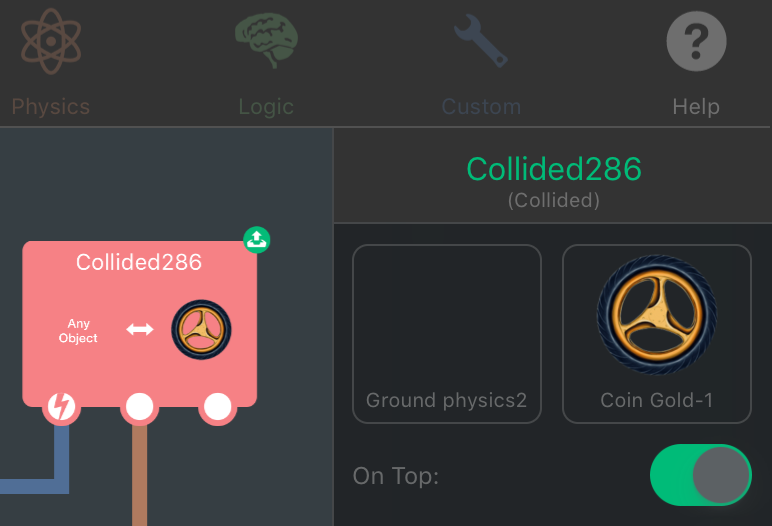
    0_1514908302789_CollidedImage-1.png

    Aidan_FireA 1 Reply Last reply
    0
    • D Deeeds

      The first item in Collided should be itself (wherever the Collided Behaviour exists).

      That's how I'm using it.

      Yet the "behaviours" presentation clearly says Any Object where it shouldn't say that:

      0_1514908302789_CollidedImage-1.png

      Aidan_FireA Offline
      Aidan_FireA Offline
      Aidan_Fire
      wrote on last edited by
      #2

      @Deeeds I’m gonna guess that your object “Ground physics2” is either completely invisible or it’s just so long in one direction but not the other (i.e a REALLY long beam) that the display box can’t even represent it as a line of pixels, so it just comes up empty and says Any Object. I don’t think it actually affects anything though.

      D 1 Reply Last reply
      0
      • Aidan_FireA Aidan_Fire

        @Deeeds I’m gonna guess that your object “Ground physics2” is either completely invisible or it’s just so long in one direction but not the other (i.e a REALLY long beam) that the display box can’t even represent it as a line of pixels, so it just comes up empty and says Any Object. I don’t think it actually affects anything though.

        D Offline
        D Offline
        Deeeds
        wrote on last edited by
        #3

        @Aidan-Oxley It has an impact. I have to question my code. Again. And it is a bug. Why do you constantly want to pretend everything is alright?

        This is a bug. I'm reporting it. It caused me consternation and confusion, made me need to test and verify that it was working, and makes me nervous that it's going to stop working at some point, so I have to make a mental checkmark of where and what this possible area of issues is/are.

        Regardless of what I'm doing, it should say what is in the box, not what it's currently saying.

        iTap DevelopmentI Michael KhalfinG 2 Replies Last reply
        0
        • D Deeeds

          @Aidan-Oxley It has an impact. I have to question my code. Again. And it is a bug. Why do you constantly want to pretend everything is alright?

          This is a bug. I'm reporting it. It caused me consternation and confusion, made me need to test and verify that it was working, and makes me nervous that it's going to stop working at some point, so I have to make a mental checkmark of where and what this possible area of issues is/are.

          Regardless of what I'm doing, it should say what is in the box, not what it's currently saying.

          iTap DevelopmentI Offline
          iTap DevelopmentI Offline
          iTap Development
          wrote on last edited by
          #4

          @Deeeds normally it says “any object” if an object hasn’t been selected. If it is showing it when an object is selected, then I agree it’s a bug.

          1 Reply Last reply
          2
          • D Deeeds

            @Aidan-Oxley It has an impact. I have to question my code. Again. And it is a bug. Why do you constantly want to pretend everything is alright?

            This is a bug. I'm reporting it. It caused me consternation and confusion, made me need to test and verify that it was working, and makes me nervous that it's going to stop working at some point, so I have to make a mental checkmark of where and what this possible area of issues is/are.

            Regardless of what I'm doing, it should say what is in the box, not what it's currently saying.

            Michael KhalfinG Offline
            Michael KhalfinG Offline
            Michael Khalfin
            wrote on last edited by
            #5

            @Deeeds Well, that never happened to me. What did you do to cause it?

            D 1 Reply Last reply
            0
            • Michael KhalfinG Michael Khalfin

              @Deeeds Well, that never happened to me. What did you do to cause it?

              D Offline
              D Offline
              Deeeds
              wrote on last edited by
              #6

              @GameCRAZY It's my fault. Right?

              ...right...

              Aidan_FireA Michael KhalfinG 2 Replies Last reply
              1
              • D Deeeds

                @GameCRAZY It's my fault. Right?

                ...right...

                Aidan_FireA Offline
                Aidan_FireA Offline
                Aidan_Fire
                wrote on last edited by
                #7

                @Deeeds I didn’t mean everything is fine, I meant it doesn’t really have an impact on how your project runs, it just looks weird and wrong. I don’t know why it says “Any Object” rather that just showing nothing If an object is too long and thin to display in that small box.

                D 1 Reply Last reply
                0
                • Aidan_FireA Aidan_Fire

                  @Deeeds I didn’t mean everything is fine, I meant it doesn’t really have an impact on how your project runs, it just looks weird and wrong. I don’t know why it says “Any Object” rather that just showing nothing If an object is too long and thin to display in that small box.

                  D Offline
                  D Offline
                  Deeeds
                  wrote on last edited by
                  #8

                  @Aidan-Oxley said in Collided Behaviour First Window Fails:

                  I don’t know why it says “Any Object” rather that just showing nothing If an object is too long and thin to display in that small box.

                  BECAUSE IT IS A.... BUG!

                  Aidan_FireA 1 Reply Last reply
                  0
                  • D Deeeds

                    @Aidan-Oxley said in Collided Behaviour First Window Fails:

                    I don’t know why it says “Any Object” rather that just showing nothing If an object is too long and thin to display in that small box.

                    BECAUSE IT IS A.... BUG!

                    Aidan_FireA Offline
                    Aidan_FireA Offline
                    Aidan_Fire
                    wrote on last edited by
                    #9

                    @Deeeds With wings?!

                    1 Reply Last reply
                    0
                    • D Deeeds

                      @GameCRAZY It's my fault. Right?

                      ...right...

                      Michael KhalfinG Offline
                      Michael KhalfinG Offline
                      Michael Khalfin
                      wrote on last edited by
                      #10

                      @Deeeds Well, not necessarily. You just have to elaborate on what caused it because it certainly won't happen every time.

                      D 1 Reply Last reply
                      0
                      • Michael KhalfinG Michael Khalfin

                        @Deeeds Well, not necessarily. You just have to elaborate on what caused it because it certainly won't happen every time.

                        D Offline
                        D Offline
                        Deeeds
                        wrote on last edited by
                        #11

                        @GameCRAZY Aidan has done that, and apprently files bug reports, too. And apparently Hamed has a list of bugs.

                        All news to me.

                        1 Reply Last reply
                        1
                        • MurtazaM Offline
                          MurtazaM Offline
                          Murtaza
                          Admin
                          wrote on last edited by
                          #12

                          I can't recreate this.
                          Do you remember if there was anything you did that lead up to this?
                          Ie. Duplicated the behaviour, duplicated object. etc.?

                          D Jack de WildeJ 2 Replies Last reply
                          0
                          • MurtazaM Murtaza

                            I can't recreate this.
                            Do you remember if there was anything you did that lead up to this?
                            Ie. Duplicated the behaviour, duplicated object. etc.?

                            D Offline
                            D Offline
                            Deeeds
                            wrote on last edited by
                            #13

                            @Murtaza As per Aidan's comment. It's a very long, very thin object. A ground plain.

                            1 Reply Last reply
                            0
                            • MurtazaM Murtaza

                              I can't recreate this.
                              Do you remember if there was anything you did that lead up to this?
                              Ie. Duplicated the behaviour, duplicated object. etc.?

                              Jack de WildeJ Offline
                              Jack de WildeJ Offline
                              Jack de Wilde
                              wrote on last edited by
                              #14

                              @Murtaza here's an example project: http://bit.ly/2rB7BMp (the behaviour is inside the thin white bar).

                              I'm guessing it happens when the object is too thin to actually draw any pixels inside the preview. Maybe replace it with the "Object" text that appears when an object's asset is deleted.


                              1 Reply Last reply
                              0

                              Hello! It looks like you're interested in this conversation, but you don't have an account yet.

                              Getting fed up of having to scroll through the same posts each visit? When you register for an account, you'll always come back to exactly where you were before, and choose to be notified of new replies (either via email, or push notification). You'll also be able to save bookmarks and upvote posts to show your appreciation to other community members.

                              With your input, this post could be even better 💗

                              Register Login
                              Reply
                              • Reply as topic
                              Log in to reply
                              • Oldest to Newest
                              • Newest to Oldest
                              • Most Votes


                              • Login

                              • Login or register to search.
                              • First post
                                Last post
                              0
                              • Categories
                              • Recent
                              • Tags
                              • Popular
                              • Users
                              • Search