
Three Dimensional
-
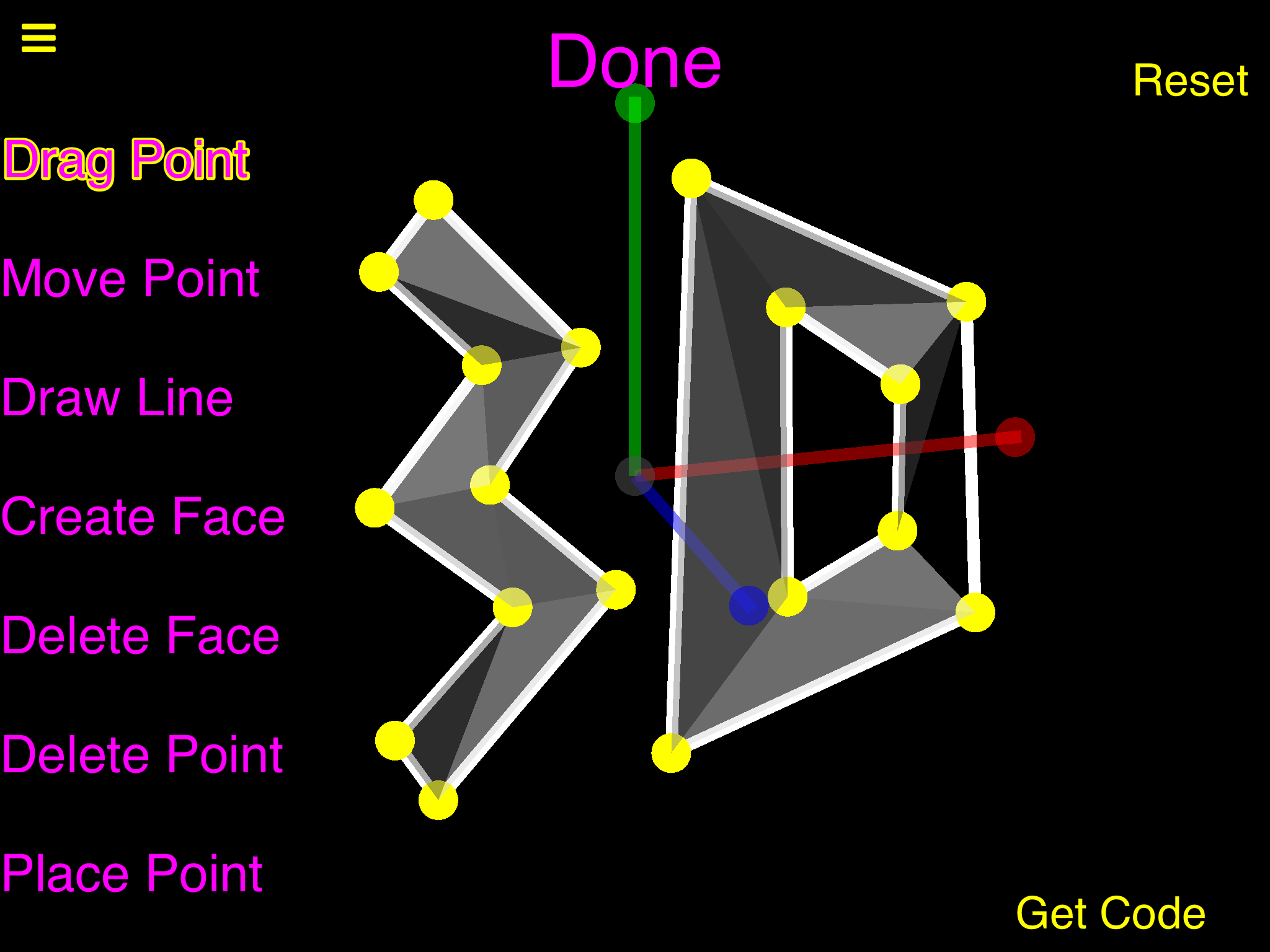
The code for that shape will work in the current version of 3D, it is: -6.8437,-0.140625,0,-1.421875,3.59375,0,-6.734375,6.171875,0,-4.03125,3.390625,0,-0.5,-3,0,-6.3125,-6.4375,0,-3.21875,-3.1875,0,-5.296875,7.953125,0,-3.8125,0.15625,0,-5.171875,-8.15625,0,0.953125,-7.53125,0,1.484375,7.828125,0,8.71875,3.765625,0,8.953125,-4.59375,0,6.984375,1.734375,0,6.90625,-2.1875,0,3.96875,4.109375,0,4.015625,-3.65625,0,18_16_9_5_12_13_7_1_5_10_4_3_13_14_17_18_10_6_2_9_11_12_1_4_6_7_16_15_15_17_8_2_14_11_3_8_8:3:2:1:7:9:16:15:13:15:13:17:9:4:1:7:10:6:18:14:11:14:14:16:7:5:10:11:18:12:13:12:17:5:7:9:3:4:2:16:14:18:2:4:9:12:17:18:|
-
The code for that shape will work in the current version of 3D, it is: -6.8437,-0.140625,0,-1.421875,3.59375,0,-6.734375,6.171875,0,-4.03125,3.390625,0,-0.5,-3,0,-6.3125,-6.4375,0,-3.21875,-3.1875,0,-5.296875,7.953125,0,-3.8125,0.15625,0,-5.171875,-8.15625,0,0.953125,-7.53125,0,1.484375,7.828125,0,8.71875,3.765625,0,8.953125,-4.59375,0,6.984375,1.734375,0,6.90625,-2.1875,0,3.96875,4.109375,0,4.015625,-3.65625,0,18_16_9_5_12_13_7_1_5_10_4_3_13_14_17_18_10_6_2_9_11_12_1_4_6_7_16_15_15_17_8_2_14_11_3_8_8:3:2:1:7:9:16:15:13:15:13:17:9:4:1:7:10:6:18:14:11:14:14:16:7:5:10:11:18:12:13:12:17:5:7:9:3:4:2:16:14:18:2:4:9:12:17:18:|
@Aidan-Oxley maybe an edit point button that lets us enter precise coordinates? Unless that's already included in place point
-
There is Drag Point for not precise movement (simply drag it) and there is Move Point for precise position entering, I didn't use precise position entering for the shape in the screenshot.
-
There is Drag Point for not precise movement (simply drag it) and there is Move Point for precise position entering, I didn't use precise position entering for the shape in the screenshot.
@Aidan-Oxley oh okay
-
-
I don't know if the code system works well as I tried to do a 3d logo but later on when tried to get it back with the code it glitched the shape and looked like this
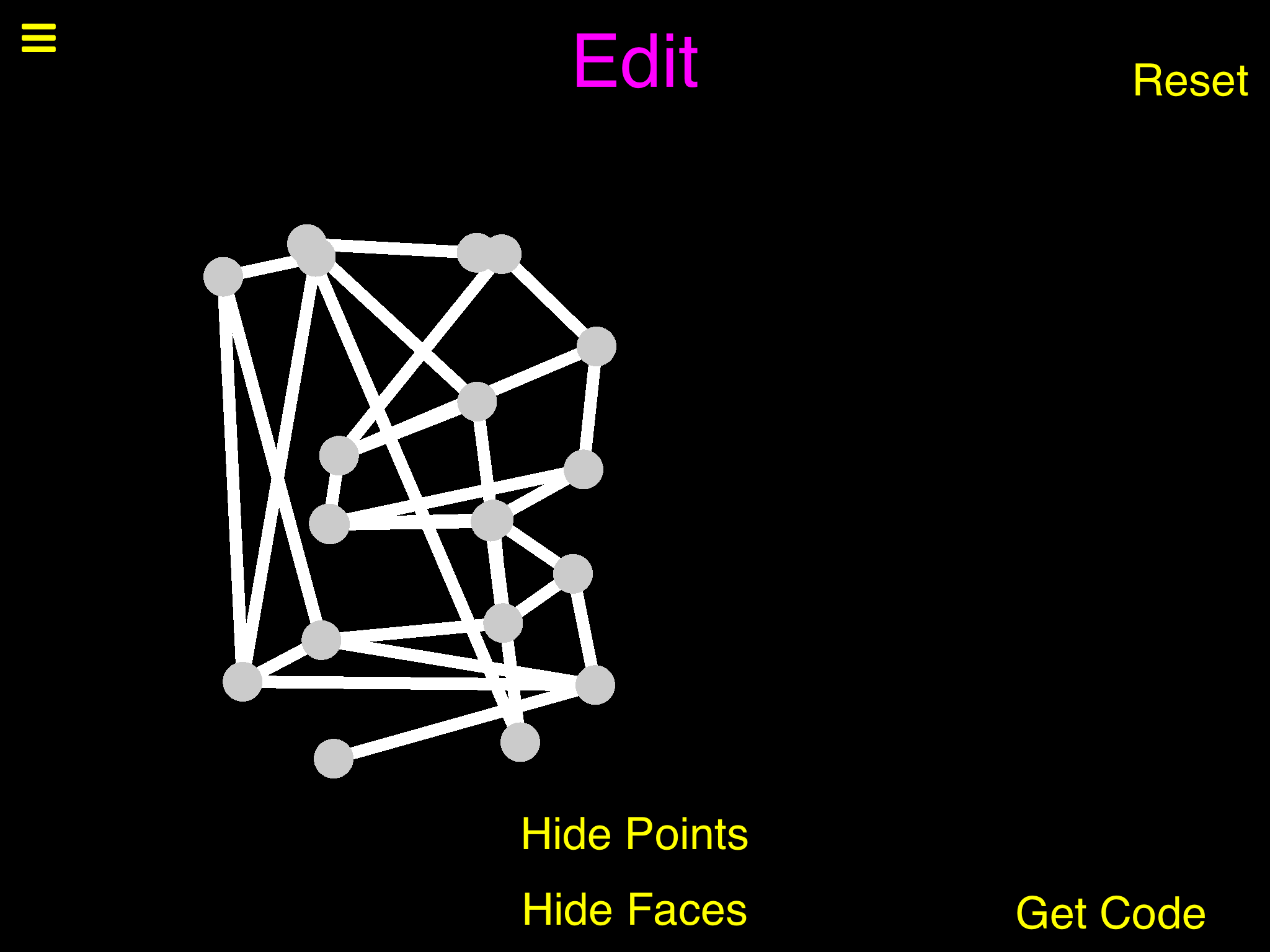
@DGames135 By the way the code was this
-8.265625,7.671875,0,-3.359375,7.390625,0,-0.96875,4.328125,0,-1.296875,0.203125,0,-3.5625,-1.5,0,-7.6875,-1.71875,0,-1.5625,-3.296875,0,-1,-7.015625,0,-7.59375,-9.5625,0,-8.0625,5.96875,1.453125,-4.015625,5.859375,1.796875,-4,1.0625,1.578125,-7.46875,-0.09375,0.78125,-7.75,-3.75,2.359375,-3.671875,-3.71875,2.453125,-3.359375,-7.265625,2.625,-7.9375,-7.8125,2.53125,-10.375,6.546875,0,-2.890625,-8.953125,0,-9.90625,-8.21875,1.375,2_3_14_5_14_14_14_4_15_16_20_17_20_10_20_8_10_20_14_6_19_12_5_7_5_6_17_8_17_20_17_18_7_8_16_5_16_7_16_17_1_19_1_2_3_4_13_14_13_3_13_2_4_5_6_15_8_9_18_20_18_10_12_13_12_1_| -
@DGames135 By the way the code was this
-8.265625,7.671875,0,-3.359375,7.390625,0,-0.96875,4.328125,0,-1.296875,0.203125,0,-3.5625,-1.5,0,-7.6875,-1.71875,0,-1.5625,-3.296875,0,-1,-7.015625,0,-7.59375,-9.5625,0,-8.0625,5.96875,1.453125,-4.015625,5.859375,1.796875,-4,1.0625,1.578125,-7.46875,-0.09375,0.78125,-7.75,-3.75,2.359375,-3.671875,-3.71875,2.453125,-3.359375,-7.265625,2.625,-7.9375,-7.8125,2.53125,-10.375,6.546875,0,-2.890625,-8.953125,0,-9.90625,-8.21875,1.375,2_3_14_5_14_14_14_4_15_16_20_17_20_10_20_8_10_20_14_6_19_12_5_7_5_6_17_8_17_20_17_18_7_8_16_5_16_7_16_17_1_19_1_2_3_4_13_14_13_3_13_2_4_5_6_15_8_9_18_20_18_10_12_13_12_1_|@DGames135 Hmm that's really weird, are the points at least in the right positions? What exactly has changed there? I'm trying to open my 3D project on the hub but it won't open (it does nothing) @administrators why does this happen? Can you tell me if the purple edit menu buttons are there right away when you load the object? If so that isn't supposed to happen, they are supposed to show up only after you press the edit button (I might have forgotten to hide the layer before I uploaded), that could possibly cause problems. Otherwise it might just be the lag. EDIT: I just went back to the hub and the 3D project was open, I'm not sure why it took so long. Also I checked that the edit menu is working fine.
-
@DGames135 By the way the code was this
-8.265625,7.671875,0,-3.359375,7.390625,0,-0.96875,4.328125,0,-1.296875,0.203125,0,-3.5625,-1.5,0,-7.6875,-1.71875,0,-1.5625,-3.296875,0,-1,-7.015625,0,-7.59375,-9.5625,0,-8.0625,5.96875,1.453125,-4.015625,5.859375,1.796875,-4,1.0625,1.578125,-7.46875,-0.09375,0.78125,-7.75,-3.75,2.359375,-3.671875,-3.71875,2.453125,-3.359375,-7.265625,2.625,-7.9375,-7.8125,2.53125,-10.375,6.546875,0,-2.890625,-8.953125,0,-9.90625,-8.21875,1.375,2_3_14_5_14_14_14_4_15_16_20_17_20_10_20_8_10_20_14_6_19_12_5_7_5_6_17_8_17_20_17_18_7_8_16_5_16_7_16_17_1_19_1_2_3_4_13_14_13_3_13_2_4_5_6_15_8_9_18_20_18_10_12_13_12_1_|@DGames135 Ok I've figured out what's wrong, you used the delete point button, didn't you? I thought I got that working, but I didn't, it happens because even though you have deleted the point, the point that you joined it to still thinks it's connected, and it messes up every single other line in the shape. For now, the only way around this is to not use the delete point button, I'll try to fix it. EDIT: lol I'm still looking at the delete point button and it's actually completely broken, @DGames135 here is your code without lines (you will have to redraw them, don't use delete Point until next update):
-8.265625,7.671875,0,-3.359375,7.390625,0,-0.96875,4.328125,0,-1.296875,0.203125,0,-3.5625,-1.5,0,-7.6875,-1.71875,0,-1.5625,-3.296875,0,-1,-7.015625,0,-7.59375,-9.5625,0,-8.0625,5.96875,1.453125,-4.015625,5.859375,1.796875,-4,1.0625,1.578125,-7.46875,-0.09375,0.78125,-7.75,-3.75,2.359375,-3.671875,-3.71875,2.453125,-3.359375,-7.265625,2.625,-7.9375,-7.8125,2.53125,-10.375,6.546875,0,-2.890625,-8.953125,0,-9.90625,-8.21875,1.375,| -
-
-
It's a diamond
0,-5,0,0,2,0,-5,0,0,5,0,0,0,0,5,0,0,-5,3.5,0,3.5,3.5,0,-3.5,-3.5,0,-3.5,-3.5,0,3.5,3,2,0,-3,2,0,0,2,3,0,2,-3,7:4:1:3:10:1:6:9:1:14:12:2:8:14:6:7:11:4:11:14:2:10:5:1:7:4:1:13:11:2:5:7:1:13:7:11:6:14:9:9:12:3:14:9:12:12:13:10:5:13:7:10:13:5:4:8:1:12:13:2:5:7:1:11:8:14:4:11:8:8:6:1:9:3:1:3:12:10:|
-
I made a branch of your project.
I looked at some of the behaviors
I can't even...You are a legend
@DomiNation hahaha. Also I love your diamond, I was gonna make one but I thought that would be too hard. I want to make the faces change colour correctly in the next update, I could see the colours in the diamond looked a bit strange, and they do in the default cube as well.
-
-
@Aidan-Oxley after I finish my graphing calculator, I think I will work on a project to build 3D objects layer by layer and output it as code for your 3D engine. I think you could make some really complex models if you build it in layers or something :)
-
Would it be hard to put the old system of rotating the shape in to moving points so you don't have to guess or be really precise about moving points.
@DGames135 nah that's easy, I'll put it in for you next update. @DomiNation what do you mean by layers? I still really like your diamond, I'm gonna add a button for it next update (and text saying you made it).
-
@Aidan-Oxley This is just a concept for a tool to make building the 3D objects easier. You place points on a 2D layer, then add another layer "x" amount higher above the last layer, place more points, more layers, more points. I guess it would be a bit like a human 3D printer. :P Anyway, it would be a lot easier to make a lot of detail this way.
-
@Aidan-Oxley This is just a concept for a tool to make building the 3D objects easier. You place points on a 2D layer, then add another layer "x" amount higher above the last layer, place more points, more layers, more points. I guess it would be a bit like a human 3D printer. :P Anyway, it would be a lot easier to make a lot of detail this way.
@DomiNation hmm, you can sort of do this because you have x y and z positions, but the layering wouldn't work as good because you would still see the points in the background and it could make it more confusing. I could add some sort of hide all points with this x, y or z value?
-
@DomiNation hmm, you can sort of do this because you have x y and z positions, but the layering wouldn't work as good because you would still see the points in the background and it could make it more confusing. I could add some sort of hide all points with this x, y or z value?
@Aidan-Oxley That would be amazing. Maybe have a translucent plane that you can drag up and down along the y axis and any points, faces, and lines above the plane are hidden. I would definitely use that :)
-
@Aidan-Oxley That would be amazing. Maybe have a translucent plane that you can drag up and down along the y axis and any points, faces, and lines above the plane are hidden. I would definitely use that :)
@DomiNation For now, there is a simple label you can enter a value into to hide points with a y level below that, I want to make something better but didn't want to wait till I made that before updating. @DGames135 the old precise rotation system
is back, you can turn it on through the new settings button. Also, I'm pretty sure you can delete points with no worries now lol. 😀 EDIT: sorry I didn't test the new temporary button enough, it gets hidden in edit mode and the points reset colour 😔 -
@DomiNation For now, there is a simple label you can enter a value into to hide points with a y level below that, I want to make something better but didn't want to wait till I made that before updating. @DGames135 the old precise rotation system
is back, you can turn it on through the new settings button. Also, I'm pretty sure you can delete points with no worries now lol. 😀 EDIT: sorry I didn't test the new temporary button enough, it gets hidden in edit mode and the points reset colour 😔




Hello! It looks like you're interested in this conversation, but you don't have an account yet.
Getting fed up of having to scroll through the same posts each visit? When you register for an account, you'll always come back to exactly where you were before, and choose to be notified of new replies (either via email, or push notification). You'll also be able to save bookmarks and upvote posts to show your appreciation to other community members.
With your input, this post could be even better 💗
Register Login