Skip to content
  • Categories
  • Recent
  • Tags
  • Popular
  • Users
  • Search
Skins
  • Light
  • Brite
  • Cerulean
  • Cosmo
  • Flatly
  • Journal
  • Litera
  • Lumen
  • Lux
  • Materia
  • Minty
  • Morph
  • Pulse
  • Sandstone
  • Simplex
  • Sketchy
  • Spacelab
  • United
  • Yeti
  • Zephyr
  • Dark
  • Cyborg
  • Darkly
  • Quartz
  • Slate
  • Solar
  • Superhero
  • Vapor

  • Default (No Skin)
  • No Skin
Collapse
hyperPad

hyperPad Forum

  1. Home
  2. Bug Reports
  3. Can't Reproduce / Expired
  4. Inaccurate disconnect behaviour touching

Inaccurate disconnect behaviour touching

Scheduled Pinned Locked Moved Can't Reproduce / Expired
10 Posts 4 Posters 3.2k Views 1 Watching
  • Oldest to Newest
  • Newest to Oldest
  • Most Votes
Reply
  • Reply as topic
Log in to reply
This topic has been deleted. Only users with topic management privileges can see it.
  • KamdroidK Offline
    KamdroidK Offline
    Kamdroid
    wrote on last edited by
    #1

    In the newest version of hyperPad, it still has an issue where I tap/swipe somewhere to move around my behaviours and the disconnect gets triggered (luckily the new disconnect press & hold prevents this if I'm not distracted by something else)

    I can't figure any pattern going on, but in this case it's affecting 3 behaviours when I swipe near them (not at all in contact with my finger)

    Would still be nice to fix, as sometimes I'm not focusing around my finger and can end up still having something disconnected by accident.

    See the video:
    https://streamable.com/3w8tf

    1 Reply Last reply
    0
    • MurtazaM Offline
      MurtazaM Offline
      Murtaza
      Admin
      wrote on last edited by
      #2

      Hmm this is really weird. You're not swiping on the lines at all?

      KamdroidK 1 Reply Last reply
      0
      • MurtazaM Murtaza

        Hmm this is really weird. You're not swiping on the lines at all?

        KamdroidK Offline
        KamdroidK Offline
        Kamdroid
        wrote on last edited by Kamdroid
        #3

        @murtaza Nope, just swiping to pan the screen, next to the behaviours. It's more annoying then I thought, because it's affecting more behaviours than I realised.

        I just noticed that when I have closed my project and opened it again, the disconnect touch area is normal. So, to try reproduce, I just opened a few different objects, panned across the scene, added and deleted some behaviours, and behold, the glitch occurs again for some behaviours.

        So I guess it occurs after a minute or so of doing just normal stuff. Not exactly 100% what is required to make it occur.

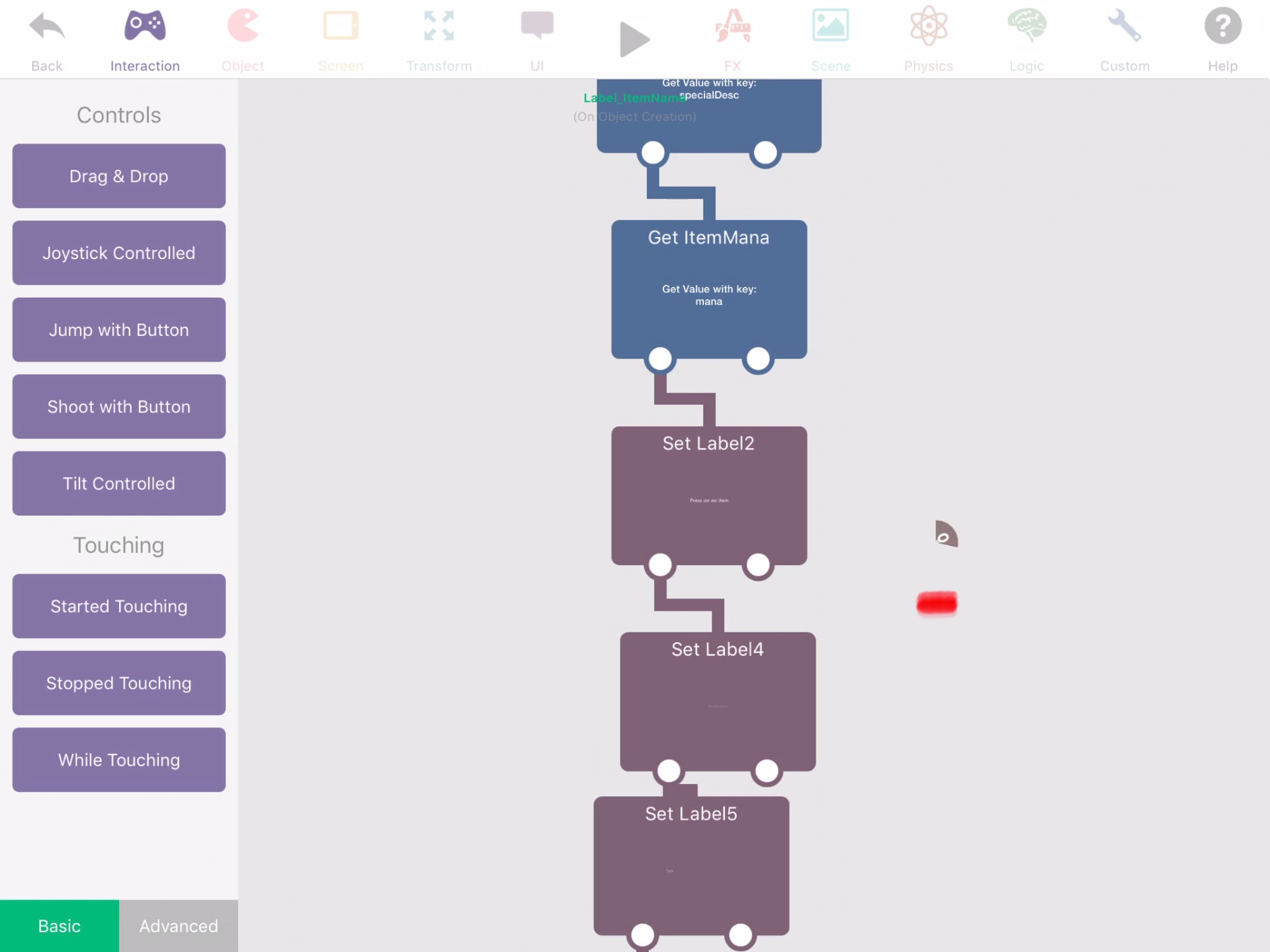
        Here's a screenshot I took right now, of how far currently it gets triggered. Looks like it also just happens mostly for touching next to the right side of the behaviour. Trying to press anywhere further than the red will not trigger anymore.

        My finger is somewhere around the marked red.
        0_1543278350494_BE0E106B-E844-402B-9A3C-1E487DDB601A.jpeg

        1 Reply Last reply
        0
        • KamdroidK Offline
          KamdroidK Offline
          Kamdroid
          wrote on last edited by
          #4

          This is getting pretty annoying, it keeps occurring and causes me to accidentally disconnect behaviours when I'm nowhere near their disconnect line. Please look into this.

          I'm using iPad Air 2.
          iOS version doesn't make a difference, as it occurred on iOS 11 and still occurs on iOS 12 when I updated.

          1 Reply Last reply
          0
          • MurtazaM Offline
            MurtazaM Offline
            Murtaza
            Admin
            wrote on last edited by Murtaza
            #5

            Haven't forgot about this. Will be fixed part of the next update, hopefully in a beta update sooner.
            Just had some trouble recreating the issue.

            1 Reply Last reply
            0
            • HamedH Offline
              HamedH Offline
              Hamed
              Admin
              wrote on last edited by
              #6

              @Kamdroid are you able to send us a link to your project?

              1 Reply Last reply
              0
              • KamdroidK Offline
                KamdroidK Offline
                Kamdroid
                wrote on last edited by Kamdroid
                #7

                @Hamed Sorry, was busy. I was able to create the bug in a project I created 10 mins ago. I normally just try do everything, add/remove/rearrange behaviours, pan screen, play project, until it happens.

                I managed to record opening the new project and messing around for 50 seconds and encountered the bug twice.

                1st time - 0:32
                2nd time (end) - 0:55

                https://streamable.com/pqevm

                1 Reply Last reply
                0
                • HamedH Offline
                  HamedH Offline
                  Hamed
                  Admin
                  wrote on last edited by
                  #8

                  Is anyone else able to reproduce this?

                  Aidan_FireA KamdroidK 2 Replies Last reply
                  0
                  • HamedH Hamed

                    Is anyone else able to reproduce this?

                    Aidan_FireA Offline
                    Aidan_FireA Offline
                    Aidan_Fire
                    wrote on last edited by
                    #9

                    I could not reproduce this on latest beta.

                    1 Reply Last reply
                    0
                    • HamedH Hamed

                      Is anyone else able to reproduce this?

                      KamdroidK Offline
                      KamdroidK Offline
                      Kamdroid
                      wrote on last edited by
                      #10

                      While reproducing I noticed that the inaccurate touch area seems to be corrected if you slightly move the effected behaviours. Perhaps it's because I commonly add a new behaviour in the middle of two and then don't need to move it after connecting them up.

                      Also encountered a little bug where the left-side behaviour list for any of the categories wouldn't show up until re-entering the object's behaviours


                      1 Reply Last reply
                      0

                      Hello! It looks like you're interested in this conversation, but you don't have an account yet.

                      Getting fed up of having to scroll through the same posts each visit? When you register for an account, you'll always come back to exactly where you were before, and choose to be notified of new replies (either via email, or push notification). You'll also be able to save bookmarks and upvote posts to show your appreciation to other community members.

                      With your input, this post could be even better 💗

                      Register Login
                      Reply
                      • Reply as topic
                      Log in to reply
                      • Oldest to Newest
                      • Newest to Oldest
                      • Most Votes


                      • Login

                      • Login or register to search.
                      • First post
                        Last post
                      0
                      • Categories
                      • Recent
                      • Tags
                      • Popular
                      • Users
                      • Search

