Skip to content
  • Categories
  • Recent
  • Tags
  • Popular
  • Users
  • Search
Skins
  • Light
  • Brite
  • Cerulean
  • Cosmo
  • Flatly
  • Journal
  • Litera
  • Lumen
  • Lux
  • Materia
  • Minty
  • Morph
  • Pulse
  • Sandstone
  • Simplex
  • Sketchy
  • Spacelab
  • United
  • Yeti
  • Zephyr
  • Dark
  • Cyborg
  • Darkly
  • Quartz
  • Slate
  • Solar
  • Superhero
  • Vapor

  • Default (No Skin)
  • No Skin
Collapse
hyperPad

hyperPad Forum

  1. Home
  2. Announcements
  3. hyperPad 1.26 Beta

hyperPad 1.26 Beta

Scheduled Pinned Locked Moved Announcements
42 Posts 9 Posters 22.0k Views 2 Watching
  • Oldest to Newest
  • Newest to Oldest
  • Most Votes
Reply
  • Reply as topic
Log in to reply
This topic has been deleted. Only users with topic management privileges can see it.
  • HamedH Hamed

    Hello friends new beta should be up

    SplitMindGamingS Offline
    SplitMindGamingS Offline
    SplitMindGaming
    wrote on last edited by
    #28

    @Hamed was there any changes made to the “Get Graphic Flip’ and “Set Graphic Flip”? I notice my game mechanics are slightly broken with this new update. My player is no longer flipping to the correct orientation as it was with the previous build.

    1 Reply Last reply
    0
    • HamedH Offline
      HamedH Offline
      Hamed
      Admin
      wrote on last edited by
      #29

      @SplitMindGaming we didn't change anything with set Flip, but we did make changes to Animate behaviour. Could that be it?

      SplitMindGamingS KamdroidK 2 Replies Last reply
      0
      • HamedH Hamed

        @SplitMindGaming we didn't change anything with set Flip, but we did make changes to Animate behaviour. Could that be it?

        SplitMindGamingS Offline
        SplitMindGamingS Offline
        SplitMindGaming
        wrote on last edited by
        #30

        @Hamed hmmm i think it has something to do with the screen touch mechanics. Because i thought it was just the character flip but i notice that certain actions wouldnt play correctly. It played perfect with the last build. I will send you the project to your email.

        1 Reply Last reply
        0
        • HamedH Hamed

          @SplitMindGaming we didn't change anything with set Flip, but we did make changes to Animate behaviour. Could that be it?

          KamdroidK Offline
          KamdroidK Offline
          Kamdroid
          wrote on last edited by
          #31

          @Hamed can you confirm if "set input field" behaviour exists in the new beta (or was it renamed)? I can't seem to find it anywhere.

          RobinsonXR Patrick123P 2 Replies Last reply
          0
          • KamdroidK Kamdroid

            @Hamed can you confirm if "set input field" behaviour exists in the new beta (or was it renamed)? I can't seem to find it anywhere.

            RobinsonXR Offline
            RobinsonXR Offline
            RobinsonX
            wrote on last edited by
            #32

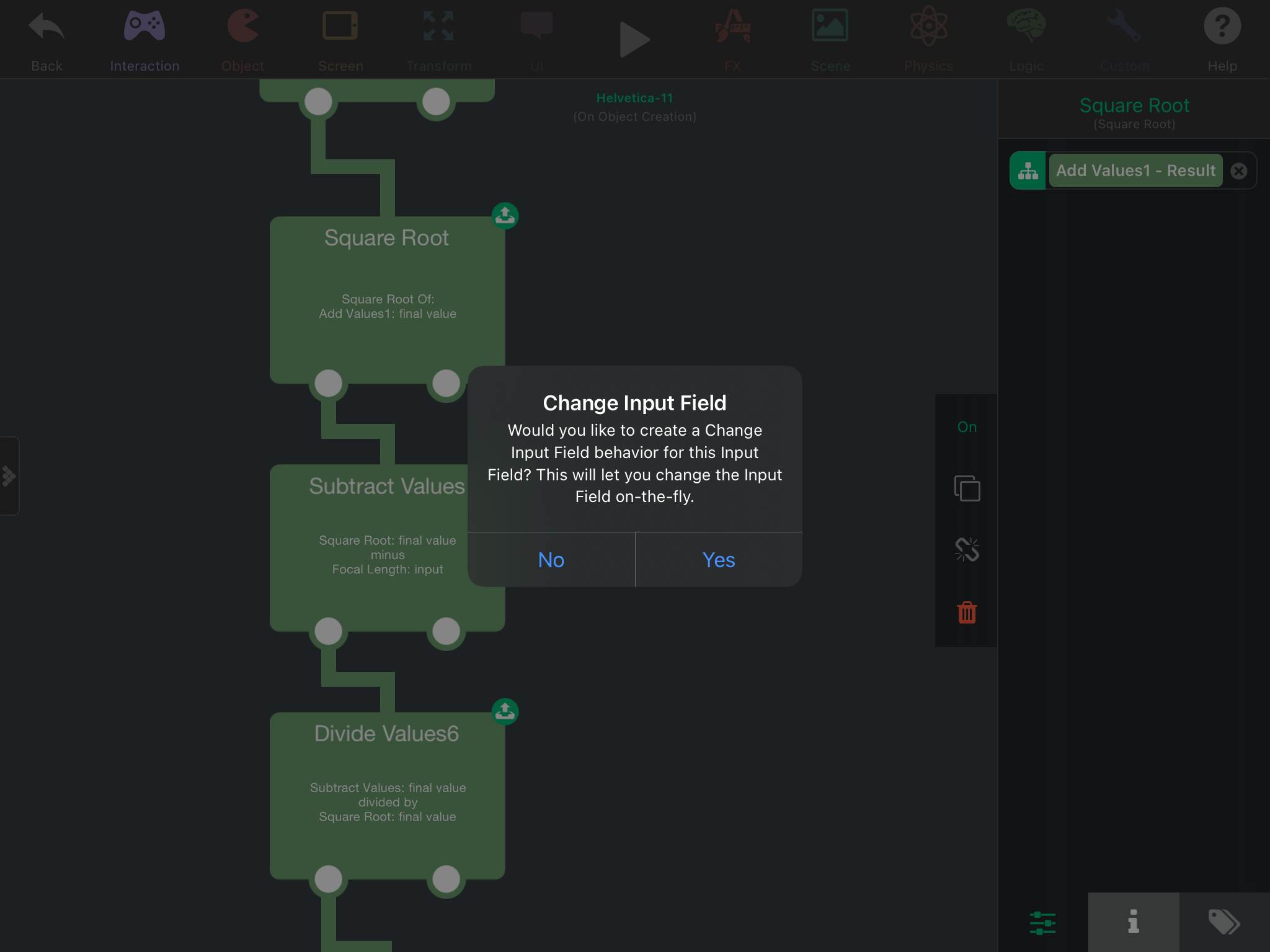
            @Kamdroid 7CB95374-572F-4FA3-973D-62938D0809A7.png

            It's not in the behavior list, you press on the green icon next to input fields in behaviors. (In fact, this has been a thing for a long time 😅 probably since the release of hyperPad..)

            When you create a change input field, you are given a behavior that changes the inputs of another behavior that you were manipulating.

            KamdroidK 1 Reply Last reply
            0
            • RobinsonXR RobinsonX

              @Kamdroid 7CB95374-572F-4FA3-973D-62938D0809A7.png

              It's not in the behavior list, you press on the green icon next to input fields in behaviors. (In fact, this has been a thing for a long time 😅 probably since the release of hyperPad..)

              When you create a change input field, you are given a behavior that changes the inputs of another behavior that you were manipulating.

              KamdroidK Offline
              KamdroidK Offline
              Kamdroid
              wrote on last edited by
              #33

              @RobinsonX thanks. In the past I've always just used get and set attributes, I had no idea

              1 Reply Last reply
              1
              • KamdroidK Offline
                KamdroidK Offline
                Kamdroid
                wrote on last edited by
                #34

                @Murtaza @Hamed I sent you an email a few days ago, but if you didn't get it:

                Can you make a TestFlight version which is just the stable version of hyperPad with the bug fix for iPad Pro UI/global layer positioning bug (so people without beta can play my projects)

                That's the only reason I'm stuck using the beta, but it means I can't release or update any projects since most people don't use the beta.

                1 Reply Last reply
                0
                • HamedH Offline
                  HamedH Offline
                  Hamed
                  Admin
                  wrote on last edited by
                  #35

                  @Kamdroid No because there are still some experimental things that some of the key fixes depend on. Unfortunately, needs to be part of the same build :(

                  1 Reply Last reply
                  0
                  • KamdroidK Offline
                    KamdroidK Offline
                    Kamdroid
                    wrote on last edited by
                    #36

                    Really sad. Hope you can release an update soon. I think I've been waiting like 6 months 🙁

                    MurtazaM 1 Reply Last reply
                    0
                    • KamdroidK Kamdroid

                      Really sad. Hope you can release an update soon. I think I've been waiting like 6 months 🙁

                      MurtazaM Offline
                      MurtazaM Offline
                      Murtaza
                      Admin
                      wrote on last edited by
                      #37

                      @Kamdroid said in 1.26 Beta:

                      Really sad. Hope you can release an update soon. I think I've been waiting like 6 months 🙁

                      Yeah this update has taken a long time. Unfortunately COVID really slowed us down as we had to find how to adapt and change development strategies.

                      1 Reply Last reply
                      0
                      • KamdroidK Kamdroid

                        @Hamed can you confirm if "set input field" behaviour exists in the new beta (or was it renamed)? I can't seem to find it anywhere.

                        Patrick123P Offline
                        Patrick123P Offline
                        Patrick123
                        wrote on last edited by
                        #38

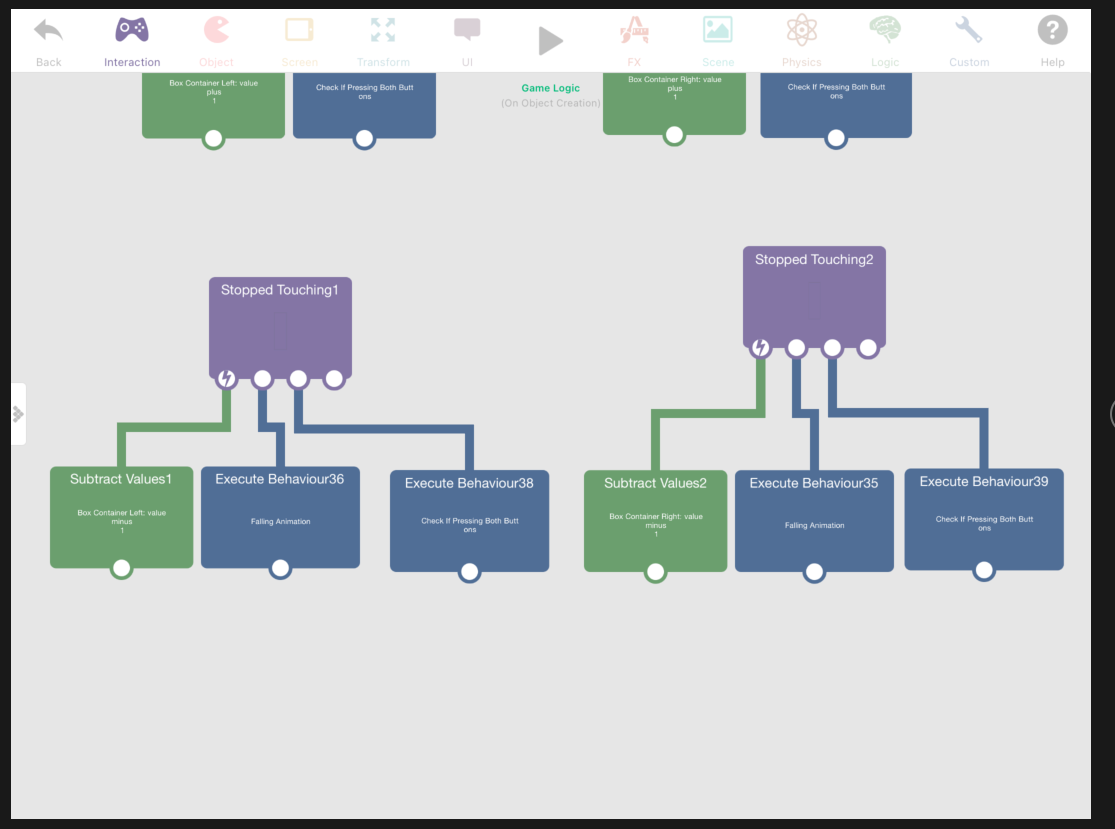
                        @Kamdroid I had a look through your project and I think I found what the issue is. I noticed that there is the stop touching behaviours to subtract from the Box container left/right but also the stop touching behaviour for objects with the tag "main controls". I think what is happening is that the stopped touching behaviour for the main controls is activating first. This then executes the "check if pressing both buttons". As a result, this is happening before the values in the box container left/right have been subtracted from. Try putting the execute "check if pressing both buttons" in the stopped touching events after you subtract the values as shown in the screenshot attached. This should fix the flip issue (This is in the game logic in The Caves - Door). I think in general the order of the execution of stop touching events is ambiguous which is something to look out for when using values from one event in the other. Let me know if you have any questions! Screen Shot 2020-11-18 at 10.15.37 AM.png
                        KamdroidK 1 Reply Last reply
                        0
                        • Patrick123P Patrick123

                          @Kamdroid I had a look through your project and I think I found what the issue is. I noticed that there is the stop touching behaviours to subtract from the Box container left/right but also the stop touching behaviour for objects with the tag "main controls". I think what is happening is that the stopped touching behaviour for the main controls is activating first. This then executes the "check if pressing both buttons". As a result, this is happening before the values in the box container left/right have been subtracted from. Try putting the execute "check if pressing both buttons" in the stopped touching events after you subtract the values as shown in the screenshot attached. This should fix the flip issue (This is in the game logic in The Caves - Door). I think in general the order of the execution of stop touching events is ambiguous which is something to look out for when using values from one event in the other. Let me know if you have any questions! Screen Shot 2020-11-18 at 10.15.37 AM.png

                          KamdroidK Offline
                          KamdroidK Offline
                          Kamdroid
                          wrote on last edited by
                          #39

                          @Patrick123 which project? I think you mentioned the wrong person

                          Patrick123P 1 Reply Last reply
                          0
                          • HamedH Offline
                            HamedH Offline
                            Hamed
                            Admin
                            wrote on last edited by
                            #40

                            Yeah he meant @SplitMindGaming Sorry

                            1 Reply Last reply
                            0
                            • KamdroidK Kamdroid

                              @Patrick123 which project? I think you mentioned the wrong person

                              Patrick123P Offline
                              Patrick123P Offline
                              Patrick123
                              wrote on last edited by
                              #41

                              @Kamdroid yes my apologies I meant to tag @SplitMindGaming sorry about that!

                              SplitMindGamingS 1 Reply Last reply
                              0
                              • Patrick123P Patrick123

                                @Kamdroid yes my apologies I meant to tag @SplitMindGaming sorry about that!

                                SplitMindGamingS Offline
                                SplitMindGamingS Offline
                                SplitMindGaming
                                wrote on last edited by
                                #42

                                @Patrick123 thanks for that. That definitely fixed the issue. I wonder why it actually worked from the last beta change. Also are you new to the team? If so welcome.


                                1 Reply Last reply
                                0

                                Hello! It looks like you're interested in this conversation, but you don't have an account yet.

                                Getting fed up of having to scroll through the same posts each visit? When you register for an account, you'll always come back to exactly where you were before, and choose to be notified of new replies (either via email, or push notification). You'll also be able to save bookmarks and upvote posts to show your appreciation to other community members.

                                With your input, this post could be even better 💗

                                Register Login
                                Reply
                                • Reply as topic
                                Log in to reply
                                • Oldest to Newest
                                • Newest to Oldest
                                • Most Votes


                                • Login

                                • Login or register to search.
                                • First post
                                  Last post
                                0
                                • Categories
                                • Recent
                                • Tags
                                • Popular
                                • Users
                                • Search