Skip to content
  • Categories
  • Recent
  • Tags
  • Popular
  • Users
  • Search
Skins
  • Light
  • Brite
  • Cerulean
  • Cosmo
  • Flatly
  • Journal
  • Litera
  • Lumen
  • Lux
  • Materia
  • Minty
  • Morph
  • Pulse
  • Sandstone
  • Simplex
  • Sketchy
  • Spacelab
  • United
  • Yeti
  • Zephyr
  • Dark
  • Cyborg
  • Darkly
  • Quartz
  • Slate
  • Solar
  • Superhero
  • Vapor

  • Default (No Skin)
  • No Skin
Collapse
hyperPad

hyperPad Forum

  1. Home
  2. Help and Support
  3. How to import SpriteSheets and their plist?

How to import SpriteSheets and their plist?

Scheduled Pinned Locked Moved Help and Support
26 Posts 3 Posters 7.5k Views 1 Watching
  • Oldest to Newest
  • Newest to Oldest
  • Most Votes
Reply
  • Reply as topic
Log in to reply
This topic has been deleted. Only users with topic management privileges can see it.
  • HamedH Hamed

    When importing an image, it counts it as the @2x version. So if you're uploading a 256 x 256 image, its actually, creating the @1x version for you. So the 128x128 px is accurate.

    Its maximum 2048 on each side. So if you have 2050px by 10px for example, it will error out.

    D Offline
    D Offline
    Deeeds
    wrote on last edited by
    #12

    @Hamed said in How to import SpriteSheets and their plist?:

    When importing an image, it counts it as the @2x version. So if you're uploading a 256 x 256 image, its actually, creating the @1x version for you. So the 128x128 px is accurate.

    Strictly speaking, this is ONLY accurate information if it lets me know it's creating a 1x version for me. Otherwise I feel like I've lost half my pixel information. And I love my pixels. Every single one of them.

    They're my little digital minions.

    1 Reply Last reply
    0
    • HamedH Offline
      HamedH Offline
      Hamed
      Admin
      wrote on last edited by
      #13

      Can you email us the images that you're using so I can re-create this and see whats going on?

      D 1 Reply Last reply
      0
      • HamedH Hamed

        Can you email us the images that you're using so I can re-create this and see whats going on?

        D Offline
        D Offline
        Deeeds
        wrote on last edited by
        #14

        @Hamed try these: https://www.dropbox.com/sh/jq2iedb8aw1gw1w/AAAoOxfVzrhc7GTVn-c0VKMha?dl=0

        1 Reply Last reply
        0
        • MurtazaM Murtaza

          Working on updating our roadmap with known bugs and issues.
          BM Fonts have the same issue.

          However, I just thought of a work around.
          You can send your self the .tap project, extract it on a computer (it's just a zip).

          Then add your assets manually. However, make sure you have both retina and non retina version and they have the correct naming scheme (check out the other assets).
          There is also a hidden meta data file that tells hyperPad what the asset is.

          If you download an art pack from the asset library you should be able to figure out the structure.

          I know this suck. Hopefully the dropbox integration will be back in the next update.

          D Offline
          D Offline
          Deeeds
          wrote on last edited by
          #15

          @Murtaza I can't get this to work the way I want. Placement issues abound. And very time consuming.

          1 Reply Last reply
          0
          • HamedH Offline
            HamedH Offline
            Hamed
            Admin
            wrote on last edited by Hamed
            #16

            So here are the steps I took:

            1. Import one of the images. It will have a graphic label in the assets library.

            2. Press and hold the graphic. Tap on Add animation.

            3. Since each image is 256 x 256 px, this means you can only select 8 images (Max 2048 x 2048 px).

            4. create a name for your your animation and press save.

            This creates a sprite sheet with your 8 images.

            If you wanted all 40 of the images, aim for 51px per image

            D 1 Reply Last reply
            0
            • HamedH Hamed

              So here are the steps I took:

              1. Import one of the images. It will have a graphic label in the assets library.

              2. Press and hold the graphic. Tap on Add animation.

              3. Since each image is 256 x 256 px, this means you can only select 8 images (Max 2048 x 2048 px).

              4. create a name for your your animation and press save.

              This creates a sprite sheet with your 8 images.

              If you wanted all 40 of the images, aim for 51px per image

              D Offline
              D Offline
              Deeeds
              wrote on last edited by
              #17

              @Hamed How is 256x256x8 getting you to 2048x2048?

              1 Reply Last reply
              0
              • HamedH Offline
                HamedH Offline
                Hamed
                Admin
                wrote on last edited by
                #18

                Its x :256 * 8, y: 256 * 8

                The axis are independent.

                D 1 Reply Last reply
                0
                • HamedH Hamed

                  Its x :256 * 8, y: 256 * 8

                  The axis are independent.

                  D Offline
                  D Offline
                  Deeeds
                  wrote on last edited by
                  #19

                  @Hamed So you fill the sprite sheet in a diagonal line?

                  1 Reply Last reply
                  0
                  • HamedH Offline
                    HamedH Offline
                    Hamed
                    Admin
                    wrote on last edited by
                    #20

                    Oh i see the confusion. Its not actually multiplying 2048 and 2048. Your final image must be less than 2048 on the x direction and 2048 in the y direction.


                    D 1 Reply Last reply
                    0
                    • HamedH Hamed

                      Oh i see the confusion. Its not actually multiplying 2048 and 2048. Your final image must be less than 2048 on the x direction and 2048 in the y direction.

                      D Offline
                      D Offline
                      Deeeds
                      wrote on last edited by
                      #21

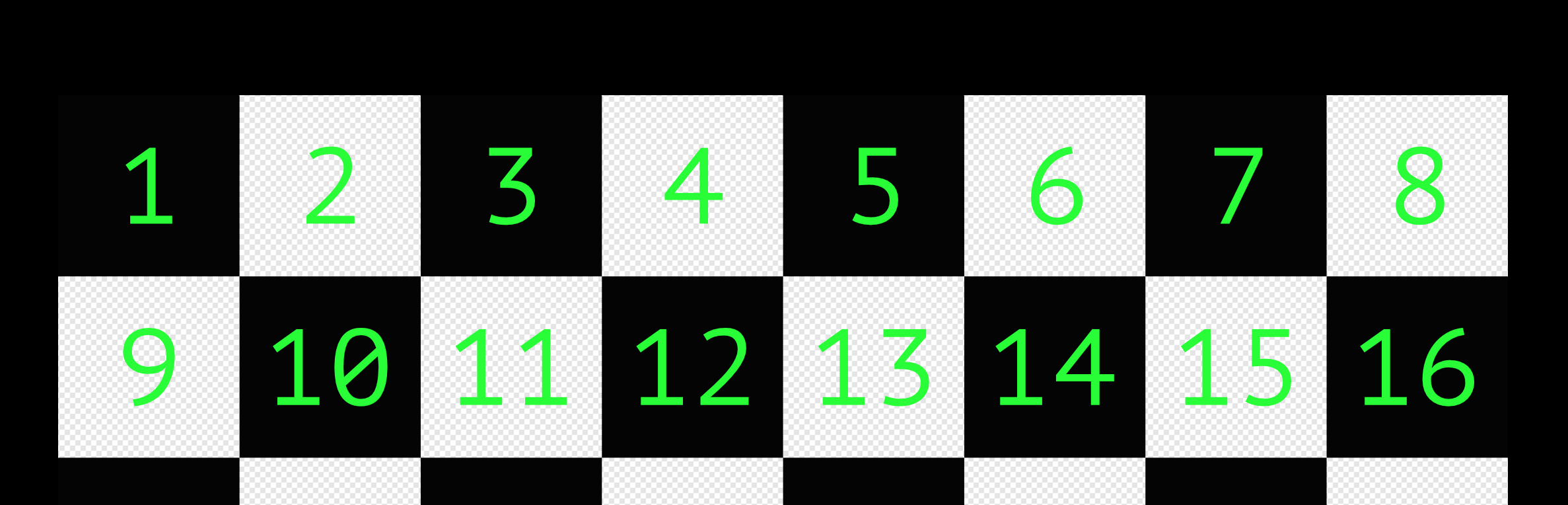
                      @Hamed So you're doing this?

                      0_1513271259809_grid8x8.png

                      1 Reply Last reply
                      0
                      • HamedH Offline
                        HamedH Offline
                        Hamed
                        Admin
                        wrote on last edited by
                        #22

                        Hmmm. No, but I see what you mean. I should definitely be able to fill up a 2048 by 2048 area.

                        This is the final image its producing 0_1513271460638_IMG_0008-hd.png

                        1 Reply Last reply
                        0
                        • HamedH Offline
                          HamedH Offline
                          Hamed
                          Admin
                          wrote on last edited by Hamed
                          #23

                          And I can only add 7 and not 8.

                          D 1 Reply Last reply
                          0
                          • HamedH Offline
                            HamedH Offline
                            Hamed
                            Admin
                            wrote on last edited by
                            #24

                            Another bug to add to the list!

                            D 1 Reply Last reply
                            0
                            • HamedH Hamed

                              Another bug to add to the list!

                              D Offline
                              D Offline
                              Deeeds
                              wrote on last edited by
                              #25

                              @Hamed Cheers, if you can, aim for wrapping, like this:

                              0_1513271708563_Screen Shot 2017-12-15 at 1.14.07 AM.png

                              1 Reply Last reply
                              1
                              • HamedH Hamed

                                And I can only add 7 and not 8.

                                D Offline
                                D Offline
                                Deeeds
                                wrote on last edited by
                                #26

                                @Hamed In the most basic version, just force users (me) to use square images, in square values (64x64, 128x128, 256x256, 512x512 etc) as this is a pretty common limitation. Most designers and artists for games are used to this limitation.

                                1 Reply Last reply
                                0

                                Hello! It looks like you're interested in this conversation, but you don't have an account yet.

                                Getting fed up of having to scroll through the same posts each visit? When you register for an account, you'll always come back to exactly where you were before, and choose to be notified of new replies (either via email, or push notification). You'll also be able to save bookmarks and upvote posts to show your appreciation to other community members.

                                With your input, this post could be even better 💗

                                Register Login
                                Reply
                                • Reply as topic
                                Log in to reply
                                • Oldest to Newest
                                • Newest to Oldest
                                • Most Votes


                                • Login

                                • Login or register to search.
                                • First post
                                  Last post
                                0
                                • Categories
                                • Recent
                                • Tags
                                • Popular
                                • Users
                                • Search