Skip to content
  • Categories
  • Recent
  • Tags
  • Popular
  • Users
  • Search
Skins
  • Light
  • Brite
  • Cerulean
  • Cosmo
  • Flatly
  • Journal
  • Litera
  • Lumen
  • Lux
  • Materia
  • Minty
  • Morph
  • Pulse
  • Sandstone
  • Simplex
  • Sketchy
  • Spacelab
  • United
  • Yeti
  • Zephyr
  • Dark
  • Cyborg
  • Darkly
  • Quartz
  • Slate
  • Solar
  • Superhero
  • Vapor

  • Default (No Skin)
  • No Skin
Collapse
hyperPad

hyperPad Forum

  1. Home
  2. Help and Support
  3. How can I make a smooth d-pad

How can I make a smooth d-pad

Scheduled Pinned Locked Moved Help and Support
71 Posts 9 Posters 38.1k Views 4 Watching
  • Oldest to Newest
  • Newest to Oldest
  • Most Votes
Reply
  • Reply as topic
Log in to reply
This topic has been deleted. Only users with topic management privileges can see it.
  • iTap DevelopmentI iTap Development

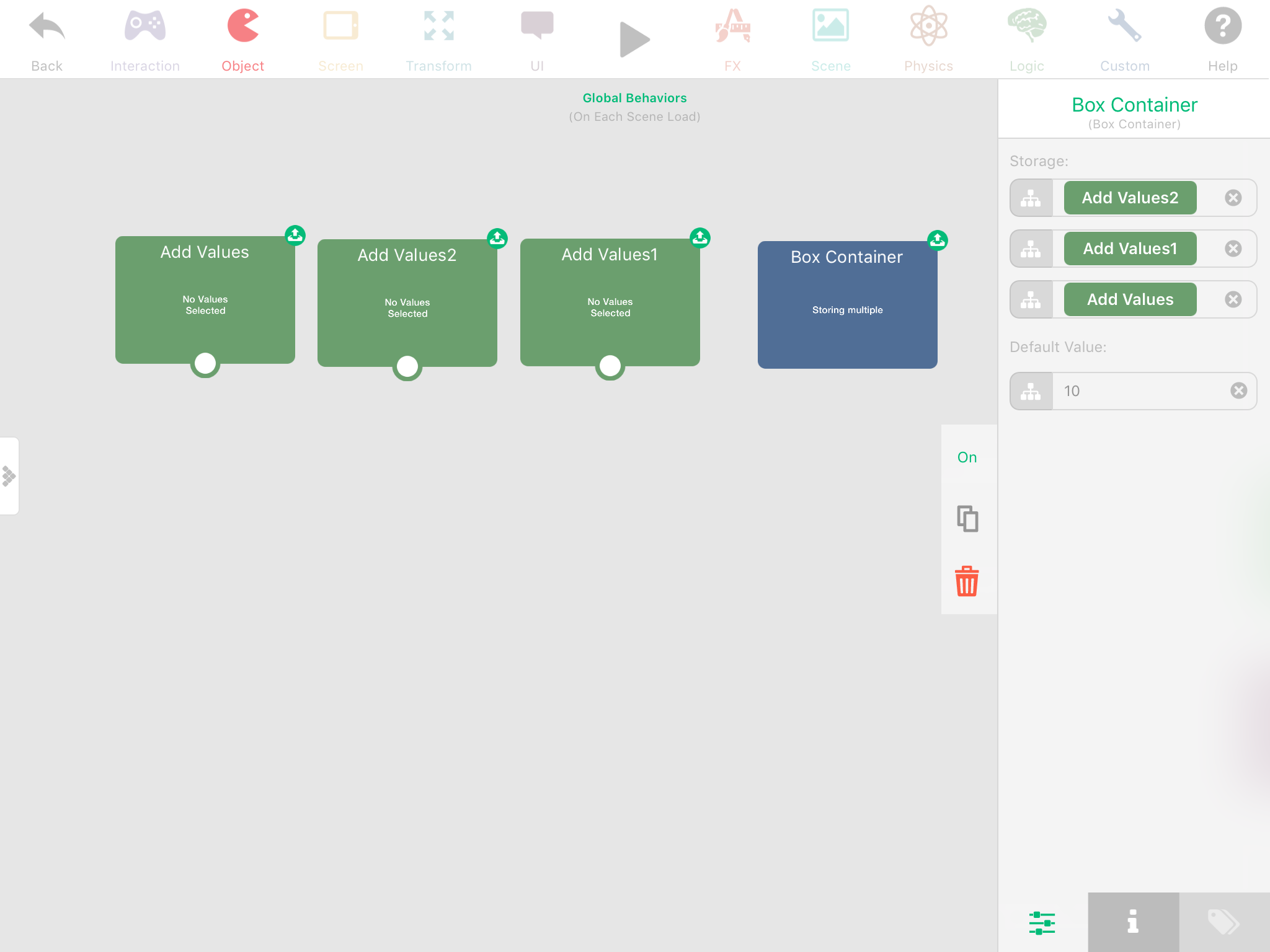
    @Aidan-Oxley I think this will work better, because with what you did you have to use the extra "set input field" behavior. For mine, When one of the add value's is triggered it will set the box container to its output automatically.0_1493340437316_IMG_1870.PNG

    Aidan_FireA Offline
    Aidan_FireA Offline
    Aidan_Fire
    wrote on last edited by Aidan_Fire
    #32

    @iTap-Development Yeah I'm still not used to that, I'm still stuck in the old way of using box containers lol before they let you have multiple storages.

    iTap DevelopmentI TutorialDoctorT 2 Replies Last reply
    1
    • S Offline
      S Offline
      Stephenn
      wrote on last edited by
      #33

      Ok thanks

      1 Reply Last reply
      0
      • Aidan_FireA Aidan_Fire

        @iTap-Development Yeah I'm still not used to that, I'm still stuck in the old way of using box containers lol before they let you have multiple storages.

        iTap DevelopmentI Offline
        iTap DevelopmentI Offline
        iTap Development
        wrote on last edited by
        #34

        @Aidan-Oxley yeah I found it out by trying to put an output in the default value input field, and when it move up to its own input field I tried again and found you could do multiple. Lol

        1 Reply Last reply
        0
        • Aidan_FireA Aidan_Fire

          @iTap-Development Yeah I'm still not used to that, I'm still stuck in the old way of using box containers lol before they let you have multiple storages.

          TutorialDoctorT Offline
          TutorialDoctorT Offline
          TutorialDoctor
          wrote on last edited by TutorialDoctor
          #35

          @Aidan-Oxley I SOOO did not know box containers could do this. How do you access one of the values?

          Aidan_FireA 1 Reply Last reply
          1
          • TutorialDoctorT TutorialDoctor

            @Aidan-Oxley I SOOO did not know box containers could do this. How do you access one of the values?

            Aidan_FireA Offline
            Aidan_FireA Offline
            Aidan_Fire
            wrote on last edited by
            #36

            @TutorialDoctor I'd like to know that too 😛 never used it.

            1 Reply Last reply
            0
            • S Offline
              S Offline
              Stephenn
              wrote on last edited by
              #37

              Does anyone know how I could make a 2x2 grid for a player to move on?

              iTap DevelopmentI 1 Reply Last reply
              0
              • Aidan_FireA Offline
                Aidan_FireA Offline
                Aidan_Fire
                wrote on last edited by
                #38

                Yes, look for my project on the hub called something like grid lock (although I don't think it works properly for negative coordinates). I think for that I would make the joystick player invisible and add a second scenery player that just moves to the invisible player, on a grid.

                1 Reply Last reply
                0
                • S Stephenn

                  Does anyone know how I could make a 2x2 grid for a player to move on?

                  iTap DevelopmentI Offline
                  iTap DevelopmentI Offline
                  iTap Development
                  wrote on last edited by
                  #39

                  @Stephenn you can divid the position by the grid size, round that number. And then multiply by the grid size.
                  So an x position of 7.4 would move to an x position of 8 since 7.4/2 is 3.7 rounded is 4 and 4*2 =8

                  1 Reply Last reply
                  0
                  • S Offline
                    S Offline
                    Stephenn
                    wrote on last edited by
                    #40

                    Ok thanks, I was over complicating by using modulus and subtract.

                    Aidan_FireA 1 Reply Last reply
                    0
                    • S Stephenn

                      Ok thanks, I was over complicating by using modulus and subtract.

                      Aidan_FireA Offline
                      Aidan_FireA Offline
                      Aidan_Fire
                      wrote on last edited by
                      #41

                      @Stephenn Lol my grid lock is actually very old, round number didn't even exist when I made it.

                      1 Reply Last reply
                      0
                      • MurtazaM Offline
                        MurtazaM Offline
                        Murtaza
                        Admin
                        wrote on last edited by
                        #42

                        We actually have a grid demo we use for our internal testing. I thought we uploaded it to the hub but I guess not. I'll get @Hamed to upload it when he gets a minute free.

                        1 Reply Last reply
                        0
                        • HamedH Offline
                          HamedH Offline
                          Hamed
                          Admin
                          wrote on last edited by
                          #43

                          It's on the hub!

                          https://www.hyperpad.com/projects/ys5ygoag

                          1 Reply Last reply
                          0
                          • S Offline
                            S Offline
                            Stephenn
                            wrote on last edited by
                            #44

                            Ok thanks, I actually want be able to move between blocks on the grid. I am trying to make a bomberman game.

                            1 Reply Last reply
                            0
                            • S Offline
                              S Offline
                              Stephenn
                              wrote on last edited by
                              #45

                              Ok actually I just got an idea from your example thanks.

                              1 Reply Last reply
                              0
                              • S Offline
                                S Offline
                                Stephenn
                                wrote on last edited by
                                #46

                                The game gets glitchy when I add particals, is there a way to prevent this?

                                Michael KhalfinG 1 Reply Last reply
                                0
                                • Aidan_FireA Offline
                                  Aidan_FireA Offline
                                  Aidan_Fire
                                  wrote on last edited by
                                  #47

                                  It depends on what type of particle you are using (especially the number of particles slider when editing, more particles = more lag) and how many objects are playing particles.

                                  1 Reply Last reply
                                  0
                                  • S Stephenn

                                    The game gets glitchy when I add particals, is there a way to prevent this?

                                    Michael KhalfinG Offline
                                    Michael KhalfinG Offline
                                    Michael Khalfin
                                    wrote on last edited by
                                    #48

                                    @Stephenn You are probably adding a lot of particles. Or just not doing them with enough time in between. Totally unnecessary.

                                    1 Reply Last reply
                                    0
                                    • S Offline
                                      S Offline
                                      Stephenn
                                      wrote on last edited by
                                      #49

                                      Ok thanks, I want a bomberman type explosion

                                      1 Reply Last reply
                                      0
                                      • Michael KhalfinG Offline
                                        Michael KhalfinG Offline
                                        Michael Khalfin
                                        wrote on last edited by
                                        #50

                                        @Stephenn Try and limit the particles and effects that you use when you do explosions. So for a bomberman explosion, you could use the default Hyperpad explosion particle, and enhance it with colors of your own. You could also tweak its size in proportion to the game.

                                        For other help with game appearance and lag, make sure to check this post of mine: https://forum.hyperpad.com/topic/121/how-professional-is-your-game

                                        And for help regarding how you are making and what your goals should be, try and follow this post: https://forum.hyperpad.com/topic/121/how-professional-is-your-game

                                        In general, you should try and avoid changing your project idea before you have finished. If you are even a little bit like me, you will never finish that way - or at least get something good done.

                                        1 Reply Last reply
                                        0
                                        • S Offline
                                          S Offline
                                          Stephenn
                                          wrote on last edited by
                                          #51

                                          Ok thanks, I want it to blow up in a plus shape.

                                          1 Reply Last reply
                                          0

                                          Hello! It looks like you're interested in this conversation, but you don't have an account yet.

                                          Getting fed up of having to scroll through the same posts each visit? When you register for an account, you'll always come back to exactly where you were before, and choose to be notified of new replies (either via email, or push notification). You'll also be able to save bookmarks and upvote posts to show your appreciation to other community members.

                                          With your input, this post could be even better 💗

                                          Register Login
                                          Reply
                                          • Reply as topic
                                          Log in to reply
                                          • Oldest to Newest
                                          • Newest to Oldest
                                          • Most Votes


                                          • Login

                                          • Login or register to search.
                                          • First post
                                            Last post
                                          0
                                          • Categories
                                          • Recent
                                          • Tags
                                          • Popular
                                          • Users
                                          • Search